35
3.6. Record Setup menu
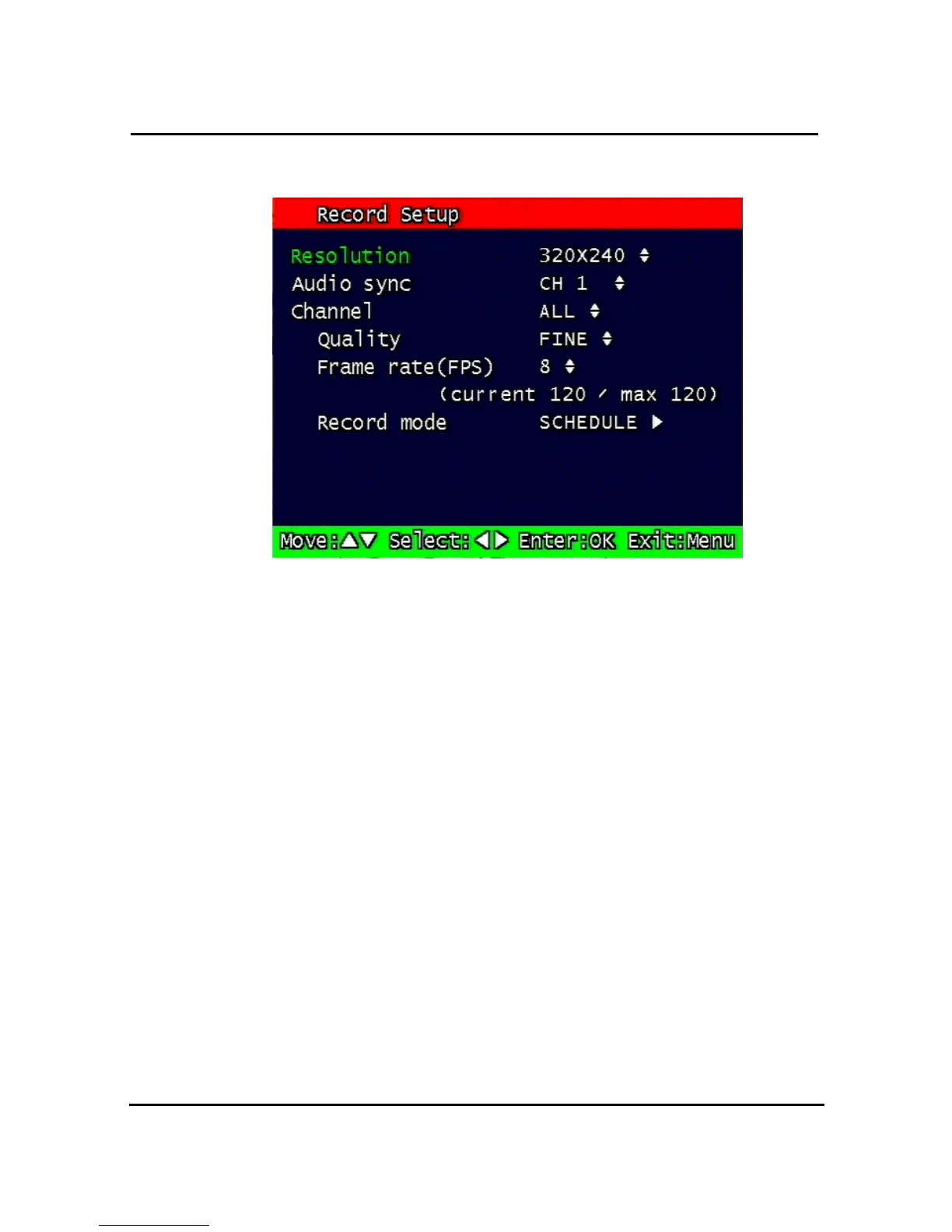
Figure 3-6 Record setup screen
3.6.1. Resolution
Resolution for NTSC is “320 x 240” or “640 x 240”. PAL is “320 x 288” or “640 x 288”
selectable and selected resolution will be applicable to all channels simultaneously.
3.2.2 Audio Sync
As audio input port is one channel available, user should synchronize audio signal with
targeted video signal. With synchronized channel will record audio as well as video. But
others will only record video input signal only.
3.3.3. Channel number
Quality, frame rate, record conditions will be selected per channel. So users can choose
targeted channel. All means all of channels.
1.4.4 Quality
Recording quality of each channel will be selectable & Normal, Enhanced, Fine, Super Fine
4 steps are available now.
1.4.5 Frame rate
User select channel’s recording frame rate and none (no recording), 1, 2, 3, 4, 5, 6, 7, 8, 9,
10, 15, 30 fps will be available. The total for all the cannels is max 120 fps.
But, with 640 x 240 (NTSC), 640x288 (PAL) resolution, user should not set to exceed 60
frame per second with accumulated total channel recording.


 To Next Page