Home
Vicon
DVR
VDR-208
Page 58 (System Password)
Vicon VDR-208 - System Password
129 pages
Manual
Save Page as PDF
To Next Page
To Next Page
To Previous Page
To Previous Page
Loading...
5
7
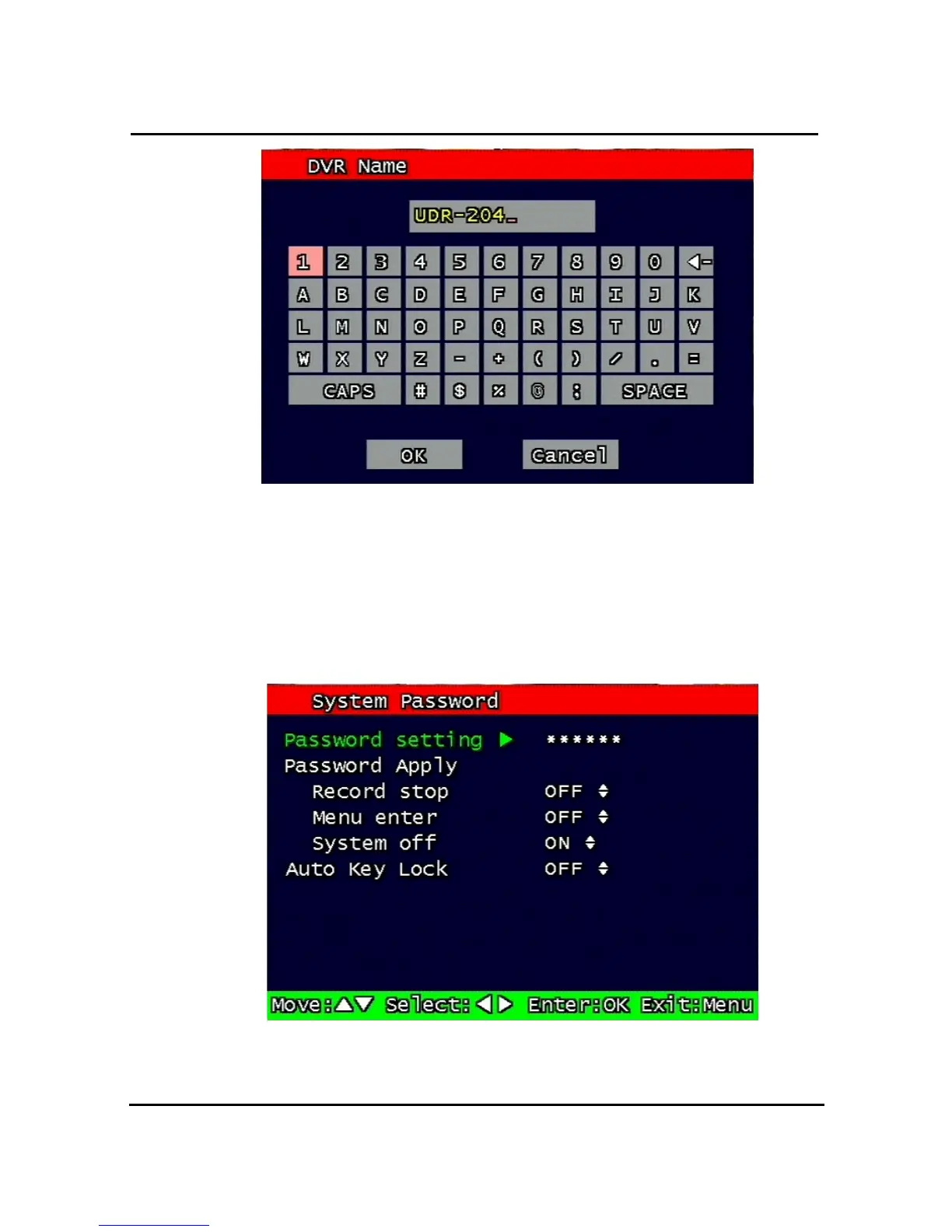
Figure 3-35 DVR name screen
Using the arrow
, type in the DVR name.
Click “OK” when finished.
3.11.2. System
Password
Figure 3-36 System password set up
Set up part for system password, related function and application.
57
59
Table of Contents
Main Page
Default Chapter
3
Table of Contents
3
1 System Overviews
11
Safety
11
Safety Instructions
12
Components & Option
14
Components
14
Options
14
Features & Specifications
15
Features
15
Specifications
16
Name, Function & Connections
17
Front View
17
Rear Panel View
20
Remote Controller Function
21
Installation
23
Installation and Connection
23
Camera
23
Video out
24
Audio
24
Ptz/Aux/Alarm
24
Network
25
USB Flash Memory
25
2 Basic Operation Procedures
26
Power On/Off
26
Power on
26
Power off
26
Date & Time Setting
26
Change of Live Video Channel in Mux Mode
26
Password Setting Procedure
26
Network Setting
27
Recording
27
Recording Types
27
Recording Modes
27
Playback
27
Press the Play Button
27
Audio Files
27
Search
27
Search Mode
27
Search Method
27
Backup
28
CD-Rw
28
USB Flash Memory
28
Network
28
Client Program
28
RAMS (Remote Access & Monitoring System)
28
Uniplayer
29
Multiviewer
29
Quick Installer
29
3 Main Setup Screen
30
Camera Setup Menu
30
Channel Number
31
Camera Name Edit
31
Camera Hide
32
Picture Setting
32
Contrast, Brightness, Hue
32
Default
32
PTZ Setup
33
Model Number
33
Ptz ID
34
Reverse Control
34
Setting
34
Test
34
Additional PTZ Menus
34
Sequence Time
35
Loop through Setup
35
Record Setup Menu
36
Resolution
36
Audio Sync
36
Channel Number
36
Quality
36
Frame Rate
36
Record Mode
37
Record Schedule Setup
38
Event Setup Menu
39
Motion Detection Setting
39
Channel
40
Sensitivity
40
Detection Zone
40
Sensor Setting
41
Sensor Type
41
Channel Link
41
Alarm Output
42
Sensor
42
Motion
42
Relay Time
42
Post Alarm Record Time
42
FTP Setting
43
FTP Server IP Address
43
Password
44
Target Path
45
FTP Length of Image (Second)
45
FTP Trigger Setting
45
Sensor
46
Motion
46
E-Mail Address Setting
46
E-Mail Setting
47
Send (Period)
47
Prohibition Setting
48
SMTP Server IP Address
48
Authentication
48
Event Log
49
Playback Setup
49
Channel
49
Starting Point
50
Audio
50
Display Setup Screen
50
Network Setup Screen
51
DDNS Setting
51
Remote Connection Login Password
53
Network Type
53
Static
54
DDNS On/Off
54
Port
54
IP Address
54
Subnet Mask
54
Gateway
54
Port
55
Pppoe
55
Port
56
Password
56
Changing the Network Configuration
57
System Setup Screen
57
DVR Name
57
System Password
58
Password Setting
59
Password Apply
59
Auto Key Lock
60
Time / Date
60
Set up Time / Date
60
Time / Date Format
60
Day Light Saving Time
60
Buzzer
61
Language
61
HDD Setup
61
The Number of HDD
62
Write Mode
62
Forced Deletion
62
Hard Disk
63
Aux Port
63
Active
64
Function
64
Factory Default
64
Software Upgrade
65
Backup
65
Backup Device
66
Start Time
66
End Time
66
Channel
66
Event
66
Backup Start
66
Format
66
System Log
67
System Information
67
Video Type
68
H/W Version
68
S/W Version
68
KERNEL Version
68
Mac Address
68
Search Menu
68
Search by Time
69
Starting Time
69
Ending Time
69
Channel
69
Event
69
Example of Search Result
70
Search of Still Image
70
Screen of Search
70
Search of Back up HDD
71
Playback
71
PLAYBACK of Recorded Images
71
Method of Playback
71
Screen of Played Back
72
Control During Play Back
72
Playback of Still Image
73
Method of Playback
73
Screen of Playing Back
74
Control During Play Back
74
Playback the Backed Up-Image
74
Miscellaneous Menu
75
Net
75
Osd
76
Audio Mute
76
Hdd
76
Log
76
4 Udr-208/216 Client Program
77
Overview of Udr-208/216
77
PC Requirement (Minimum)
77
Installation & Execution of Program
77
RAMS (Remote Access & Monitoring System)
78
Screen and Button
78
Connecting to DVR
79
Uniplayer Link
80
Full-Screen Display
81
Program Setup
82
DVR Recording
82
DVR Playback Search
83
DVR Playback Search
84
DVR Backup
87
DVR Setting
88
Still Image Capture
88
Watermark Insertion
89
Printing Still Image
89
Motion Picture Recording
89
Pan/Tilt, Zoom/Focus
90
HDD Information
90
Check the Program Version
91
S/W Upgrade of DVR
92
Program Minimizing
92
Close Program
93
Uniplayer
93
Screen and Button
93
Search
94
Search Option from Video Image & Backup File
94
Search Option for Still Image
96
Searching by Directory
97
Still Image Capture
98
Input Water Mark
99
Printing Still Image
99
Moving Picture File Playback, Playing, Pause, Temporarily Pause, Move
99
By Interval of Frame, Fast Forward Playing
99
Water Mark Drawing
100
Panorama
101
Check the Program Version
103
Close Program
103
Multiviewer
103
Program Login
103
Screen and Button
105
DVR LIST Management & Connection
106
Camera On/Off
107
Full Screen
108
Program Setup
108
Link with Uniplayer
109
Pan/Tilt, Zoom/Focus
109
HDD Information
109
Confirmation of Version of Program
110
Minimizing of Program
110
Closing of Program
110
Quick Installer
111
Select Model
111
System Parameter Setting
111
Communication over Network or Serial Port
112
Connection by Internet Explorer
113
Security Setup
113
Download Activex Control
113
Connection with DVR
113
Fill the Address of DVR up in the Address Window of Internet Explorer
113
Login
113
Connected Screen
114
Search
115
Playback
115
5 Appendix
116
Installing Hdd
116
Installing Single Hard Disk Drive
116
Terminal Information
119
Dsub-9P (Rs-232)
119
Dsub-15P (Ptz / Aux / Alarm / Sensor)
120
Factory Default Value
122
Main Menu
122
Search Menu
125
Protocol
126
Code Table
126
Usage
127
Hdd Recording Time Table
128
Other manuals for Vicon VDR-208
Installation & Operation Manual
14 pages
Related product manuals
Vicon Express
2 pages


 To Next Page