89
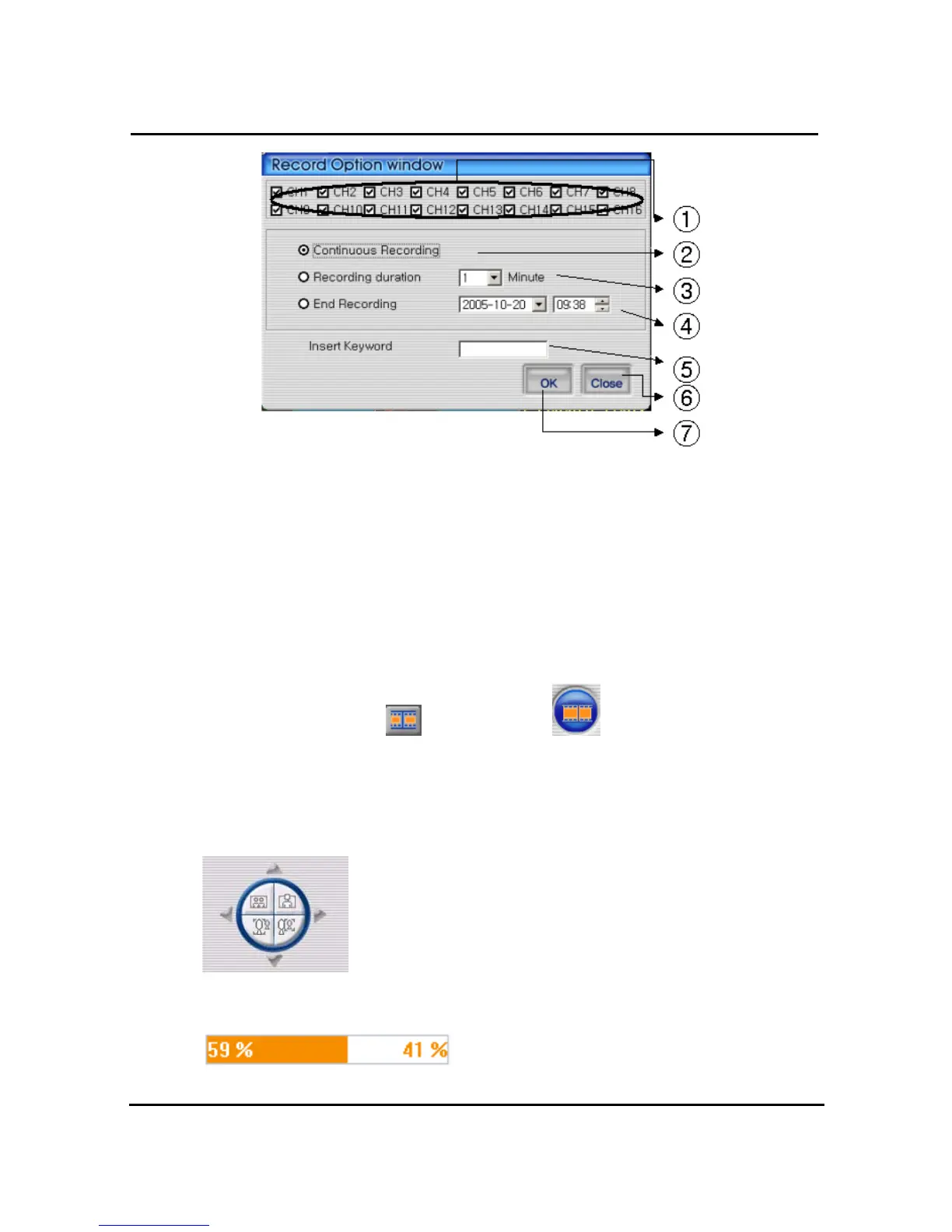
① Select the targeted channel changed recording time. Among this mode, Quad mean that
timing choice for recording button on main menu
② Continuous recording until clients stop recording mode
③ Continuous recording until targeted minutes. Of course, it stopped manually by users
④ Continuous recording until targeted date & time. It stopped manually by users
⑤ For easy searching by keyword, client will insert keyword at search mode
⑥ Close record option window
⑦ After saving new selected recording option, automatically close it
With starting record, button
will be changed to button
In order to stop recording, users just push record button again & record. The recording
destination is record directory installed in Program.
4.7.15. PAN/TILT, ZOOM/FOCUS
These buttons are for PAN/TILT, ZOOM/FOCUS function of DVR
and after logging in by admin and/or one channel selected.
4.7.16. HDD Information
Orange: used parts of HDD,


 To Next Page