Vigilant MX1-Au Operator Manual Document: LT0439
Page 23 October 2018 Issue 1.73
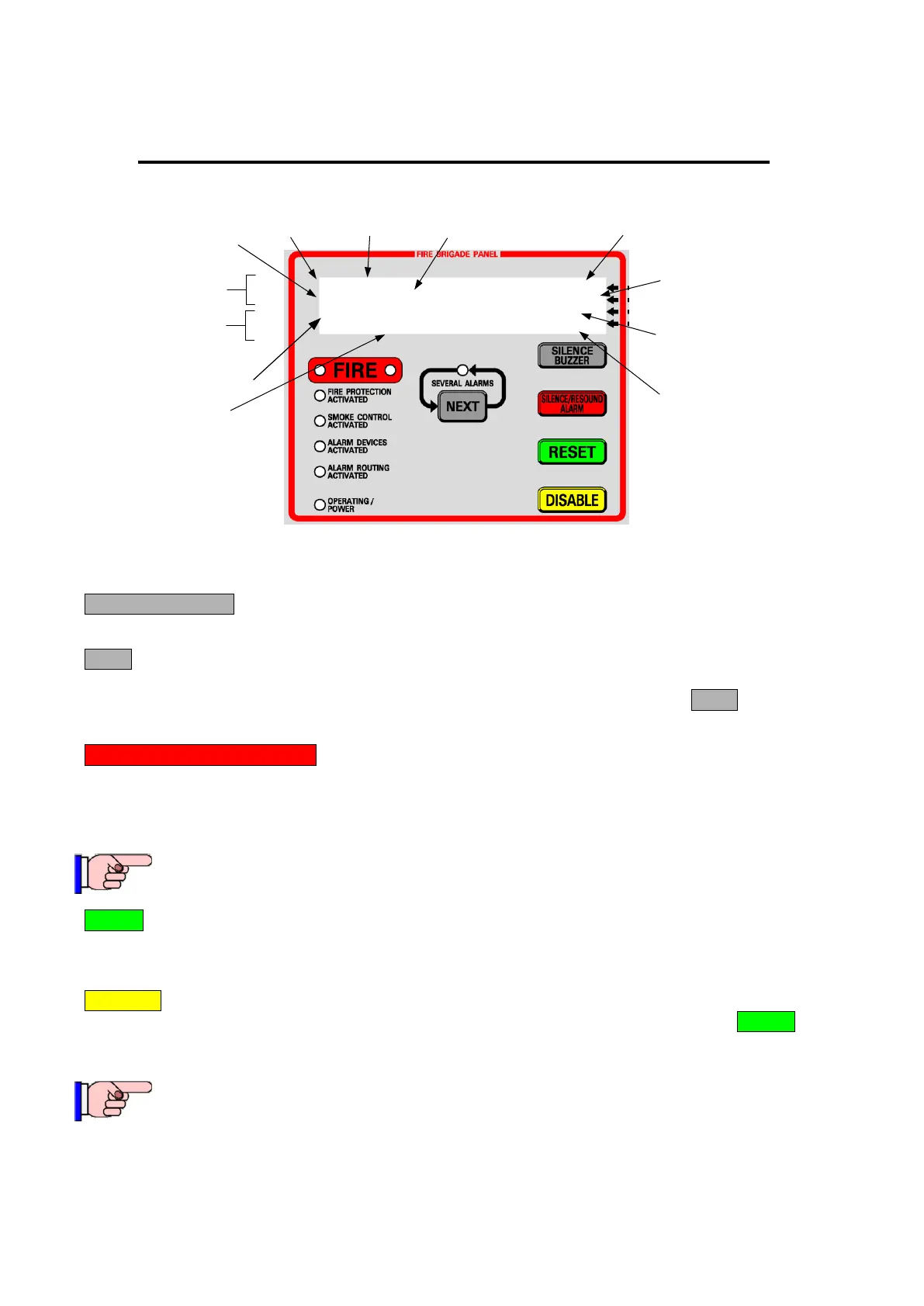
Using the Fire Brigade Panel – Quick Reference
Z003-Shop 1/3
P1.32-814CH Shop CO
Z001-Office 2/3
P1.1-MIM800 Office Input
First
alarm
Second
alarm
Zone
number
Zone
name
Point
name
First of 3
alarms
Second of
3 alarms
Device
number
Point
name
Alarm Type
(Input module)
Alarm
type (CO
detector)
Zone number
and name
1. SILENCE BUZZER
Press to silence the internal sounder.
2. NEXT
If the SEVERAL ALARMS indicator is lit, there are more than two zones in alarm. Initially, the first two
alarms are displayed. The first alarm is always shown on the top 2 lines. Press the NEXT key to scroll
through any subsequent alarms on the bottom two lines.
1. 3. SILENCE/RESOUND ALARM
Press this button to silence all alarm devices (occupant warning) including the external alarm (bell or
strobe). The red ALARM DEVICES ACTIVATED LED will extinguish.
Pressing this button again will activate all alarm devices if alarms are present.
This key will not silence separate occupant warning systems such as EWIS.
2. 4. RESET
Once all alarms are fully investigated and the alarm devices are silenced, press this key to reset all alarms.
If any alarm does not clear it will be re-annunciated.
3. 5. DISABLE
Press this key to disable all remaining alarms and if zone alarms remain in the list, press RESET to reset
the zones and return the LCD to the base display. Use only after attempting to reset and clear the alarms
first.
Do not use unless the previous reset was unsuccessful.
For more information refer to Section 2, “Handling Alarms using the Fire Brigade Panel”.



 To Next Page