VIKING TECHNICAL SUPPORT 1.800.908.0884
18
Limit Position Setup
GATE OPERATOR INSTALLATION
STEP 2
Remove the Lead Screw Cover:
a.
Remove the cover mounting screw.
b.
Remove the Lead Screw Cover.
STEP 3
Set the Limit Positions:
a.
Manually position the gate to the desired
Close Limit Position.
b.
Loosen the setscrews for the Close Positive
Stop and slide the Stop up against the Lead
Screw Carrier.
c.
Re-secure the Close Positive Stop when the
proper position has been determined. Ensure
it is tightly secured.
d.
Repeat the above steps for the Open Limit
Position.
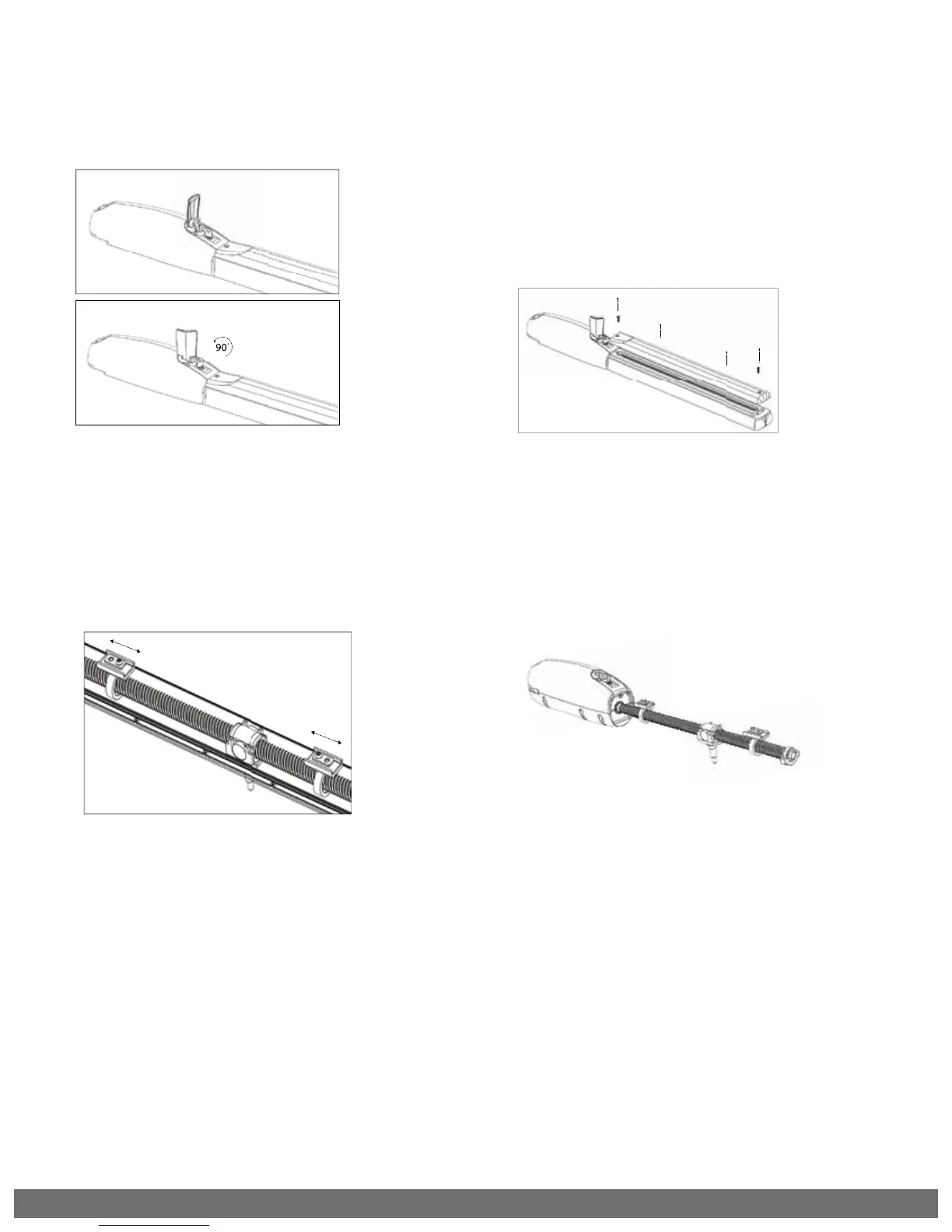
STEP 1
Manually Release the E-4 Operator:
a. Lift the Release Handle.
b. Insert the Release Key.
c. Rotate Release Key.
d. Rotate Handle.
STEP 4
Verify the set Limit Positions:
a. Re-engage the manual release.
b. Run the operator two full cycles to
verify that the limits are set at the desired
positions.
! IMPORTANT: The gate operator uses positive stops to set the limits.
! TECHNICAL TIP: The Limit LEDs will illuminate solid when the limit position is set and the
operator is at the corresponding limit.



 To Next Page