EasyManua.ls Logo

Visionix VX40 - Accessing Configuration Settings; VX40 User Settings

Visionix VX40
53 pages
Print Icon
To Next Page IconTo Next Page
To Previous Page IconTo Previous Page
Loading...
Configuring the VX40
VX40 User Guide
26 / 53
5.1 Configuration Access
Click on Tools button .
5.2 User Settings
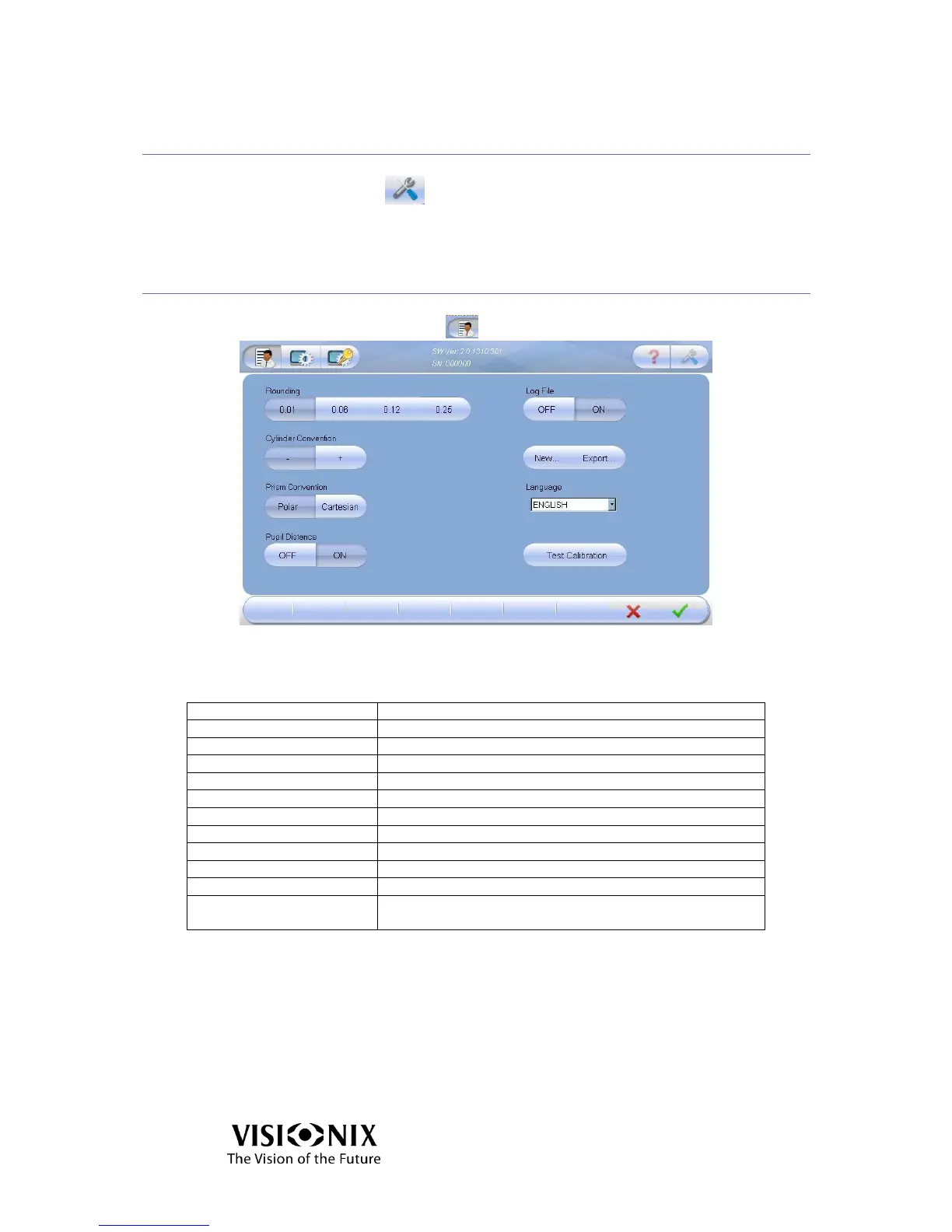
Click on User Settings button
5-1: User Settings Screen
Table 5-1: User Setting Elements Key
Operation Name
Operation Description
Software Version
Current software version
Serial Number
The serial number of the product
Rounding
Show results with an accuracy of 0.01/0.06/0.12/0.25
Cylinder Convention
Minus / Plus
Prism Convention
Polar (Amp & Angle) / Cartesian (X,Y)
Pupil Distance
Display the distance of each pupil to the center.
Log File
Save the data in a file or create a new file.
New
Create new log file (delete data).
Export
Export log file to a USB.
Language
Change the language.
Test Calibration
Test if the instrument requires calibration, using the
supplied test frame.

Table of Contents

Other manuals for Visionix VX40

Related product manuals