23
Cylinder head
Camshaft, replacement
(12A-06)
Special tools: 885037
1
Disconnect the battery
2
Remove the screw from the adjustment hole on the
top of the front end of the camshaft cover (12A.03/
A4). Turn the crankshaft until the adjustment hole in
the front of the camshaft front bearing journal corre-
sponds with the hole in the cover.
3
Install the adjustment drifts 885037 on the camshaft
and flywheel.
4
Remove the cap of the timing cover, operation 15A-
01.
5
Remove the camshaft pulley, operation 15A-06.
6
Remove the camshaft cover, operations 12A-01.
7
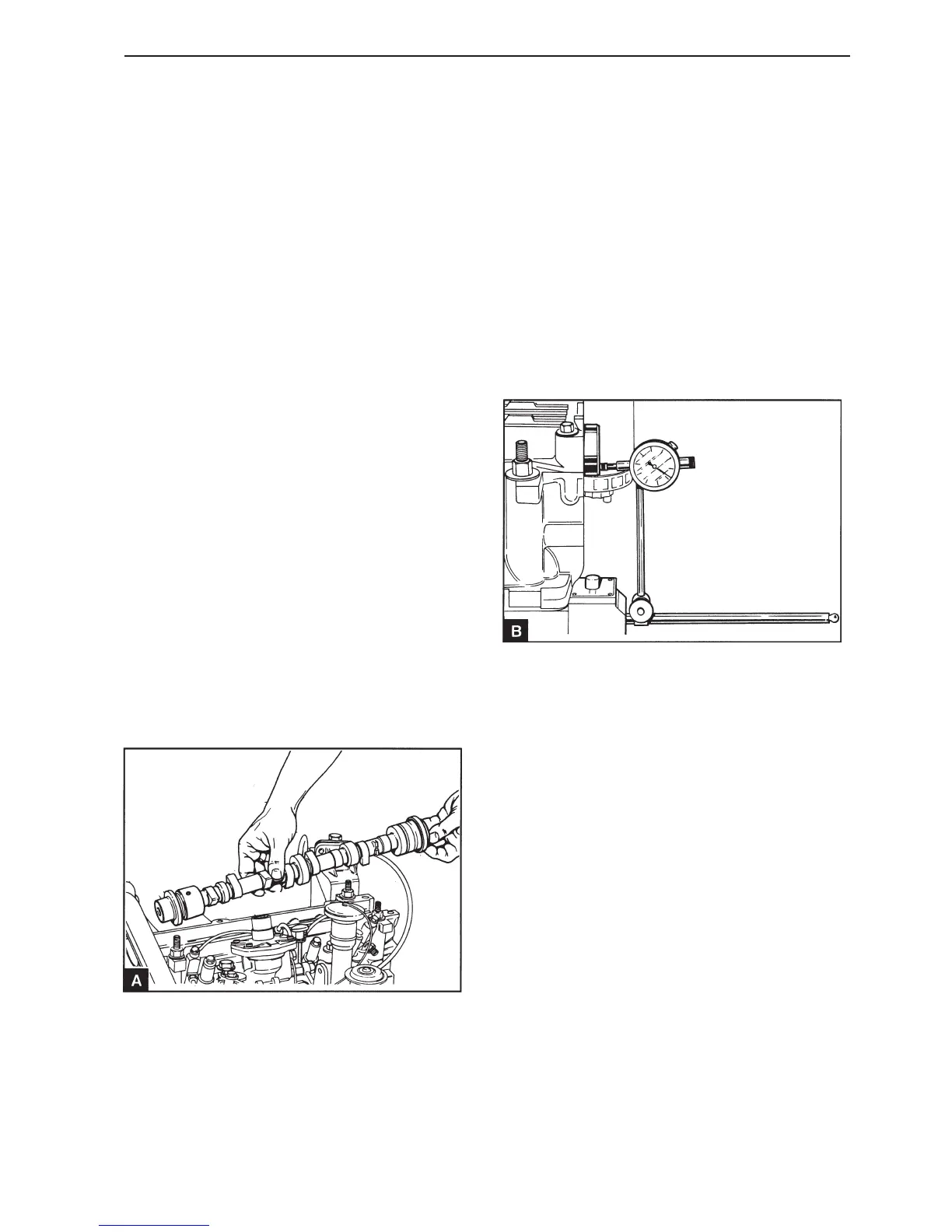
Remove the camshaft (A) and remove the camshaft
sealing rings.
8
Check the camshaft for wear and damage and re-
place it if required.
9
Ensure that the camshaft is clean and lubricated
with fresh engine oil. Install the camshaft in position
and check the valve clearance if necessary, see
operation 12A-02.
10
Install the camshaft cover, operations 12A-01.
11
Check the camshaft axial clearance with a dial indi-
cator (B). For tolerances see Workshop Manual
“Technical data”.
12
Install the camshaft sealing rings, operations 12A-
04 and 12A-05.
13
Install the rear camshaft cover.
Install the seawater pump, section 20.
14
Install the camshaft pulley and the timing belt and
adjust the belt tension, section 15.



 To Next Page