Instrument panels
30 Display unit
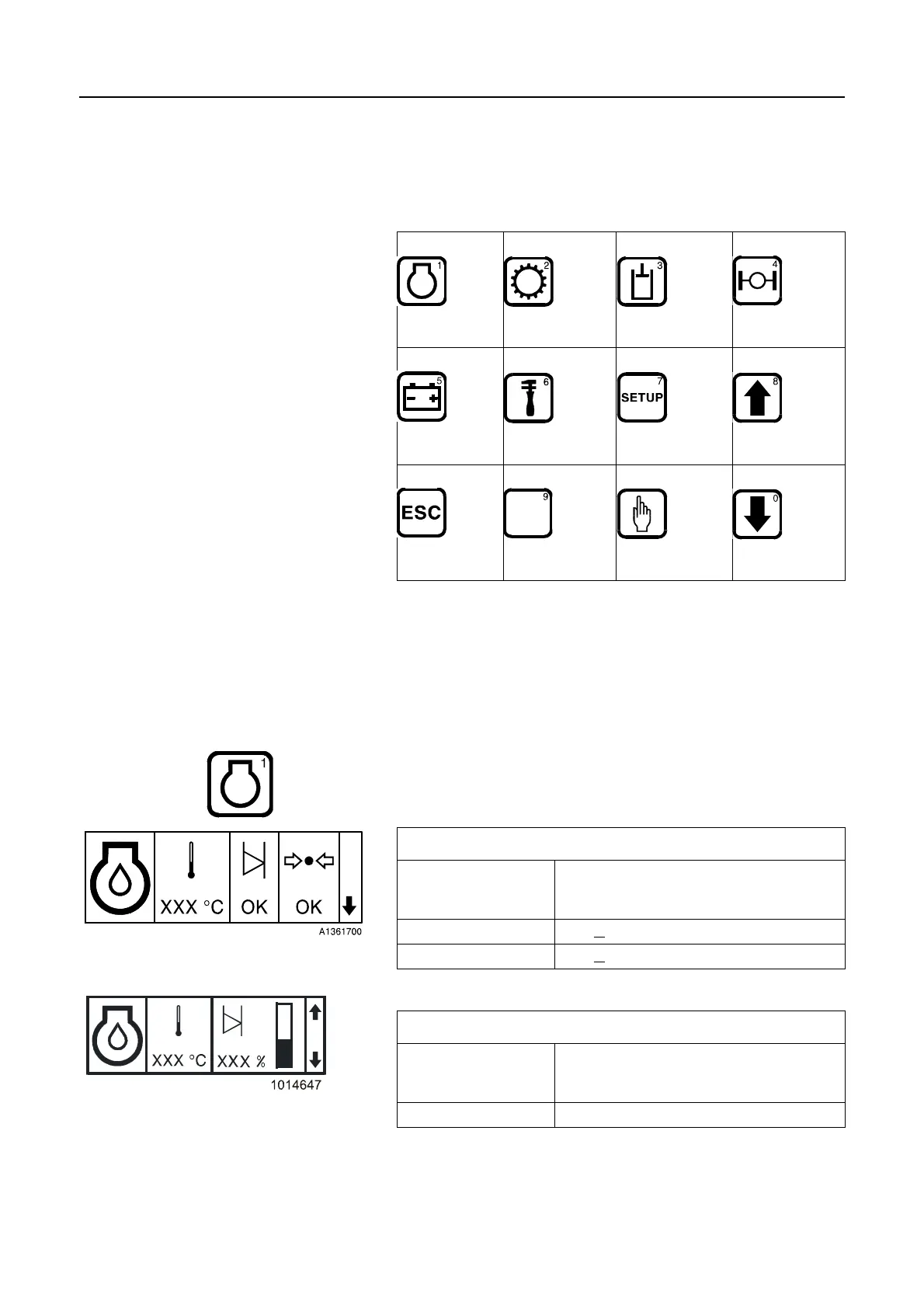
Keypad for display unit
With the aid of the keyboard on the left instrument panel the
operator may obtain information about the status of the machine,
make settings and enter the code for anti-theft device.
Component information
Information about the machine components is obtained by
pressing the respective keys. Use the arrow keys for browsing
between the images.
Changing the setting of units, time and date is carried out with the
SETUP key, see page 34.
Engine
The screens shown below become available after pressing the
engine key. Change screen with the arrow keys.
1
ENGINE
2
TRANSMISSION
3
HYDRAULICS
4
AXLES/
BRAKES
5
ELECTRICAL
SYSTEM
6
SERVICE
7
SETTINGS
8
ARROW UP
REVERT
9
SELECT/
ACKNOWLEDGE
0
ARROW DOWN
Engine oil
Temperature °C/°F (in case of minus degrees, the
minus sign will be shown at the first
position)
Level OK / V
(low) / – – (incorrect value)
Pressure OK / V
(low) / – – (incorrect value)
Engine oil
Temperature °C/°F (in case of minus degrees, the
minus sign will be shown at the first
position)
Level % within the measuring range



 To Next Page