Instrument panels
34 Display unit
Setting/setting to zero/acknowledgement
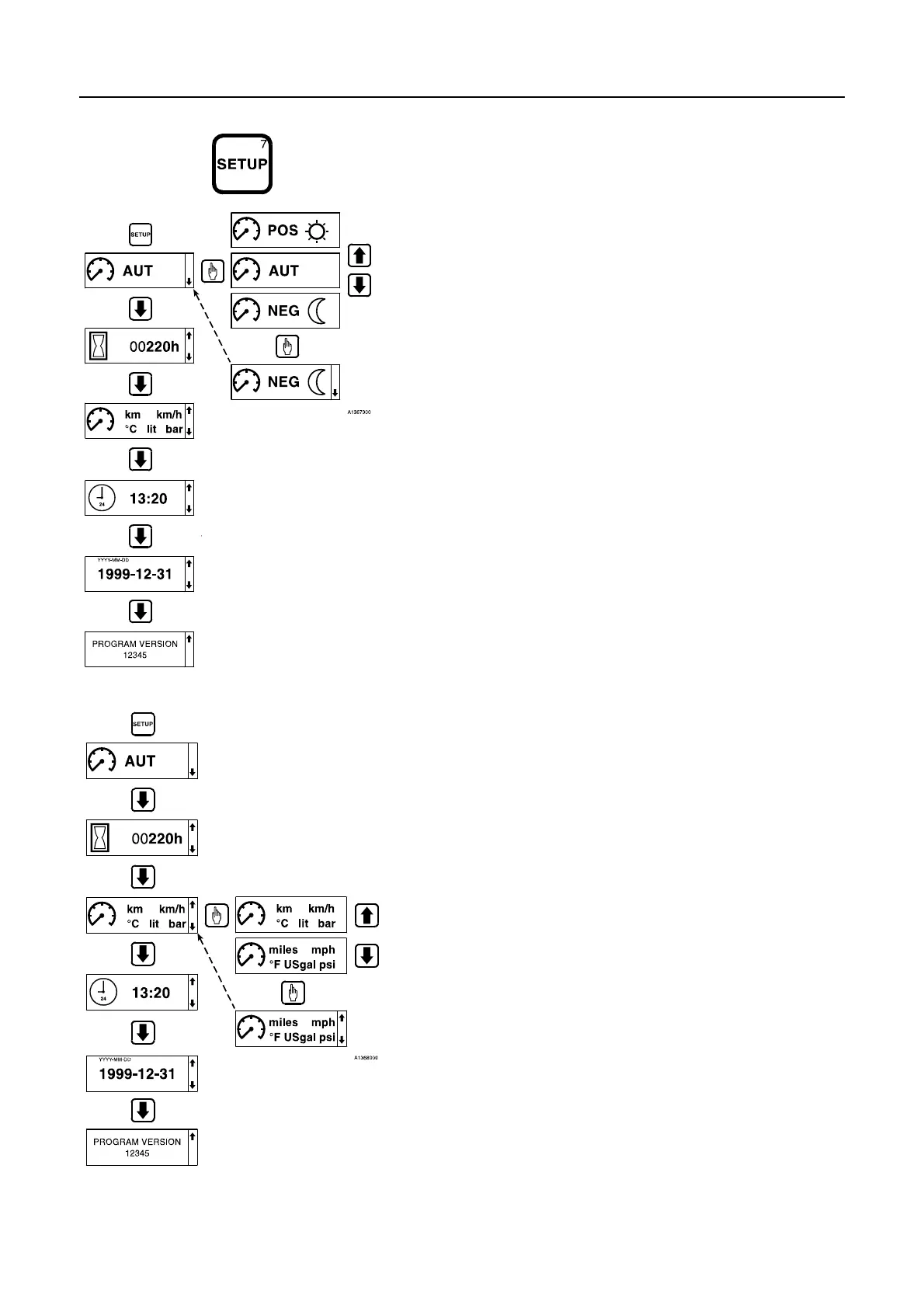
The settings below are made with the SETUP key.
Setting display mode
1 Press the SETUP key.
2 Press the select/acknowledge key.
3 Browse with the arrow keys to the required setting. (The setting
procedure may at any time be interrupted with the ESC key.)
POS = positive display screen
AUT = automatic display screen
NEG = negative display screen
4 Acknowledge with the select/acknowledge key.
Setting units
1 Press the SETUP key.
2 Press the arrow down key to the unit screen.
3 Press the select/acknowledge key.
4 Browse with the arrow keys to the required setting. (The setting
procedure may at any time be interrupted with the ESC key.)
SI/metric = km, km/h, °C, lit, bar
Non-metric = miles, mph, °F, US gal, psi)
5 Acknowledge with the select/acknowledge key.


 To Next Page