2787-2146 (/0000-00x0) Configuration
Product manual | Version: 1.2.2 59
Power Supply Pro 2
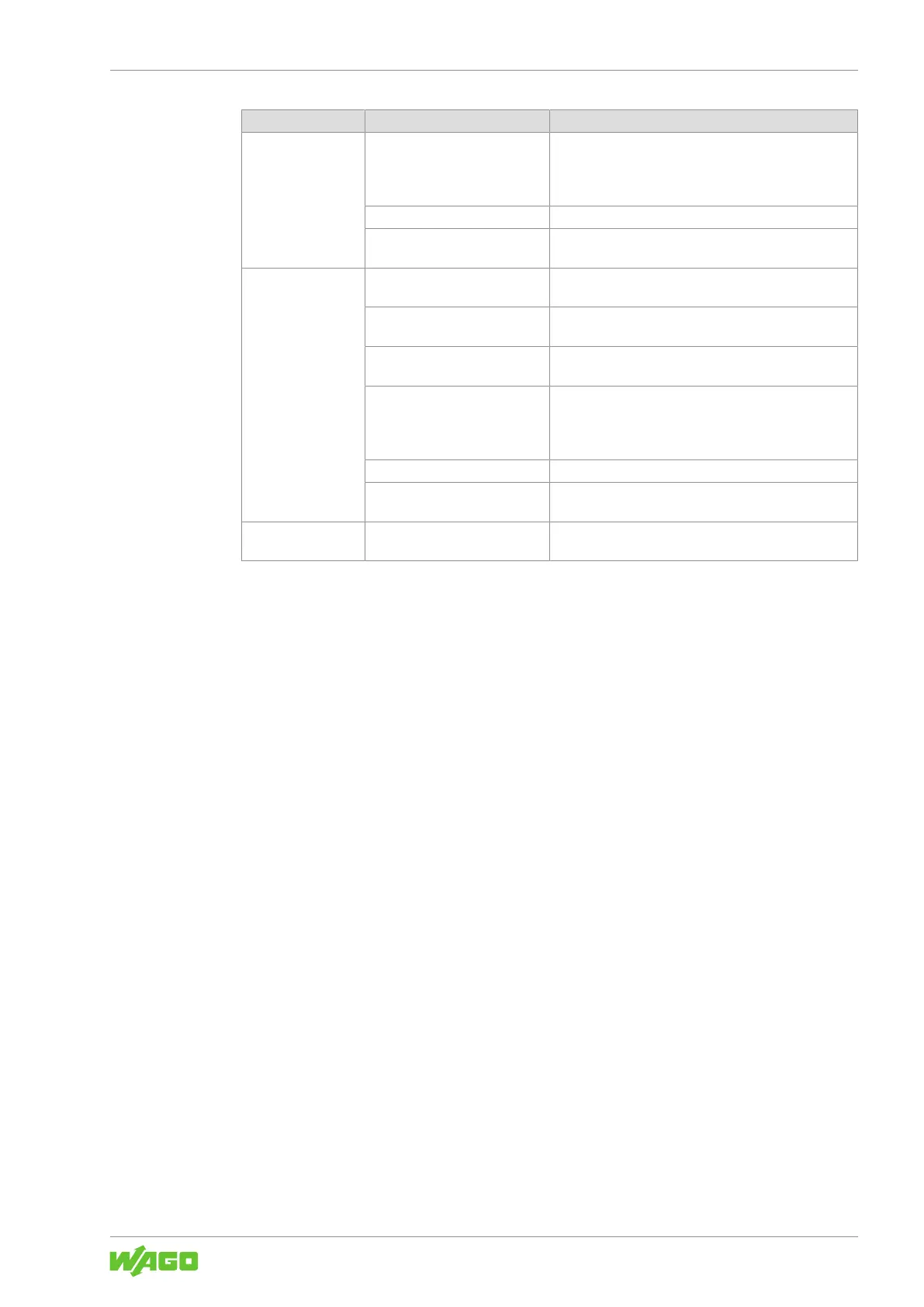
Pos. Setting Description
With export • Box checked: The recording is exported as a CSV
file.
• Box unchecked: The data is recorded only for on-
line display and not saved.
[Start] Starts the recording (setting at pos. 1 = chart).
[Stop] Stops the recording before the specified number is
reached (setting at pos. 1 = chart).
4 Start time Here you can enter the time when recording should
start (setting at pos. 1 = clock).
End time Here you can enter the time when recording should
end (setting at pos. 1 = clock).
Sample rate Here you can enter the recording cycle for the mea-
sured values (unit: ms)
With export • Box checked: The recording is exported as a CSV
file.
• Box unchecked: The data is recorded only for on-
line display and not saved.
[Start] Starts the recording (setting at pos. 1 = chart).
[Stop] Stops the recording before the specified number is
reached (setting at pos. 1 = chart).
5 – This shows the time series for the selected measured
value.



 To Next Page