2787-2146 (/0000-00x0)Configuration
58 Product manual | Version: 1.2.2
Power Supply Pro 2
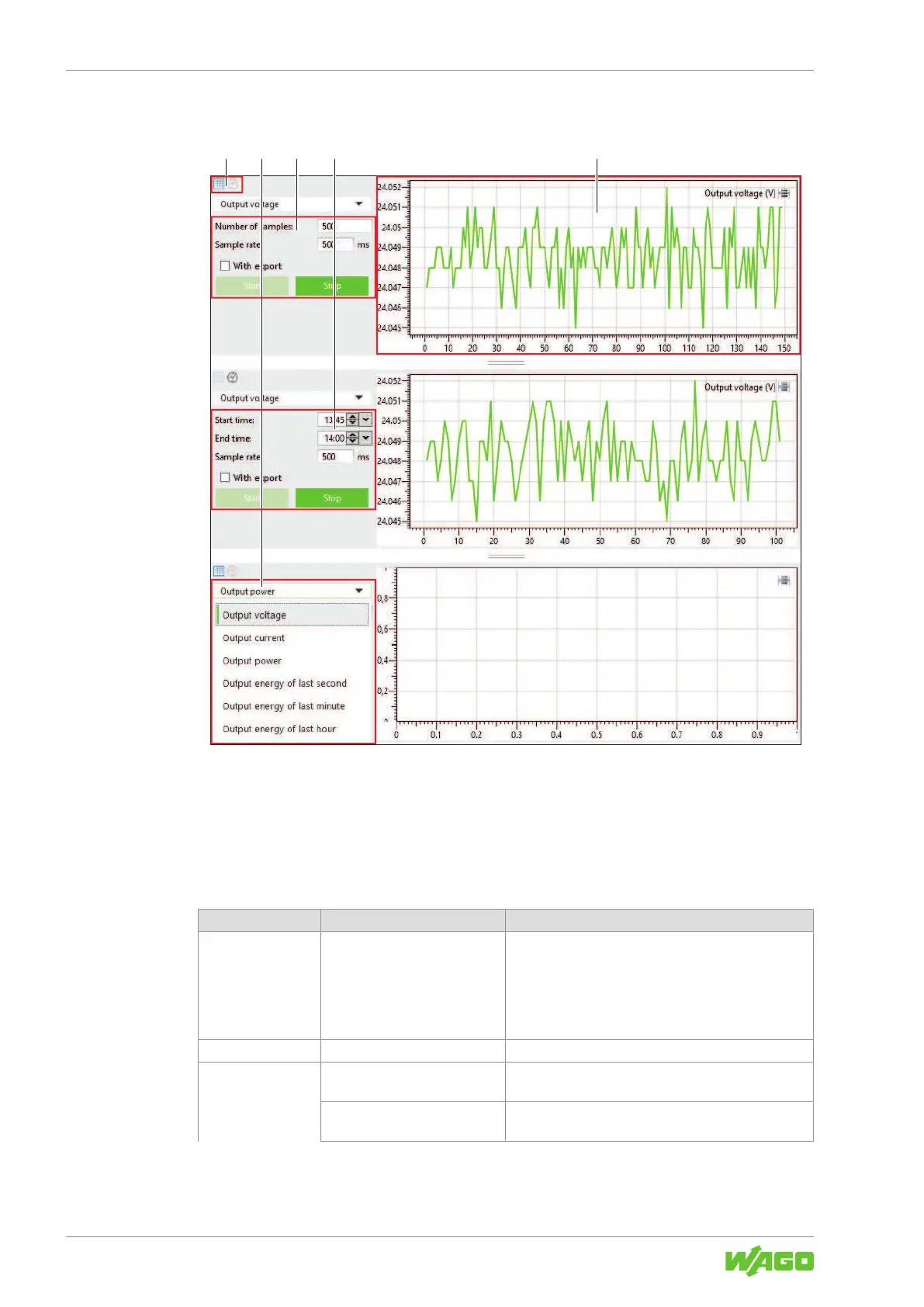
10.3.3.2 Display Section: Measurement Recording
Figure34: Display Section: “Measurement Recording”
This display section can represent the time series of up to three different measured val-
ues (measurement recordings).
You can make the following settings for each time series:
Table63: Display Section: “Measurement Recording”
Pos. Setting Description
1 Chart/Clock Here you can specify whether a specific number of val-
ues (chart) or measured values over a specific time
period (clock) should be recorded. The corresponding
input form changes accordingly:
• Pos. 3 = input form for chart
• Pos. 4 = input form for clock
2 Measured Value Selection Here you can select the measured value to record.
3 Number of samples Here you can enter the number of measured values to
record (setting at pos. 1 = chart).
Sample rate Here you can enter the recording cycle for the mea-
sured values (unit: ms)



 To Next Page