Call cleardown
Why?
!
Stop measurements on this mobile station.
Requirements
!
Mobile station is on traffic channel (
{MS_Call}
or
{BS_Call}
pressed before).
!
Screen shows basic test mask.
How?
!
Release the PTT if applicable.
!
Press the DISCONNECT key on the mobile.
!
Press
{RELEASE}
.
If the mobile station has not already sent a Disconnect message to the simulated
network, the STABILOCK sends a message to the mobile station saying that the
call is over and that the traffic channel should be released.
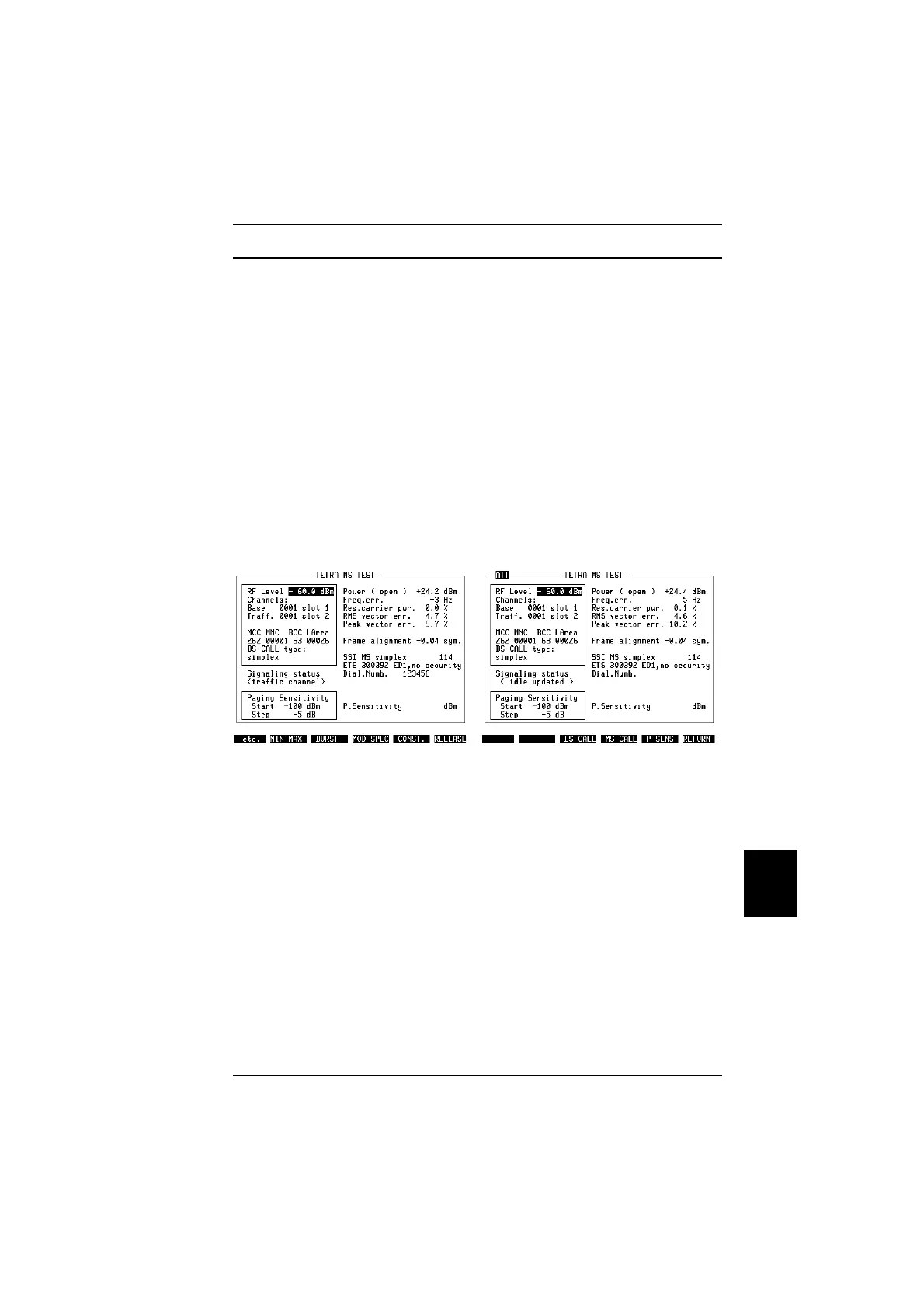
The mobile and the STABILOCK return to the "idle updated" state, the softkeys
return to the previous state as indicated in Fig. 10.13.
"
In order to set up a new call, you can press the
{MS_Call}
or
{BS_Call}
keys again.
"
To test another MS, switch off the mobile and press
{RETURN}
to return to the idle
state. You can then disconnect the previous mobile from the STABILOCK and
connect another one.
Fig. 10.12: Press the
{RELEASE}
key to end a
call.
Fig. 10.13: TETRA basic test mask after Call
cleardown.
10
Modes of operation TETRA MS Test
10-27



 To Next Page