31
WebdynSunPM – User guide — Version 1.0
7 User interface
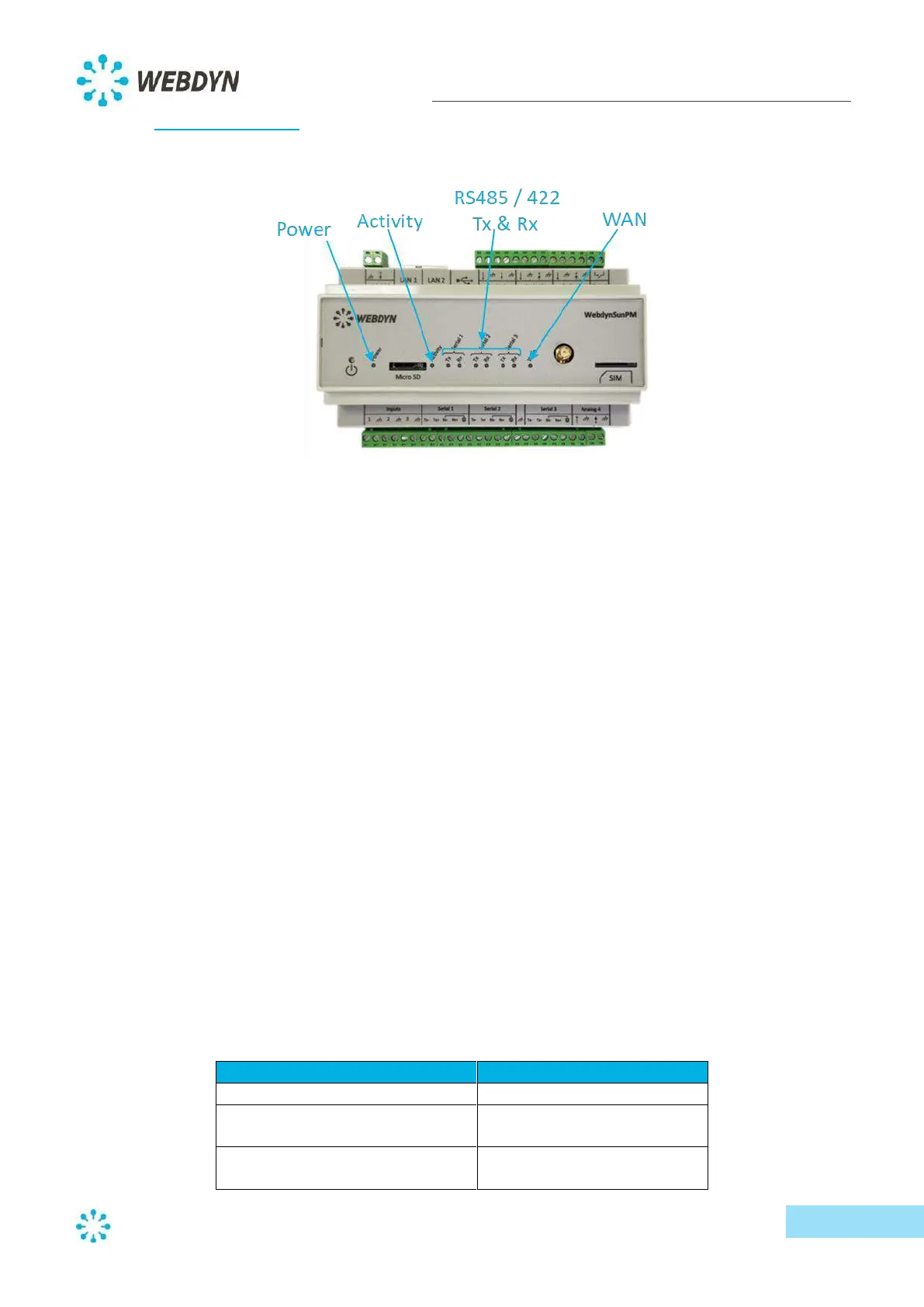
7.1 Status indicators
7.1.1 Power
This indicator represents the power status of the WebdynSunPM concentrator. The LED is lit as soon
as a voltage is present on the power supply terminal block. If the voltage disappears, the light goes
out.
7.1.2 Activity
The Activity light reflects the operating status of the product. When the product is initialized, the
Activity light flashes quickly. When the product is in "normal" operation, the Activity light stays on.
7.1.3 Serial (Tx & Rx)
The three sets of two lights (Tx/Rx) reflect the communication taking place on the three RS485/422
serial buses. Upon data transmission on a serial bus, the Tx light for that bus will flash in response to
data transmitted. Similarly, when data is received, the Rx light will flash in response to data received.
Note: In two-wire cabling, data sent by the concentrator is received as an echo. These do not cause
the Rx lights to flash.
7.1.4 WAN
The WAN light indicates the connection status. The light can take three different colors (green,
orange and red). Green represents stable states, orange represents transitional states, and red
represents errors.
Below is a summary of each of those states.
- Stable states:
Offline and modem switched off
Offline, but modem attached to
the mobile network
Connected to the mobile IP
network



 To Next Page