CFW-11 | 5-3
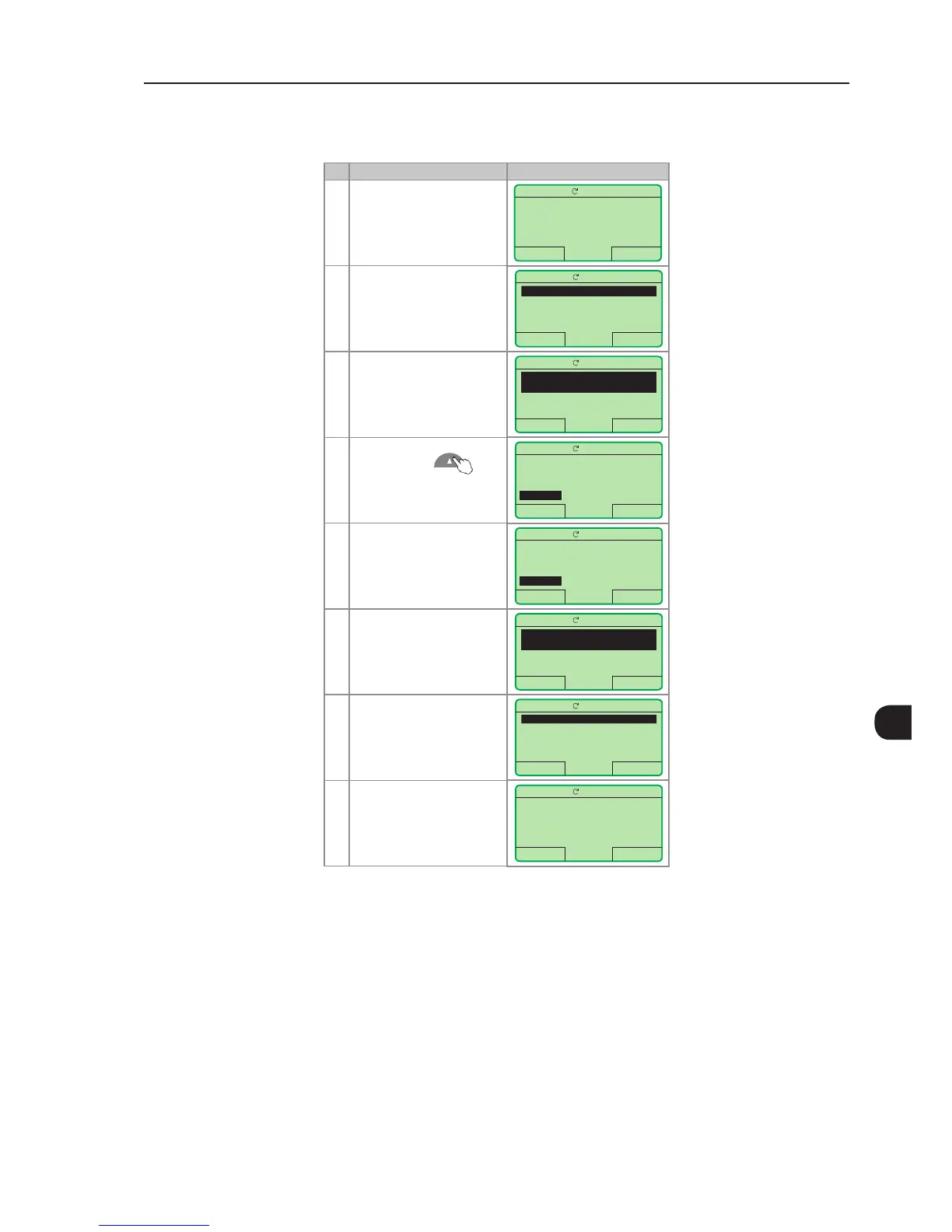
5.2.1 P0000 Password Setting
Step Action/Result Display Indication
1 - Monitoring mode
- Press "Menu"
(right soft key)
Ready
LOC
0rpm
15:45 Menu
0 rpm
0.0 A
0.0 Hz
2 - The group "00 ALL
PARAMETERS" is already
selected
- Press "Select"
Ready
LOC
0rpm
Return 15:45 Select
00 ALL PARAMETERS
01 PARAMETER GROUPS
02 ORIENTED START-UP
03 CHANGED PARAMETERS
3 - The parameter "Access to
Parameters P0000: 0" is
already selected
- Press "Select"
Ready
LOC
0rpm
Return 15:45 Select
Access to Parameters
P0000: 0
Speed Reference
P0001: 90 rpm
4 - In order to set the,
password, press until
the number 5 appears on the
display
Ready
LOC
0rpm
Return 15:45 Save
P0000
Access to Parameters
0
5 - When the number 5
appears, press "Save"
Ready
LOC
0rpm
Return 15:45 Save
P0000
Access to Parameters
5
6 - If the setting was performed
correctly, the display must
show "Access to Parameters
P0000: 5"
- Press "Return" (left soft key)
Ready
LOC
0rpm
Return 15:45 Select
Access to Parameters
P0000: 5
Speed Reference
P0001: 90 rpm
7 - Press "Return"
Ready
LOC
0rpm
Return 15:45 Select
00 ALL PARAMETERS
01 PARAMETER GROUPS
02 ORIENTED START-UP
03 CHANGED PARAMETERS
8 - The display returns to the
monitoring mode
Ready
LOC
0rpm
15:45 Menu
0 rpm
0.0 A
0.0 Hz
Figure 5.1 - Steps for allowing parameter modication via P0000
5.2.2 Oriented Start-Up
There is a group of parameters named "Oriented Start-up", which makes the inverter settings easier. The parameter
P0317 from this group allows entering the Oriented Start-up routine.
The Oriented Start-Up routine presents the main parameters on the HMI in a logical sequence, so that their
setting, according to the operation conditions, prepares the inverter for the operation with the used line and motor.
In order to enter an Oriented Start-up routine, follow the sequence presented in Figure 5.2 on page 5-5, first
changing P0317 = 1, and then setting the other parameters as they are displayed on the HMI.



 To Next Page