2-12 | CFW-11
USB connector
USB LED
Off: without USB connection
On/blinking: USB communication active
Status LED
Green: normal operation without fault or alarm
Yellow: in the alarm condition
Blinking red: in the fault condition
1
2
3
3
2
1
Figure 2.6 - LEDs and USB connector
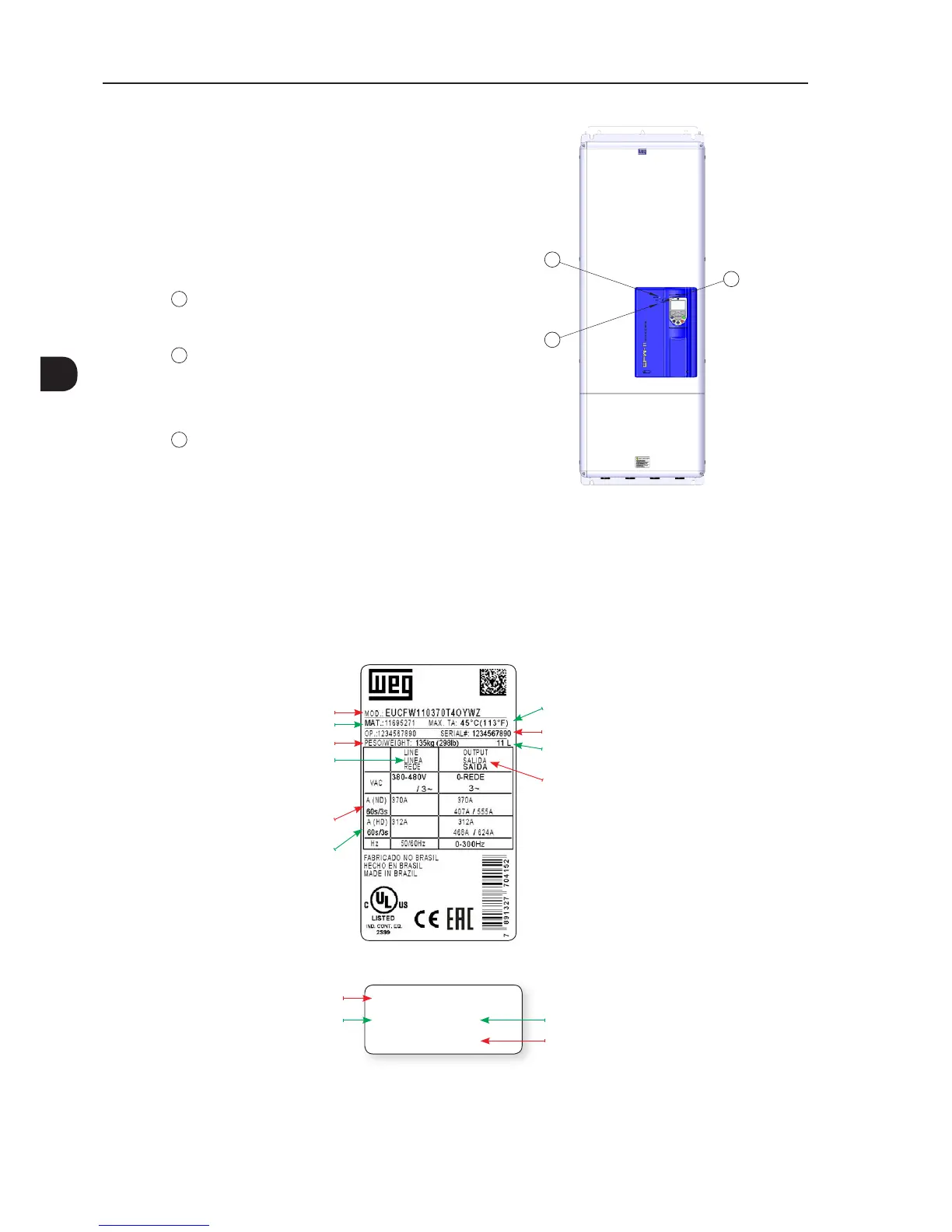
2.4 CFW-11 IDENTIFICATION LABELS
There are two identification labels, one complete nameplate is affixed at the side of the inverter and a simplified
label is located under the keypad. The label under the keypad allows the identification of the most important
characteristics of the inverter even if they are mounted side-by-side.
Rated output data (voltage, number of power
phases, rated currents for use with Normal Duty
(ND) and Heavy Duty (HD) cycles, overload
currents for 1min and 3 s, and frequency range)
Maximum ambient temperature surrounding the
inverter
Manufacturing date (37 corresponds to the
week and I to the year)
Serial number
Rated input data (voltage, number of
power phases, rated currents for use with
Normal Duty (ND) and Heavy Duty (HD)
cycles, frequency)
Current specifications for use with the
Heavy Duty (HD) cycle
Current specifications for use with the
Normal Duty (ND) cycle
CFW-11 model
WEG part number
Inverter net weight
(a) Nameplate afxed at the side of the inverter
EUCFW11DB70T4CYWZ
11695271
SERIAL#:
11L
1234567890
WEG part number
CFW-11 model
Serial number
Manufacturing date
(37 corresponds to
week and L to year)
(b) Label located under the keypad
Figure 2.7 - (a) and (b) - Identication labels



 To Next Page