CFW-11 | 5-9
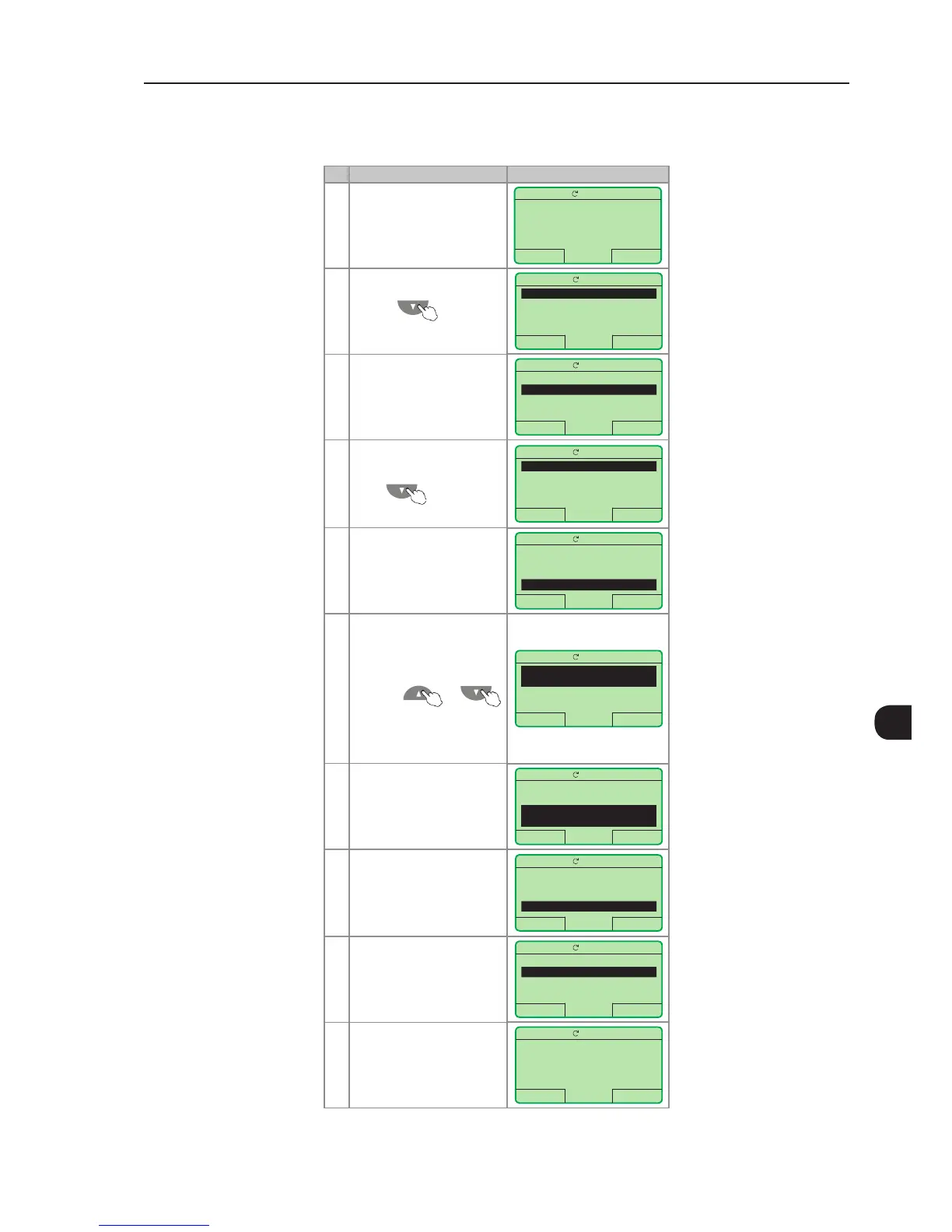
5.3 DATE AND TIME SETTING
Step Action/Result Display Indication
1 - Monitoring mode
- Press "Menu"
(right soft key)
Ready
LOC
0rpm
16:10 Menu
0 rpm
0.0 A
0.0 Hz
2 - Group "00 ALL
PARAMETERS" is already
selected
Ready
LOC
0rpm
Return 16:10 Select
00 ALL PARAMETERS
01 PARAMETER GROUPS
02 ORIENTED START-UP
03 CHANGED PARAMETERS
3 - Group "01 PARAMETER
GROUPS" is selected
- Press "Select"
Ready
LOC
0rpm
Return 16:10 Select
00 ALL PARAMETERS
01 PARAMETER GROUPS
02 ORIENTED START-UP
03 CHANGED PARAMETERS
4 - A new list of groups is
displayed and group "20
Ramps" is selected
- Press until you
reach group "30 HMI"
Ready
LOC
0rpm
Return 16:10 Select
20 Ramps
21 Speed References
22 Speed Limits
23 V/F Control
5 - Group "30 HMI" is selected
- Press "Select"
Ready
LOC
0rpm
Return 16:10 Select
27 V/F DC Volt. Limit.
28 Dynamic Braking
29 Vector Control
30 HMI
6 - Parameter "Day P0194" is
already selected
- If needed, set P0194
according to the actual day.
To do so, press "Select" and
then, and or
to change P0194 value
- Follow the same steps to set
parameters "Month P0195"
to "Seconds P0199"
Ready
LOC
0rpm
Return 16:10 Select
Day
P0194: 06
Month
P0195: 10
7 - Once the setting of P0199
is over, the Real Time Clock is
now updated
- Press "Return"
(left soft key)
Ready
LOC
0rpm
Return 18:11 Select
Minutes
P0198: 11
Seconds
P0199: 34
8 - Press "Return"
Ready
LOC
0rpm
Return 18:11 Select
27 V/F DC Volt. Limit.
28 Dynamic Braking
29 Vector Control
30 HMI
9 - Press "Return"
Ready
LOC
0rpm
Return 18:11 Select
00 ALL PARAMETERS
01 PARAMETER GROUPS
02 ORIENTED START-UP
03 CHANGED PARAMETERS
10 - The display is back to the
monitoring mode
Ready
LOC
0rpm
18:11 Menu
0 rpm
0.0 A
0.0 Hz
Figure 5.4 - Date and time setting



 To Next Page