24 | CFW501
HMI (Keypad) and Basic Programming
English
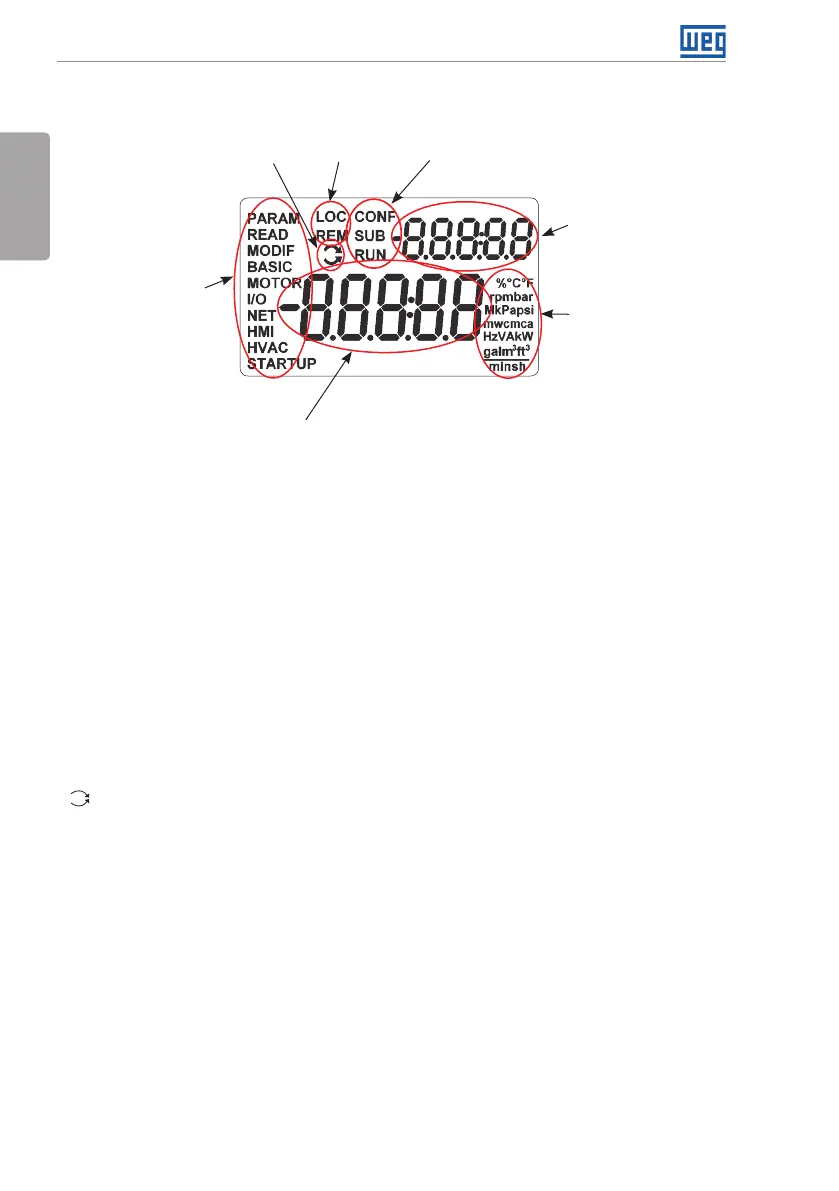
4.2 INDICATIONS ON THE HMI DISPLAY
Inverter statusMotor rotation
Local/Remote
(commands and
references source)
Secondary indication
Measurement unit
(it refers to the
value of the main
indication)
Menu (to select the
parameter groups) –
only one parameter
group is shown
at a time.
Main display
Figure 4.2: Display fields
Parameter groups available in the field Menu:
PARAM: all parameters.
READ: reading parameters only.
MODIF: parameters modified in relation to the default only.
BASIC: parameters for basic application.
MOTOR: parameters related to the control of the motor.
I/O: parameters related to digital and analog inputs and outputs.
NET: parameters related to the communication networks.
HMI: parameters to configure the HMI.
HVAC: parameters related to HVAC application.
STARTUP: parameters for oriented Start-up.
Status of the inverter:
LOC: command source or local references.
REM: command source or remote references.
: direction of rotation by means of arrows.
CONF: configuration error.
SUB: undervoltage.
RUN: execution.



 To Next Page