30 | CFW501
Powering up and Startup
EnglishEnglish
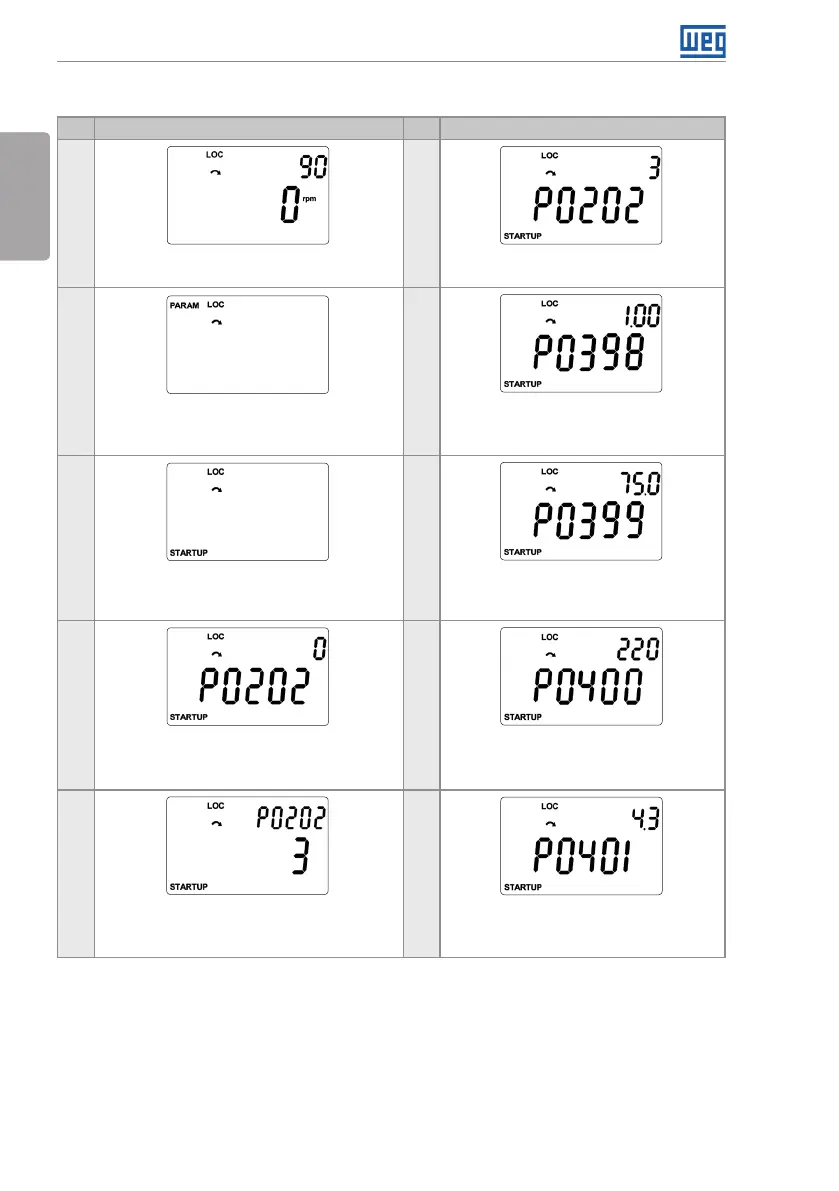
Figure 5.3: Sequence of the Startup group for VVW control
5.2.1.2 VVW Control Type (P0202 = 3)
Seq Indication on the Display / Action Seq Indication on the Display / Action
1
6
Monitoring mode. Press the key ENTER/MENU
to enter the 1st level of the programming mode.
Press the key to proceed with the
Startup of the V V W.
2 7
The PARAM group is selected, press the Keys
or until selecting the STARTUP group.
If necessary, modify the content of “P0398
– Motor Service Factor”.
Press the key for the next parameter.
3 8
When the STARTUP group is selected press
the key ENTER/MENU.
If necessary, modify the content of “P0399
– Motor rated performance”, or press the
key for the next parameter.
4 9
Press ENTER/MENU and with the keys and
set the value 5, which activates the control
mode VVW.
If necessary, modify the content of “P0400
– Motor rated voltage”, or press the key
for the next parameter.
5 10
Press ENTER /MENU to save the modification
of P0202.
If necessary, modify the content of “P0401
– Motor rated current”, or press the key
for the next parameter.



 To Next Page