32 | CFW501
Powering up and Startup
EnglishEnglish
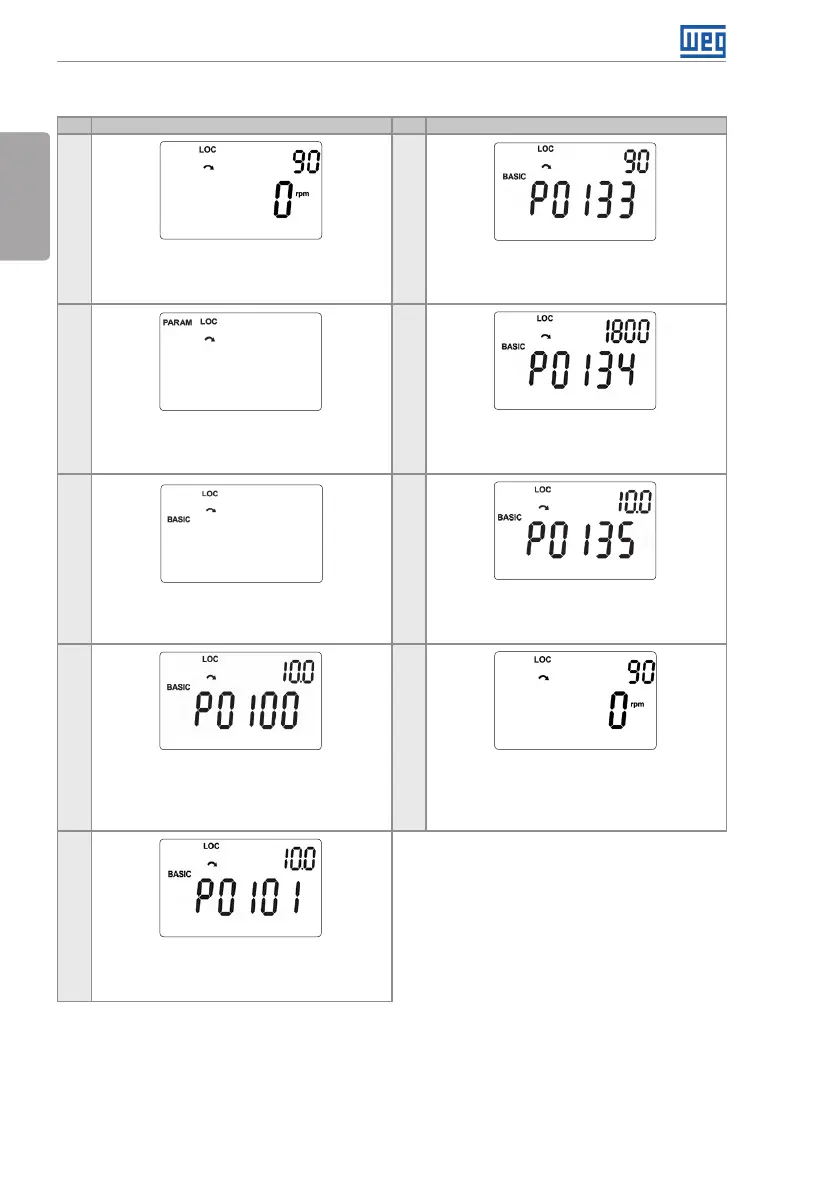
5.2.2 Menu BASIC – Basic Application
Seq Indication on the Display / Action Seq Indication on the Display / Action
1
6
Monitoring mode. Press the key ENTER/MENU
to enter the 1st level of the programming mode.
If necessary, modify the content of “P0133 –
Minimum Speed”.
Press the key for the next parameter.
2 7
The PARAM group is selected, press the
keys or until selecting the BASIC group.
If necessary, modify the content of “P0134 –
Maximum Speed”.
Press the key for the next parameter.
3 8
When the BASIC group is selected press the
key ENTER/MENU.
If necessary, modify the content of “P0135 –
Maximum Output Current”.
Press the key for the next parameter.
4 9
Basic Application routine is started. If
necessary, modify the content of “P0100 –
Acceleration Time”.
Press the key for the next parameter.
To end the Start-up routine, press the key
BACK/ESC.
To return to the monitoring mode, press the
key BACK/ESC again.
5
If necessary, modify the content of “P0101 –
Deceleration Time”.
Press the key for the next parameter.
Figure 5.4: Sequence of the Basic Application group



 To Next Page