Pro-EC44 2-Loop Graphical Profile Controller & Recorder
Pro-EC44 Product Manual - 59540-2 September 2014 Page 38
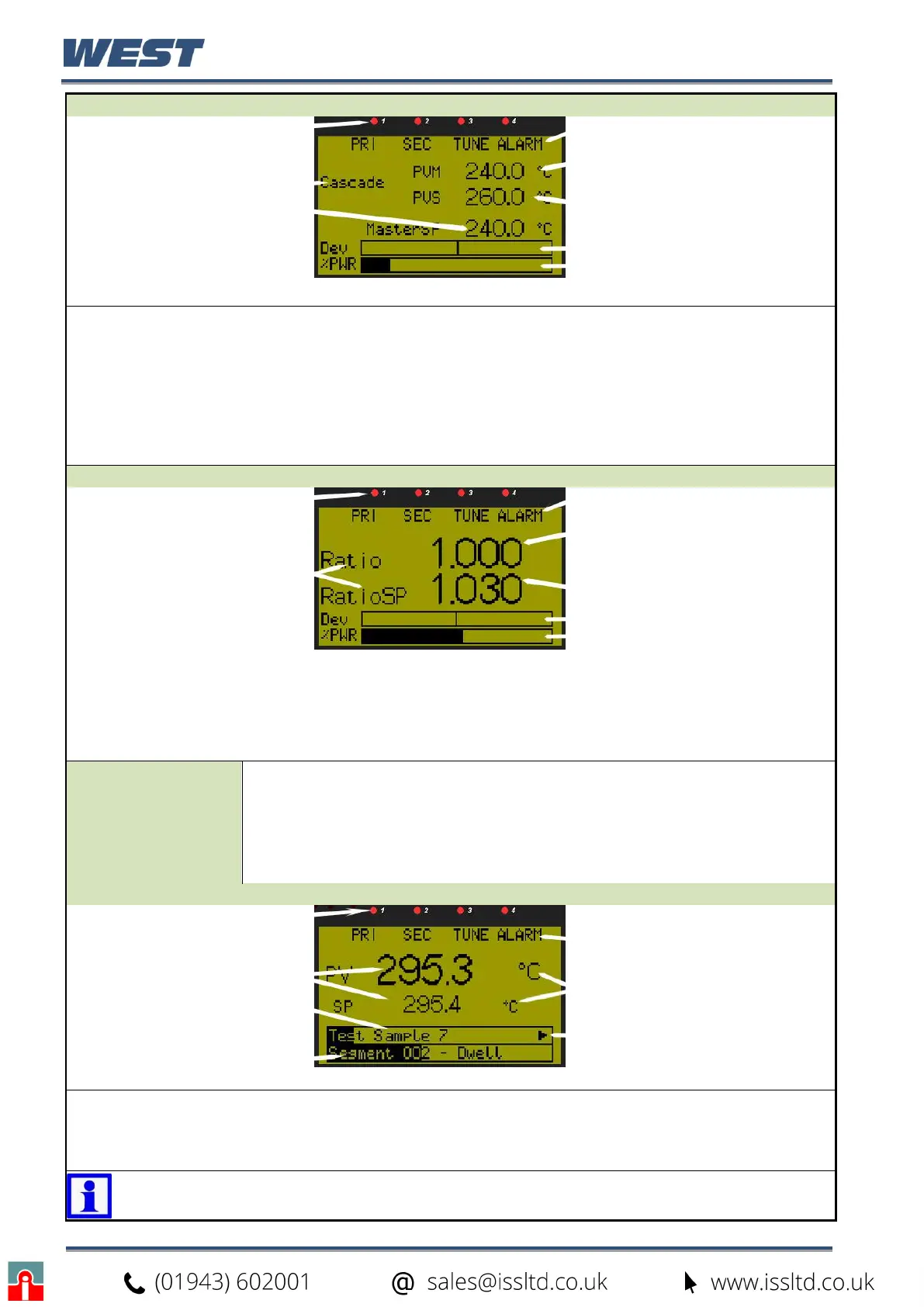
Cascade Control: Normal Operation
LED Indicators
LED Function Labels
Cascade Status
Master Process Value
Slave Process Value
Master Setpoint (
Cascade Open)
Control Deviation (±5% of
span) & Power Graphs
CASCADE CONTROL
Default LED indicator functions are PRI, SEC, TUNE & ALARM - the functions and their labels can be
altered only with the PC configuration software.
Cascade Status shows “Cascade” when cascade is operating normally and “Cascade Open” when
the master / slave link has been disconnected. Master & Slave Process Values.
In valve motor drive mode, the power bar-graph is replaced by valve Open / Stop / Close.
In manual mode the slave setpoint is replaced by the %Manual Power and the label “MAN”.
In manual mode with valve motor drive the slave setpoint is replaced by valve Open / Stop / Close.
If control is disabled the effective master setpoint value is replaced by “OFF”.
Ratio Control: Normal Operation
LED Indicators
LED Function Labels
Relative Process Value
Ratio & Setpoint Labels
Relative Setpoint
Control Deviation (±5% of
span) & Power Graphs
RATIO CONTROL
Default LED indicator functions are PRI, SEC, TUNE & ALARM - the functions and their labels can be
altered only with the PC configuration software.
In manual mode the ratio setpoint value is replaced by the %Manual Power and the label “MAN”.
If control is disabled the effective setpoint value is replaced by “OFF”.
Operator Profile
Control
Allows the operator to control the defined profiles.
If a profile is running, the choices are: Do Nothing; Abort Profile (end
immediately); Jump to Next Segment; Hold Profile or Release Hold.
If no profile is running, the choices are: Do Nothing; Run Profile; End Profile
Control (returns to standard controller operation) or Select Profile.
◘ only shown if set to do so in Display Configuration.
Single Control Loop: Profiler Status
LED Indicators
LED Function Labels
Process Value & Setpoint
Engineering Units
Profile Name & Progress
Segment No, Type &
Progress (or Delayed Start
Time)
Profile Status Indicator:
► Run, ▌▌ Held, ■ Stopped
1-LOOP PROFILE STATUS
Default LED indicator functions are as shown in the initial base screen.
In manual mode the effective setpoint is replaced by the %Manual Power and the label “MAN”.
In manual mode with valve motor drive the setpoint is replaced by valve Open / Stop / Close.
If control is disabled the effective setpoint value is replaced by “OFF”.
Note: If power is lost when a profile is running and recovery is set to continue,
the bar-graph re-starts from the beginning but the overall time remains correct.


 To Next Page