Pro-EC44 2-Loop Graphical Profile Controller & Recorder
Pro-EC44 Product Manual - 59540-2 September 2014 Page 93
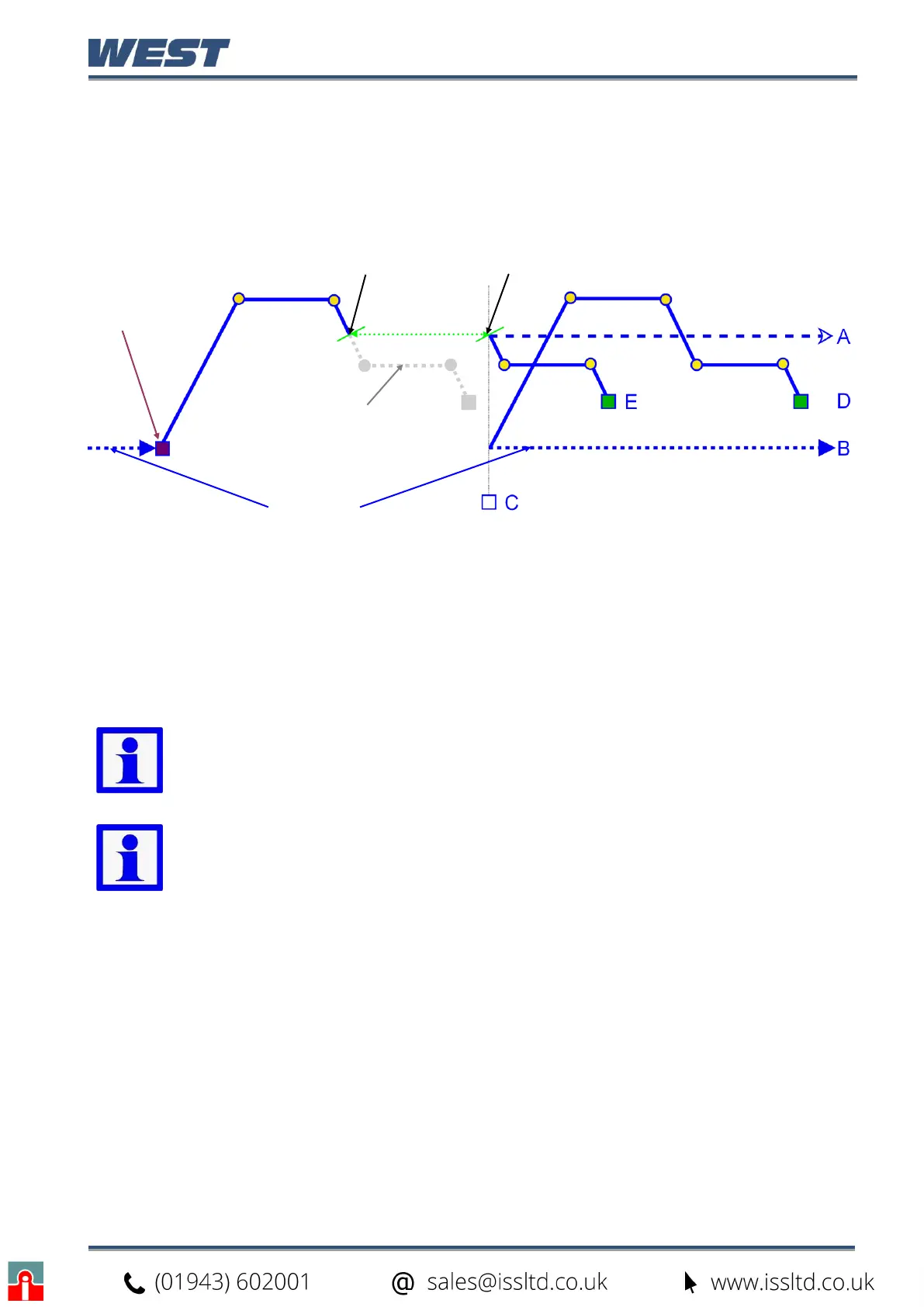
Power/Signal Lost Recovery Actions
If the power is cut or the input signal is lost while a profile is running, the instrument will use
the defined Profile Recovery Method once the signal / power returns. The profile recovery
method is set in the profile header.
The possible profile recovery options are explained below.
Possible Recovery Methods:
See
note
below
A
End the profile and maintain the setpoint value(s) from the time the power failed.
B End the profile and use Controller Setpoint value(s).
C
End the profile with the Control outputs off - setpoint value replaced by “OFF”.
D Restart the profile again from the beginning.
E Continue profile from the point it had reached when the power failed
Figure 55. End, Abort and Recovery Actions
Note: Recorder versions always use option E (Continue profile) if the “off time” is
less than the Profile Recovery Time setting. If the “off time” is longer, the defined
Profile Recovery Method is used.
Note: With option E, after the power returns profile bar graph resets and shows
the remaining/elapsed time for the profile only since re-starting.
Controller SP
Run
(Start-on SP)
Power / input returns
= Control Off
Planned Profile
Off Time


 To Next Page