Pro-EC44 2-Loop Graphical Profile Controller & Recorder
Pro-EC44 Product Manual - 59540-2 September 2014 Page 76
Soft Digital Inputs
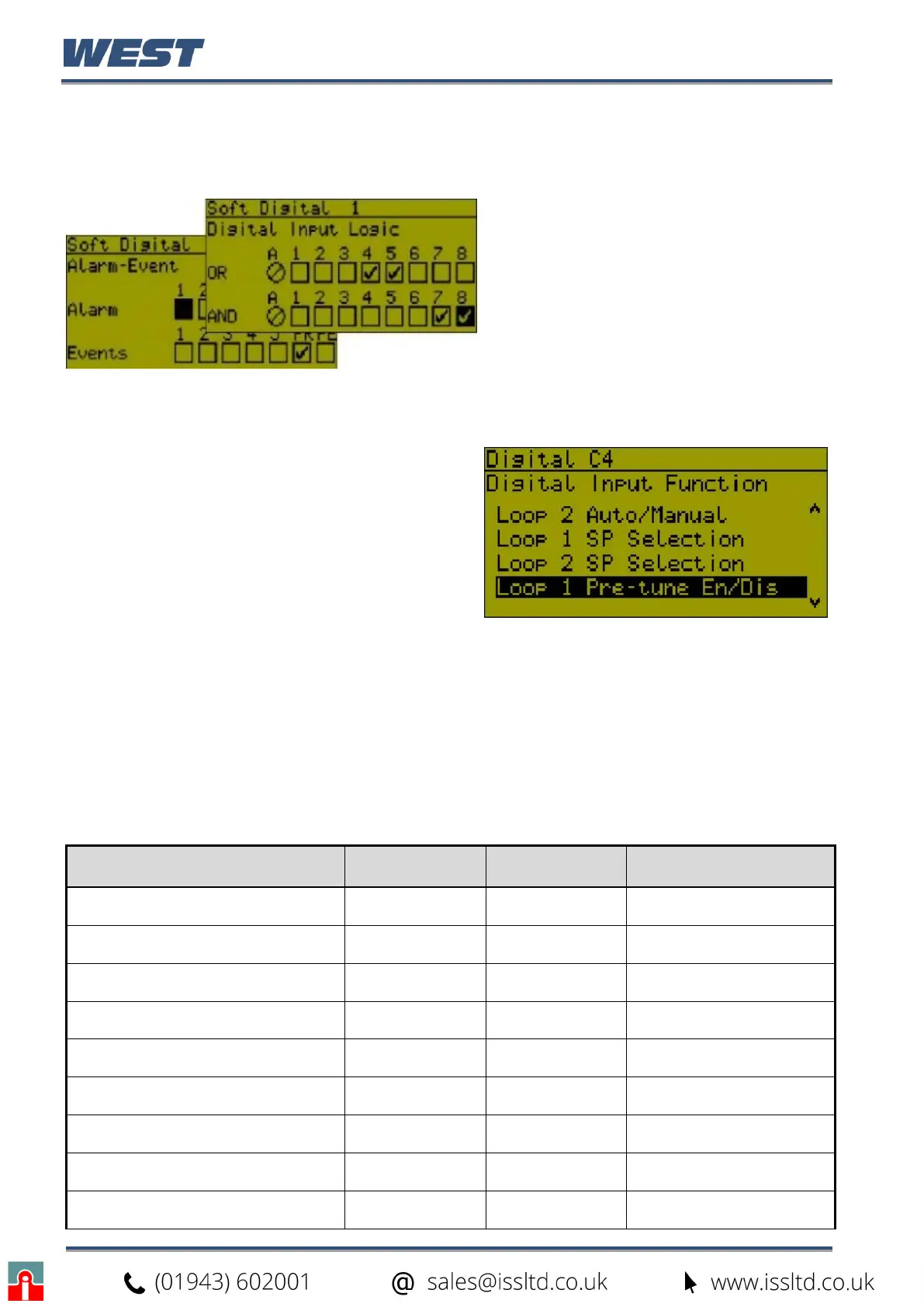
In addition to the physical digital inputs, four “soft” digital inputs are available. They are used
to select functions in the same way as the physical inputs.
The four soft digital inputs can be
configured by combining physical inputs,
alarms & events using Boolean logic.
Input AND selections are then globally
OR’d with the input OR selections, the
alarms & the events. By using the invert
inputs function, NAND & NOR
equivalents can be created.
Digital Input Functions
Some or all of inputs C1 to C7 can be used for
profile selection. If used in this way they cannot
be used for any other functions.
Soft inputs and any physical digital inputs not
allocated for profile selection can be used to
change the instrument status.
Each input can only perform a single function.
The possible functions are listed below.
Single Functions
Digital inputs can often work in parallel with equivalent menus, where either can change
function status.
In the table below, █ = Level Sensitive: Where a High or low signal sets the function status.
┌ ┐
= Edge Sensitive: High-Low or Low-High transition changes the function status.
Pre-Tune is always off at power on (except if auto pre-tune is in use), and profile recovery is
as configured, but others functions retain their power off status when the power returns.
Function Logic High*
Logic Low* Sensitivity / Functions’
Power On State
Loop 1 Control Select Enabled Disabled
┌ ┐
/ Retained
Loop 2 Control Select Enabled Disabled
┌ ┐
/ Retained
Loop 1 Auto/Manual Select Automatic Manual
┌ ┐
/ Retained
Loop 2 Auto/Manual Select Automatic Manual
┌ ┐
/ Retained
Loop 1 Setpoint Select Main SP Alternate SP
┌ ┐
/ Retained
Loop 2 Setpoint Select Main SP Alternate SP
┌ ┐
/ Retained
Loop 1 Pre-Tune Select Stop Run
┌ ┐
/ OFF
Loop 2 Pre-Tune Select Stop Run
┌ ┐
/ OFF
Loop 1 Self-Tune Select Stop Run
┌ ┐
/ Retained


 To Next Page