User Guide
1. Overview
1.11 LEDs
Number LED Name Color Behavior
6 Ethernet
Connector
Speed
Green/
Amber
Off – Operating at 10 Mbps
Green Solid – Operating at 100 Mbps
Amber Solid – Operating at 1Gpbs
7 Ethernet
Connectors
Link/Activity
Green Off – No Connection
Solid – Connected
Blink – Activity
1.11.2
IOM LEDs
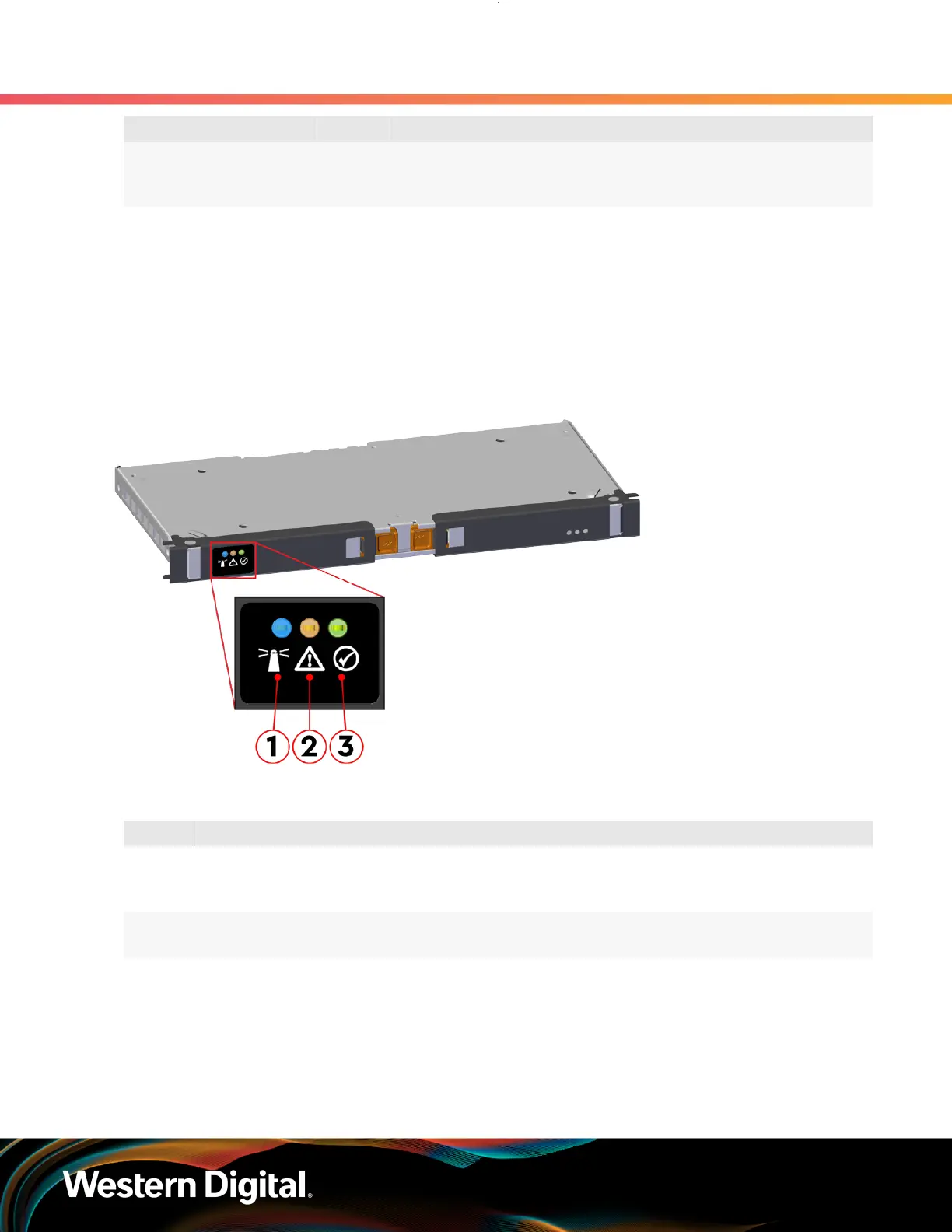
The IOM has three LEDs, one each for power, fault, and identification.
Figure 8: IOM LEDs Location
Table 10: IOM LEDs Identification
Number LED Name Color Behavior
1 IOM Identification Blue Blink @ 0.5 Hz (75% duty cycle) – Blinks only when IOM
Identification has been activated
Off - Not being identified
2 IOM Fault Amber Blink @ 0.5 Hz (75% duty cycle) – IOM has Fault
Off - IOM is functioning normally
3 IOM Power Green Solid – IOM is on
Off – IOM is off
1.11.3
IOM Fan LED
The IOM Fan has a single LED with three distinct states for fault condition, identification, and power off.
11















 To Next Page