User Guide
2. Components
2.9 2.5in SSD Assembly
2.9
2.5in SSD Assembly
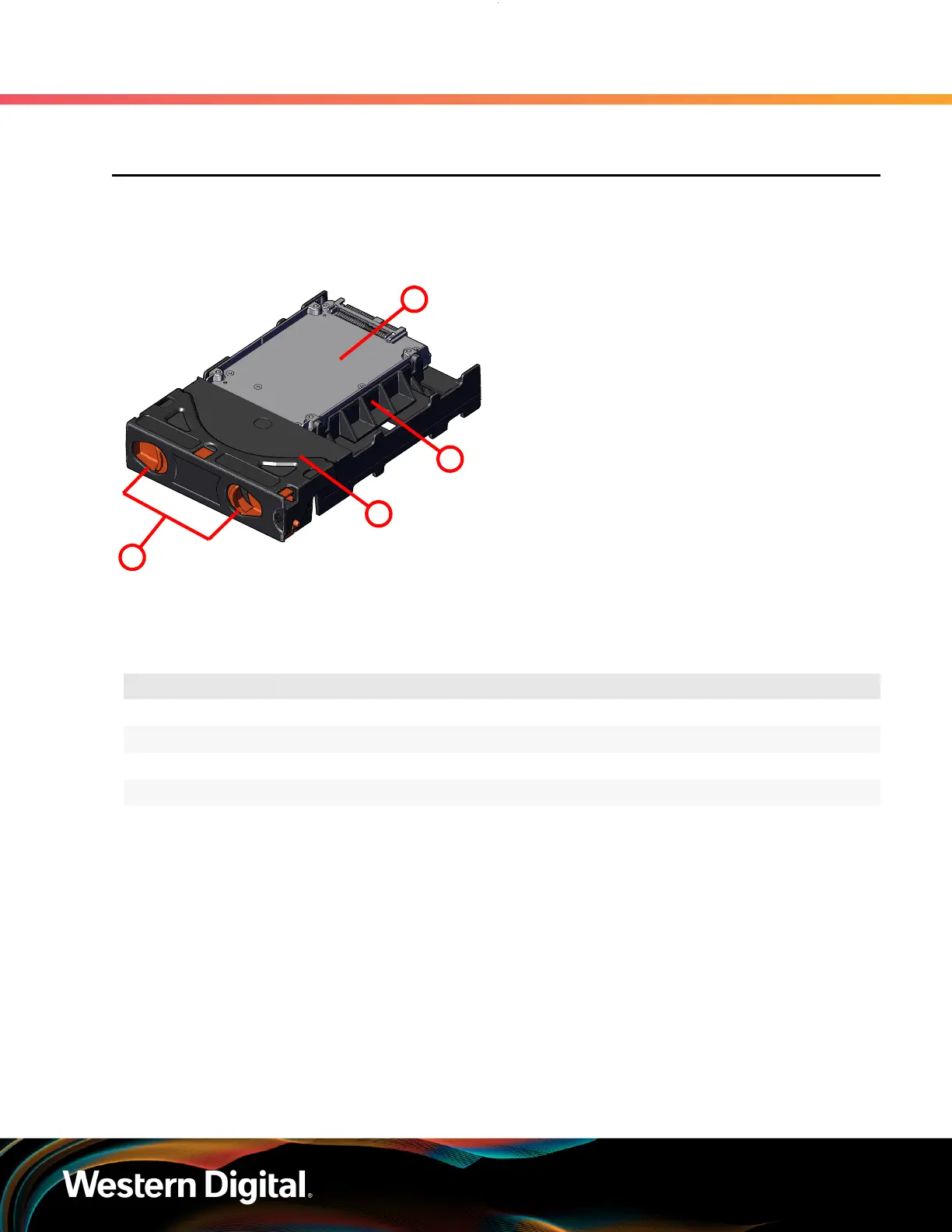
Figure 34: 2.5in SSD Assembly Component
Locations
The 2.5in SSD Assembly is used to adapt a 2.5" form
factor SSD to the 3.5" drive slots in the Ultrastar
Data60 drive bays. This allows the enclosure to
accommodate high speed SSD drives as its primary
data storage medium. The carrier operates by
utilizing an innovative clamping mechanism. The 2.5"
drive is seated in the orientation shown the overview
image. Then the clamp is inserted to apply pressure
to the SSD and secure it in place.
Table 44: 2.5in SSD Assembly Component Descriptions
Number Feature
1 Drive Holder Clamp
2 SSD
3 Carrier Shell
4 Drive Latch Release
2.9.1
Operating the 2.5" Drive Carrier
Follow these steps to operate the clamping mechanism and install a 2.5" drive in the carrier.
Step 1 : Locate the release clips on the rear and press them inward to release the clamp.
55















 To Next Page