page 3 – 4
IP-12/IP-16 / Dec 2014
IP-12 CONTROLS AND FUNCTIONS
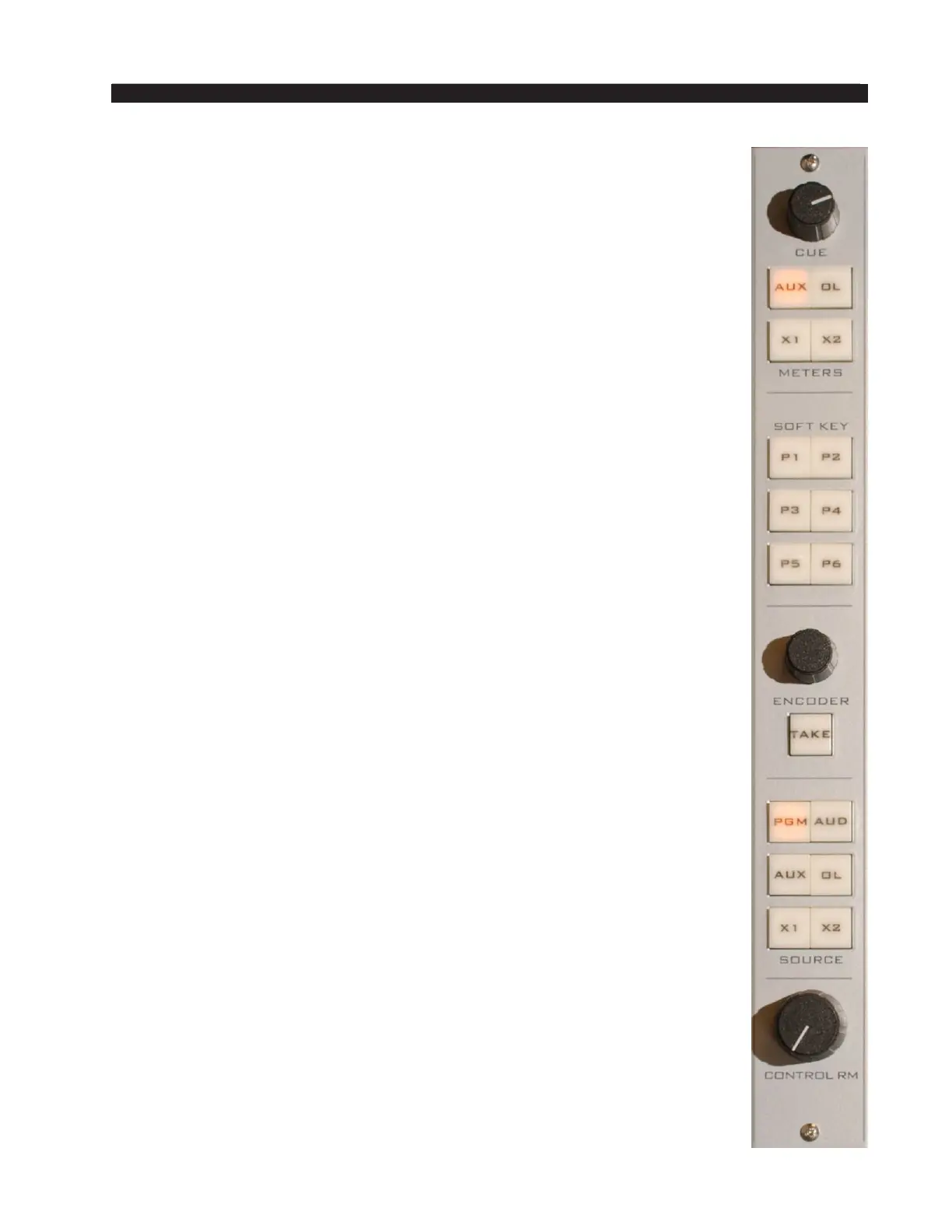
Control Room Module (CR-12)
This is the console operator’s monitor that allows the operator to listen to
the console’s four stereo outputs and two external stereo line level inputs. This
module includes the cue level control, switched meter selection, programmable
buttons (soft keys), the source select encoder and take button, and source
select and level control for the control room and headphone outputs.
In a typical radio application the console is located in the Control Room.
Speakers in the Control Room allow the console operator to listen to the con-
sole bus outputs to be assured that the console is performing as desired. These
speakers are fed by a stereo signal from the console’s Control Room output.
In addition to the Control Room output, the operator may also desire to listen
to specic isolated faders via the cue system and the console’s internal cue
speaker. Thus, the control room monitor consists of the above mentioned level
controls, along with four source select (PGM, AUD, AUX and OL) buttons, as
well as two programmable X1 and X2 buttons. In some instances the console
operator may also be performing talent whose voice will be heard over the
radio. The operator’s microphone may thus provide a part of the signal that
is going out over the air. If that signal is the one being monitored with the
Control Room speakers, there is the potential for feedback. The amplied
signal from the Control Room speakers is picked up by the microphone and
amplied to a new, higher, level, which then is once again picked up by the
microphone. The signal quickly rises to an ear-splitting screech. To prevent
this, the operator’s microphone is normally set to MUTE the Control Room
output to prevent the occurrence of feedback.
The master CUE circuit drives a meterbridge-mounted speaker through a
built-in power amp, and can be programmed to interrupt the control room feed.
CUE Level Control
The CUE master level control is located at the top of the module.
The CUE level control determines the overall loudness of the cue signal
as it appears in the console’s cue speaker (located behind the grill in the
METERBRIDGE).
Like the Control Room speakers, the cue speaker also has the potential
for feedback. To avoid this situation, operator mics that mute the Control
Room can also be set to mute the cue speaker.
NOTE: If cue is muted and you turn the level control all the way up, then
remove the condition that has the cue muted, the sound in the cue speaker
will suddenly be VERY LOUD!
SOFT KEY Buttons
These six switches and indicating LEDs are designed to perform
user-programmable functions. These functions, such as ring Salvos,
making temporary connections, or interfacing with the logic input and output
ports on system Logic I/O cards, must be congured through the optional
WheatNet-IP Navigator GUI program. See the WheatNet‑IP Audio Over IP
Network manual for details.



 To Next Page