WIKA operating instructions, model CEP6000
MM/YYYY country code based on 10/2014 GB/CN
GB
F1
HOME
7
F2 F3
89CE
E
N
T
E
R
4
1
MEASURE / SOURCE
3W
mA+
TC
V
mA
Loop
+
V
Hz
–
+
–
5
2
0
6
3
.
4W
mA–
MEASURE
–
CEP6000
Ω
1
2
3
4
6
8
7
5
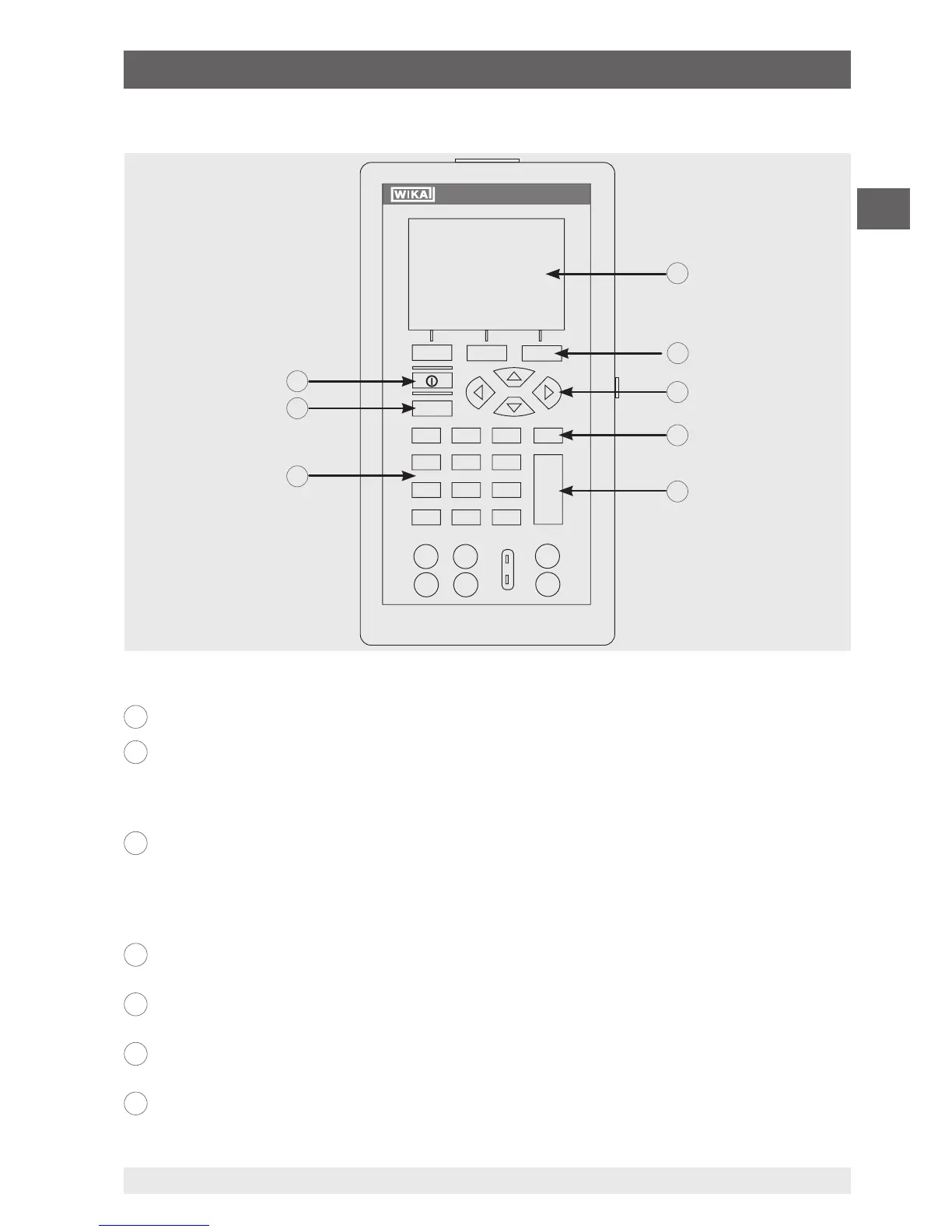
4.1.2 Key function
1
Display
2
Function keys, used to operate the menu bar at the bottom of the calibrator display
The [F1] key acts to select the options in the left-hand box, the [F2] key acts for the selection of
the functions in the middle box and the [F3] key for the selection of the functions in the right-
hand box.
3
Modification of individual digits of the output value; increase, decrease or ramp output
value
Use the left and right arrow buttons to select which digit in the output value should be changed.
With the up and down arrow keys, the output value can be increased, decreased or changed to
a ramp form.
4
Clear the input value
The last numerical value input will be deleted.
5
ENTER
Confirms the input of numerical values.
6
Numeric keys
Used for the input of numerical values.
7
HOME, returns to main menu
Reverts back to the start menu on the menu bar.
4. Design and function


 To Next Page