2
3
4
7
6
5
1
6.1 Main display
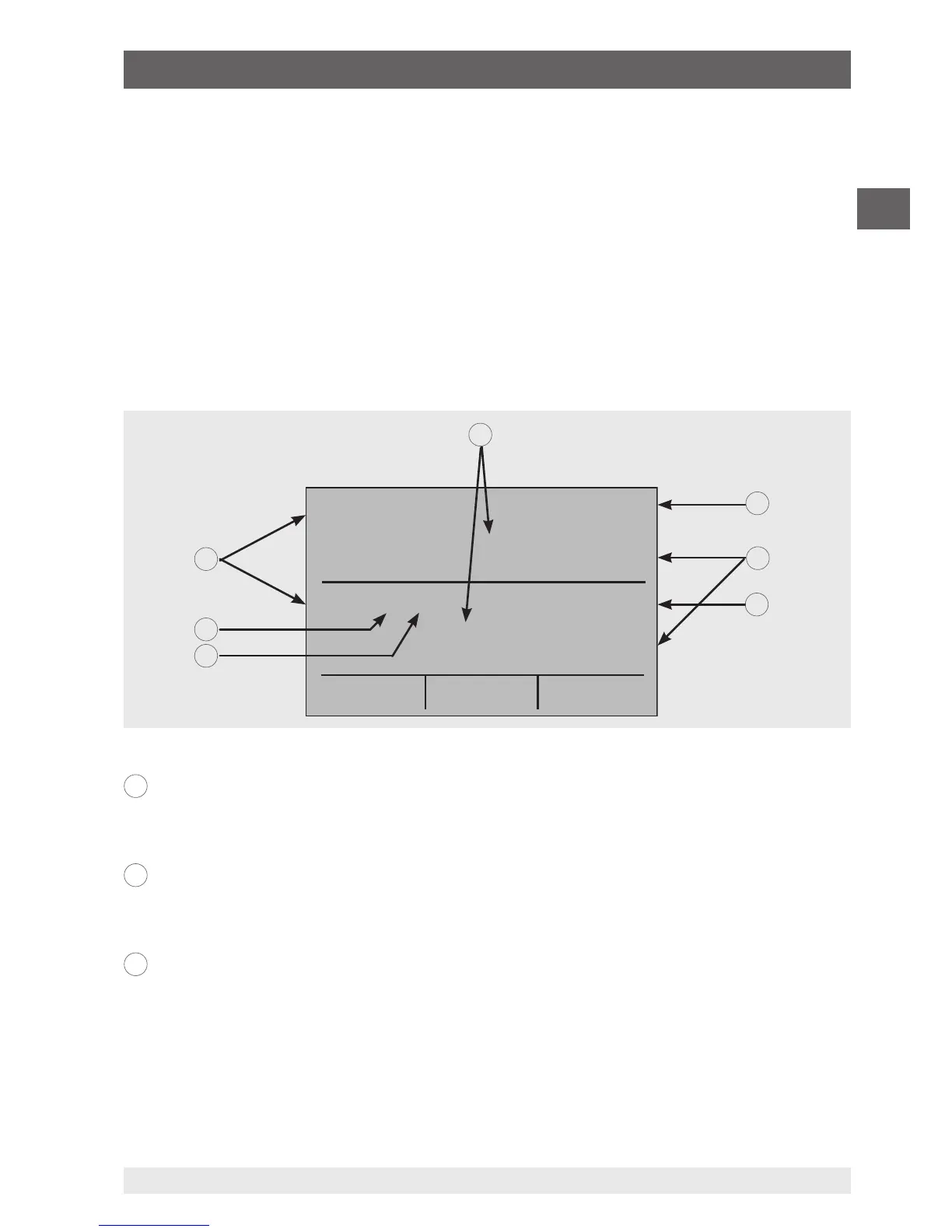
The display of the multi-function calibrator is subdivided into 3 main sections: the upper
display, the lower display and the menu bar.
■
The upper display is used for the measurement of direct current voltages, direct
current (with or without loop voltage) and for pressure measurement.
■
The lower display can be used both for measurement and for simulation.
■
The menu bar (at the bottom of the display) serves for configuration of the upper and
lower display (according to the desired function).
The following figure shows the location of the various display fields, which are described
in the table.
Numeric display
Displays the numeric value of the measured or simulated signals.
A measurement “OL” or “-OL” signals a value outside of the measuring range.
Display of the span
Only for the display “mA” and “mA LOOP”.
Displays the current measured value with respect to 4 mA = 0 % and 20 mA = 100 %.
Units
Displays the corresponding unit for measurement or output/simulation.
For “RTD” (resistance thermometer) and “TC” (thermocouple), °C or °F are offered; for
“FREQ” (frequency) and “PULSE” (pulse), CPM, Hz or kHz.
1
2
3
6. Commissioning, operation


 To Next Page