MEASURE / SOURCE
3W
mA+
TC
V
mA
Loop
+
V
Hz
–
+
4W
mA–
MEASURE
–
Ω
Calibrating a TC temperature transmitter
To calibrate TC temperature transmitters, follow the steps below:
1. In the main menu, switch to the upper display “UPPER” and select “mA LOOP”.
2. In the main menu, switch to the lower display “LOWER” and select “TC”.
3. The input/output setting must be set to “OUT”.
4. Set the end values 0 % and 100 % with the keypad and the [0 %] and [100 %] keys
(also see chapter 6.5.1 “Setting the output parameters 0 % and 100 %”).
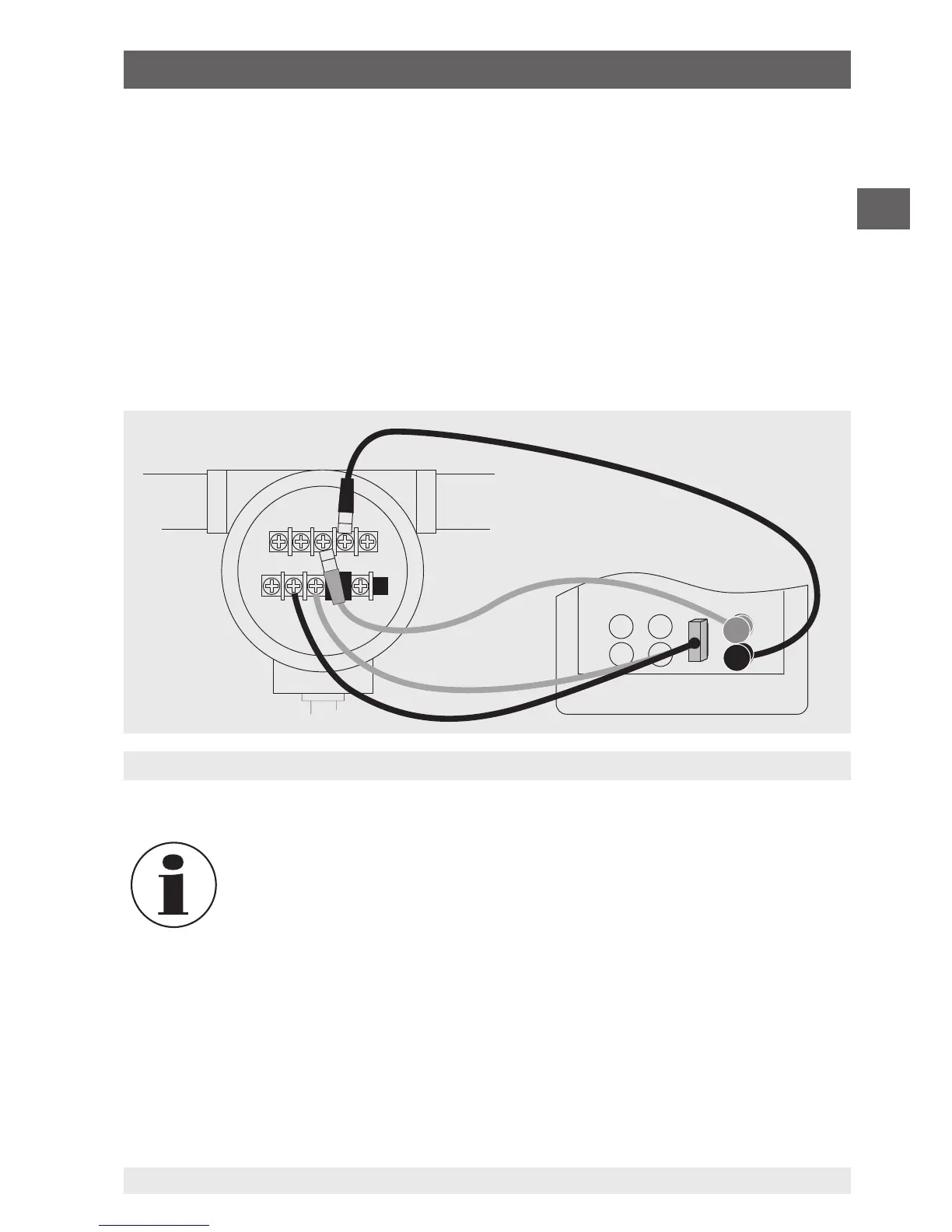
5. Connect the calibrator with the TC output to the TC input of the transmitter. In addition,
connect the calibrator, using its mA input, to the mA output of the transmitter (see
following figure).
6. Output a temperature value using the keypad or test 0-25-50-75-100 % using the 25 %
step function (25 % key).
To calibrate a different type transmitter, follow the steps above with the
exception of the selection of the lower display. Set the thermocouple with
the correct parameters for the transmitter.
6.7.4 Calibrating a pressure transmitter
To calibrate pressure transmitters, follow the steps below:
1. In the main menu, switch to the upper display “UPPER” and select “mA LOOP”.
2. In the main menu, switch to the lower display “LOWER” and select “PRESSURE”.
3. Connect the calibrator with the mA input to the mA output of the pressure transmitter.
In addition, connect the external pressure module with the pressure connection of the
6. Commissioning, operation


 To Next Page