F1
HOME
7
F2 F3
89CE
E
N
T
E
R
4
1
MEASURE / SOURCE
3W
mA+
TC
V
mA
Loop
+
V
Hz
–
+
–
5
2
0
6
3
.
4W
mA–
MEASURE
–
CEP6000
Ω
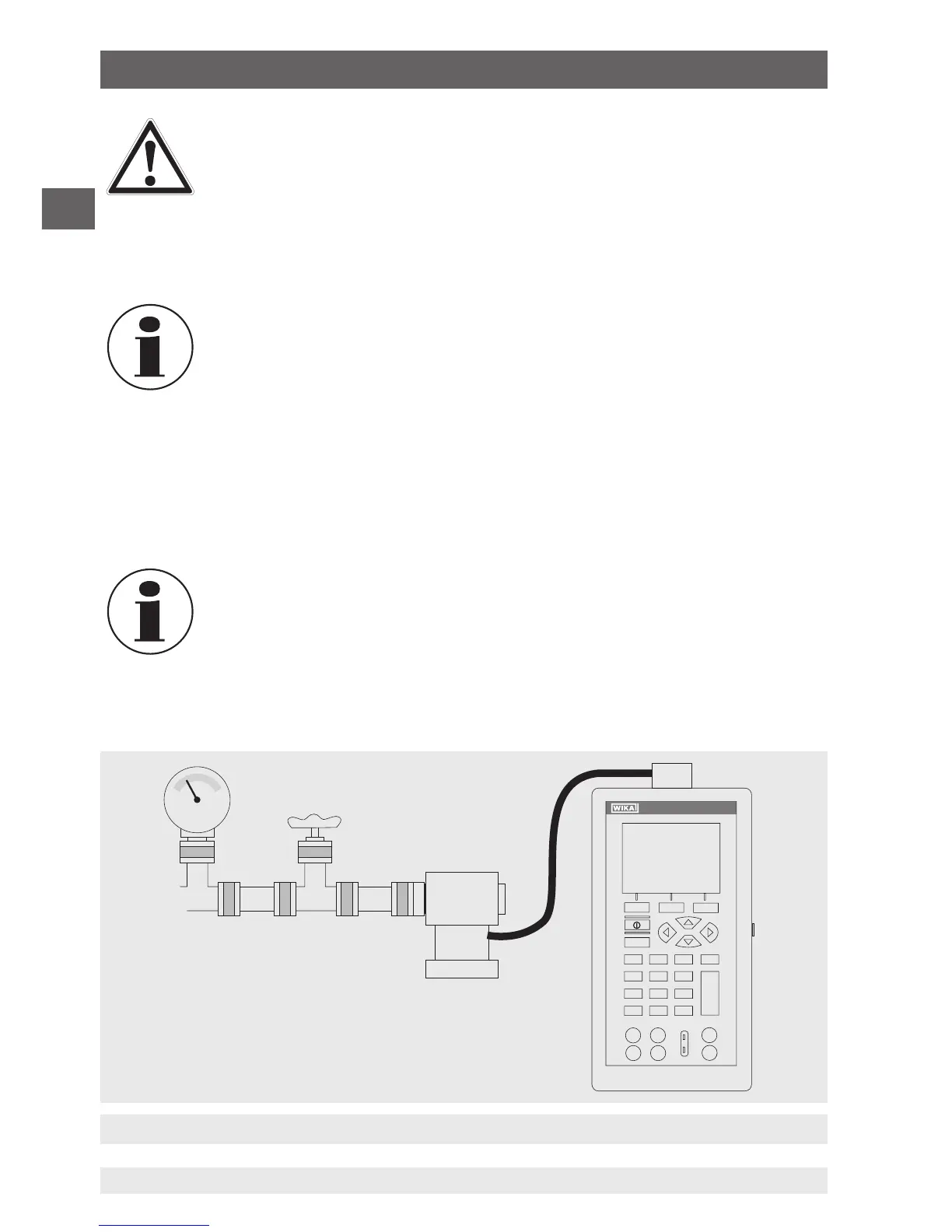
Connection for pressure measurement
Valve
Pressure
module
Pressure module
adapter
▶
Never exceed the permissible maximum pressure.
▶
Only use pressure modules with compatible media. See specification of
the pressure module.
To measure pressure with external pressure modules, follow the steps below:
1. Connect the pressure module to the calibrator using the pressure module adapter (see
following figure).
For the connection of the pressure module to the calibrator, a WIKA
pressure module adapter must be used.
2. From the main menu, switch to the upper or lower display as required. The calibrator
measures pressure in the upper as well as the lower display. In this way, pressure can
be measured on two different units at the same time.
3. As the primary parameter, select “PRESSURE”.
4. Select the desired unit of measure.
■
With high-pressure modules, technical units of measure that are only
used for low pressure ranges, such as inH
2
O, cmH
2
O, etc., are not
valid selections. If one of these units is selected with a high-pressure
module connected, “----” is shown on the display.
5. Set the pressure module to zero (ZERO). The function to reset the calibrator is found
under the menu function “ZERO”.
6. Commissioning, operation


 To Next Page