29
WPS-365-DVR-9CH & 16CH Installation and Users Manual
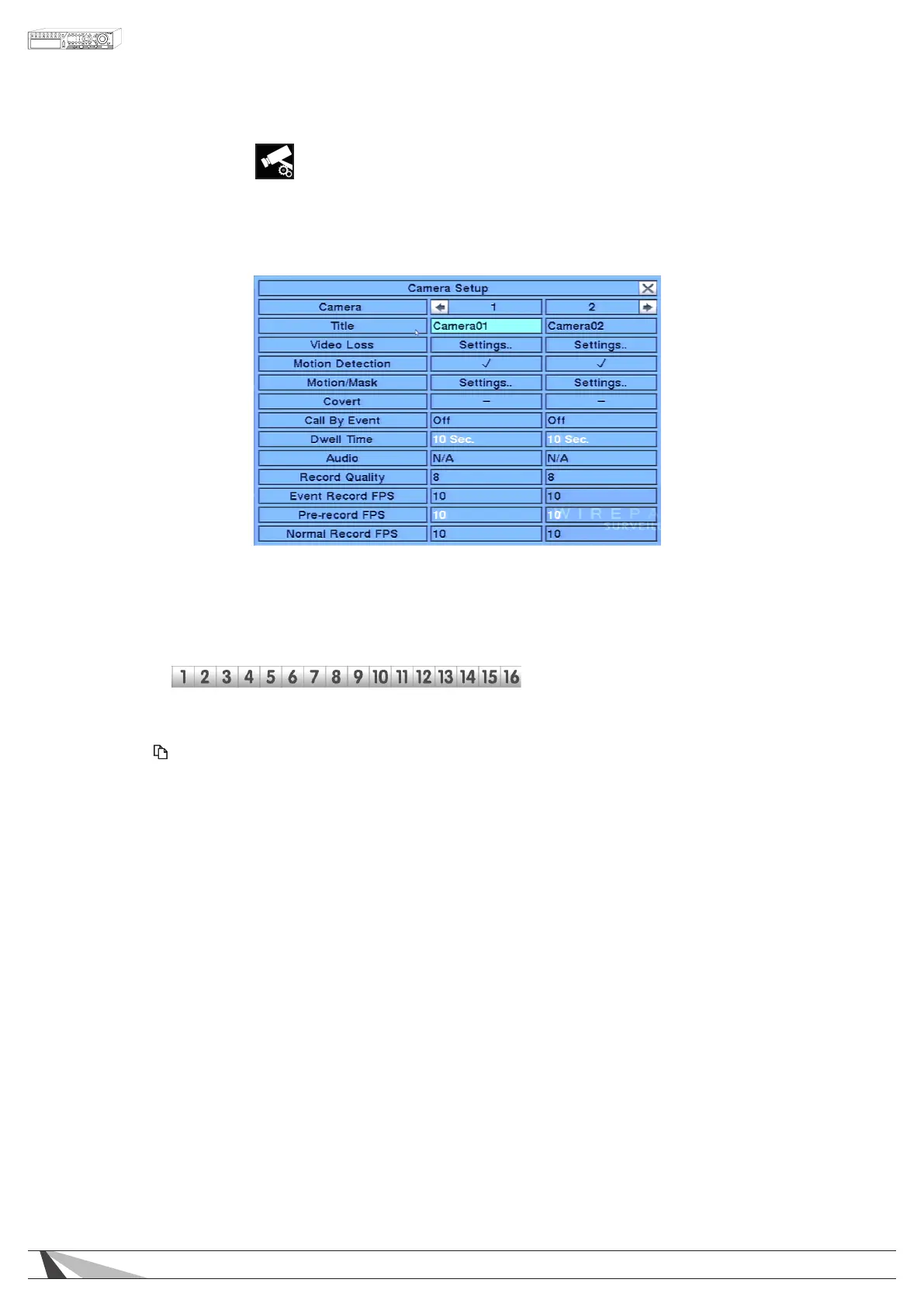
6.2. CAMERA SETUP
The Camera Setup menu allows the administrator to dene additional attributes for each camera.
In the Setup menu, press ▲▼◄► on the front panel of the DVR or on the remote to change the highlighted
option to Camera Setup, and then press ENTER to display the Camera Setup menu.
To navigate and operate this menu:
• ▲▼◄►
Press these buttons on the front panel of the DVR or remote control to select an item. Alternatively
use the mouse to select an item. The display will scroll left/right if a camera is not shown on the screen.
•NUMERIC
Press these buttons on the front panel of the DVR or remote control to change the camera. Alternatively
use the mouse to select the desired camera.
• COPY ( )
Press the COPY button on the front panel of the DVR or remote control to copy all the settings (excluding
Title, Video Loss, Motion Detection and Audio) - of the focus camera to all of the cameras.
•ESC
Press the ESC button on the front panel of the DVR or remote control to escape from this menu and
return to the main menu. Alternatively use the mouse to exit the sub menu by clicking on the “X.”
If the contents in this menu have been modied, a Save dialog box will be displayed requesting the
user to save the changes. Press ENTER on the front panel of the DVR or remote control to exit and save,
ESC to exit without saving. Another method to escape is to use the mouse to “right-click” and exit the
sub menu.
Thefollowingisabriefdescriptionforeachiteminthesubmenuanditsspecicoperations:
•CAMERA
Indicates selected camera.
•TITLE
Name each camera with a unique identifying name up to eight characters maximum. Follow
the Text Input method described in Section 4.1 to modify this item.
•VIDEOLOSSSETTINGS
Used to set specic actions when the DVR losses the video signal for the selected camera. Refer
to Section 6.2.1 for the details.
•MOTIONDETECTION
Enable or disable motion detection for the selected camera. Default setting enables this feature.
Note:ThishasnoeffectontheSmart Search function.



 To Next Page