Relio 4.2.x User Manual – 07/2015
Page 11
Head Office : Parc d’activites Kennedy - 20, avenue Neil Armstrong – 33700 Bordeaux-Merignac (France)
Tel +33 (0)5 57 928 928 – Fax +33 (0)5 57 928 929 – contact@worldcastsystems.com – www.worldcastsystems.com
3. RELIO QUICK START
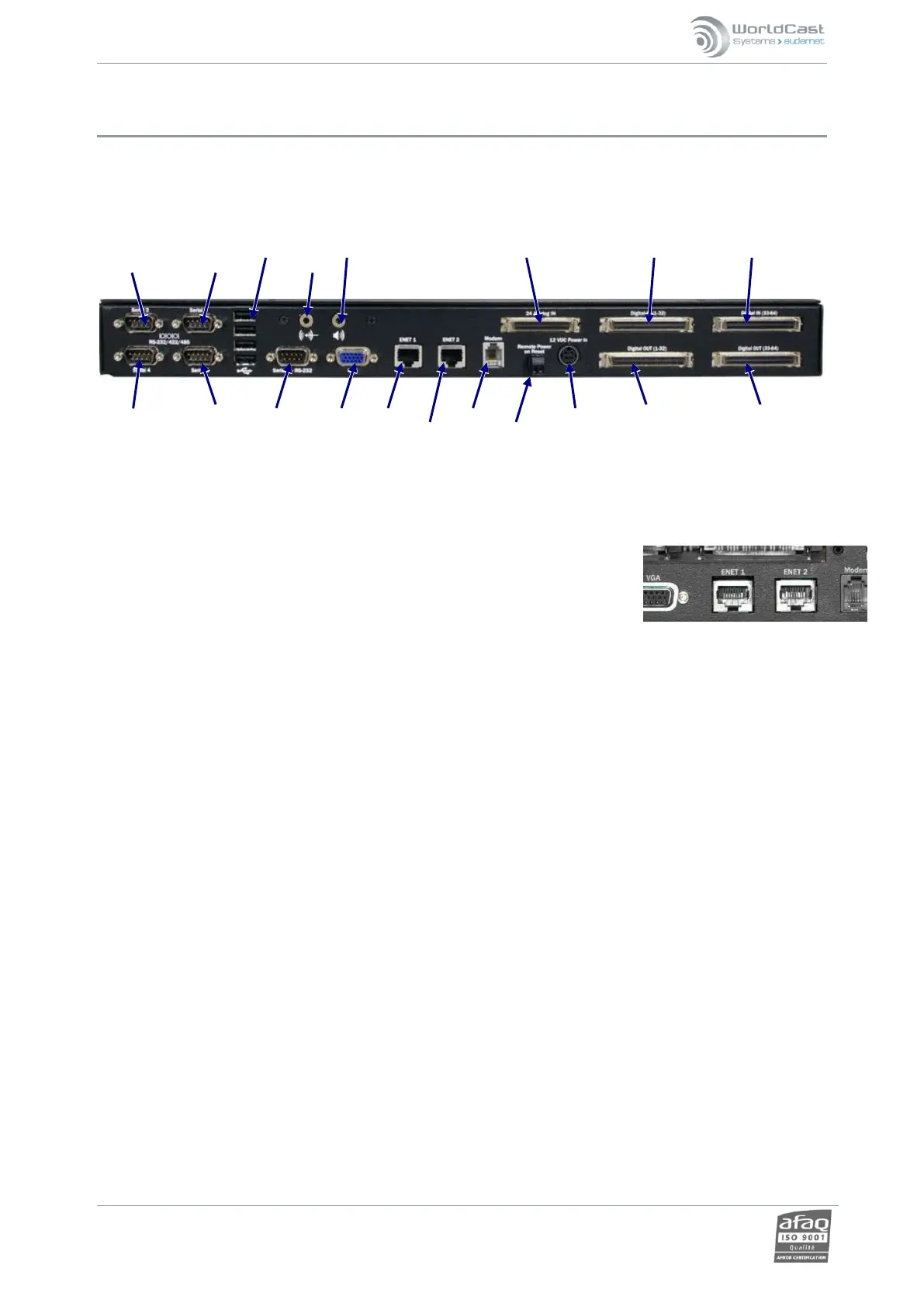
3.1. Connections
RS-232 USB Ports Audio output 24 Analog Inputs 32 Digital IN 32 Digital IN
Serial 2 Serial 3 Audio input
Serial 4 Serial 5 Serial 1 VGA ENET1 MODEM 12VDC 32 Digital OUT 32 Digital OUT
ENET2 Remote power input
reset
3.2. Configuring the IP connection
The primary Ethernet port is labeled ENE1. We recommend using the secondary Ethernet port labeled ENE2 for
initialization and maintenance.
Connect the RELIO to the AC power supply, Ethernet cable and breakout panels. It
should power up as soon as it is connected to AC power.
Open a Web browser (Google Chrome, Mozilla Firefox…) and enter the default IP address for the ENE2 port:
172.17.2.172 to open the unit’s embedded website. Default login is: Admin / admin.
Though the web application is compatible with most browsers, performances vary from one browser to
another. Below is a list of compatible browsers from the most performing to the less performing by operating
system:
Windows XP: Google Chrome / Mozilla Firefox
Windows Vista: Google Chrome / Mozilla Firefox
Windows 7: Google Chrome / Mozilla Firefox / Microsoft Internet Explorer 11
Windows 8: Google Chrome / Mozilla Firefox / Microsoft Internet Explorer 11
Mac (OSX 10.9): Google Chrome / Mozilla Firefox / Safari
Linux (2013): Google Chrome / Mozilla Firefox
iPad / iPhone (IOS 6.X, 7.0x): Apple Safari / Google Chrome
Android phone (4.4): Google Chrome / Mozilla Firefox
Connecting to the embedded web site can be done in http (standard mode) or https (secured mode). With
https, some browsers may display a message indicating that the connection is not certified. WorldCast
Systems cannot indeed certify your unit’s address; however, the connection is secured (data is encrypted) and
you may proceed to access it. Other browsers may block access to the site; you may then use an http
connection.
Open a Web browser (Google Chrome, Mozilla Firefox…) and enter the default IP address for the ENE2 port:
starting with the chosen protocol:
http://172.17.2.172 or https://172.17.2.172
Default Login and Password: “Admin” / “admin”.



 To Next Page