Relio 4.2.x User Manual – 07/2015
Page 42
Head Office : Parc d’activites Kennedy - 20, avenue Neil Armstrong – 33700 Bordeaux-Merignac (France)
Tel +33 (0)5 57 928 928 – Fax +33 (0)5 57 928 929 – contact@worldcastsystems.com – www.worldcastsystems.com
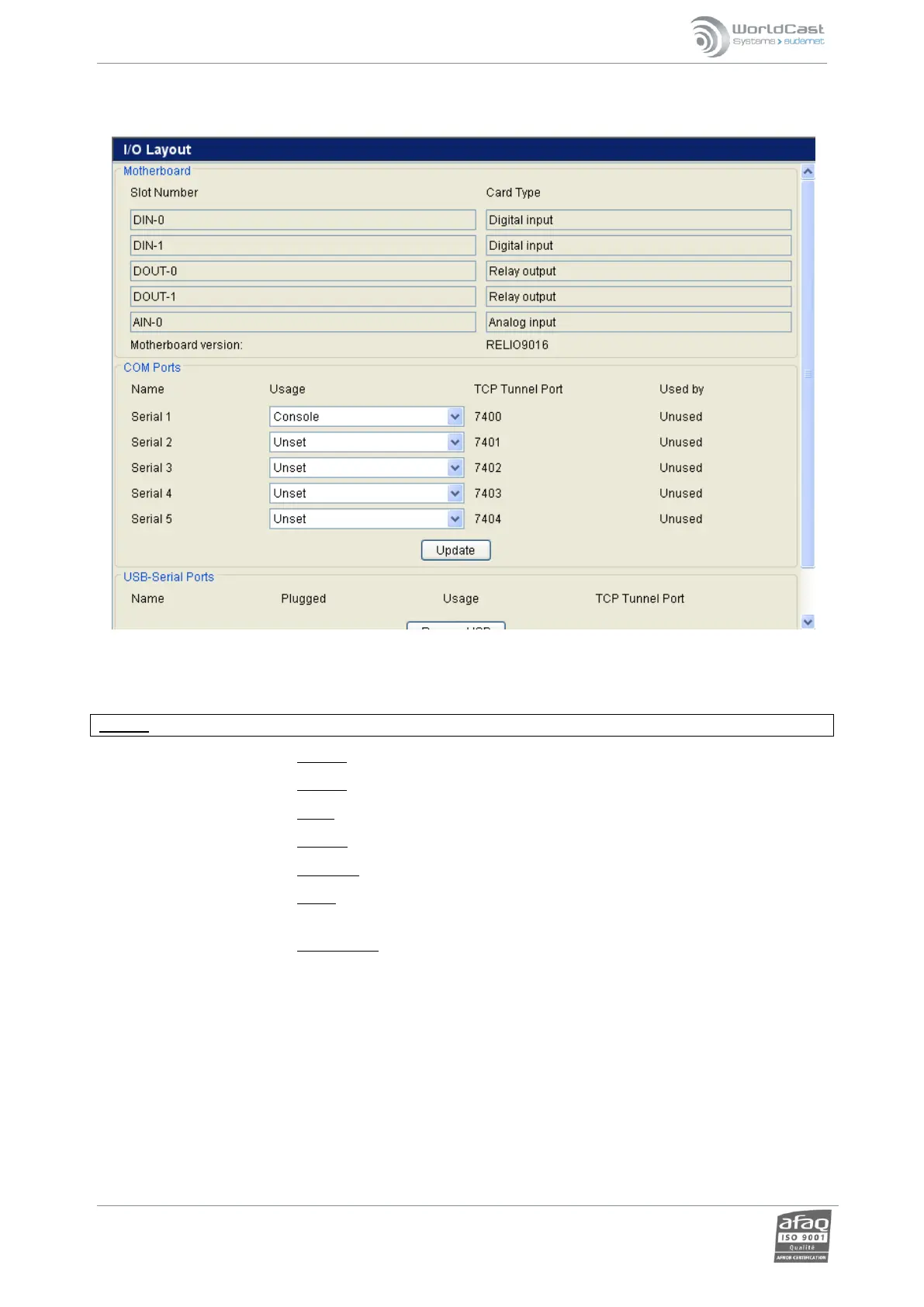
3.26. I/O Layout
Motherboard: the user can view the configuration of I/Os on the Relio. This can be useful in diagnosing a
hardware fault, if any should occur.
COM ports: Each of the 5 available COM ports can operate in several modes:
Caution: if you disable the console port, you will no longer have access to the terminal IP setup mode!
o Modem: configuration of serial port for an external modem (in development)
o Console: configuration for console communications
o Unset: serial port inactive.
o Support: reserved for WorldCast Systems, do not use.
o Tunneling: configuration of serial port for TCP tunneling to external equipment.
o Driver: to use a driver to communicate with external equipment (contact the sales
and support department for more information)..
o Driver debug: reserved for WorldCast Systems, do not use.
USB-Serial ports: This enables serial ports to be added dynamically. Contact WorldCast Systems to check
compatibilities.
Remember to click the ‘Update’ button in each section to lock in any changes.



 To Next Page