Relio 4.2.x User Manual – 07/2015
Page 34
Head Office : Parc d’activites Kennedy - 20, avenue Neil Armstrong – 33700 Bordeaux-Merignac (France)
Tel +33 (0)5 57 928 928 – Fax +33 (0)5 57 928 929 – contact@worldcastsystems.com – www.worldcastsystems.com
3.20. Webcam (option) / Audio Streaming
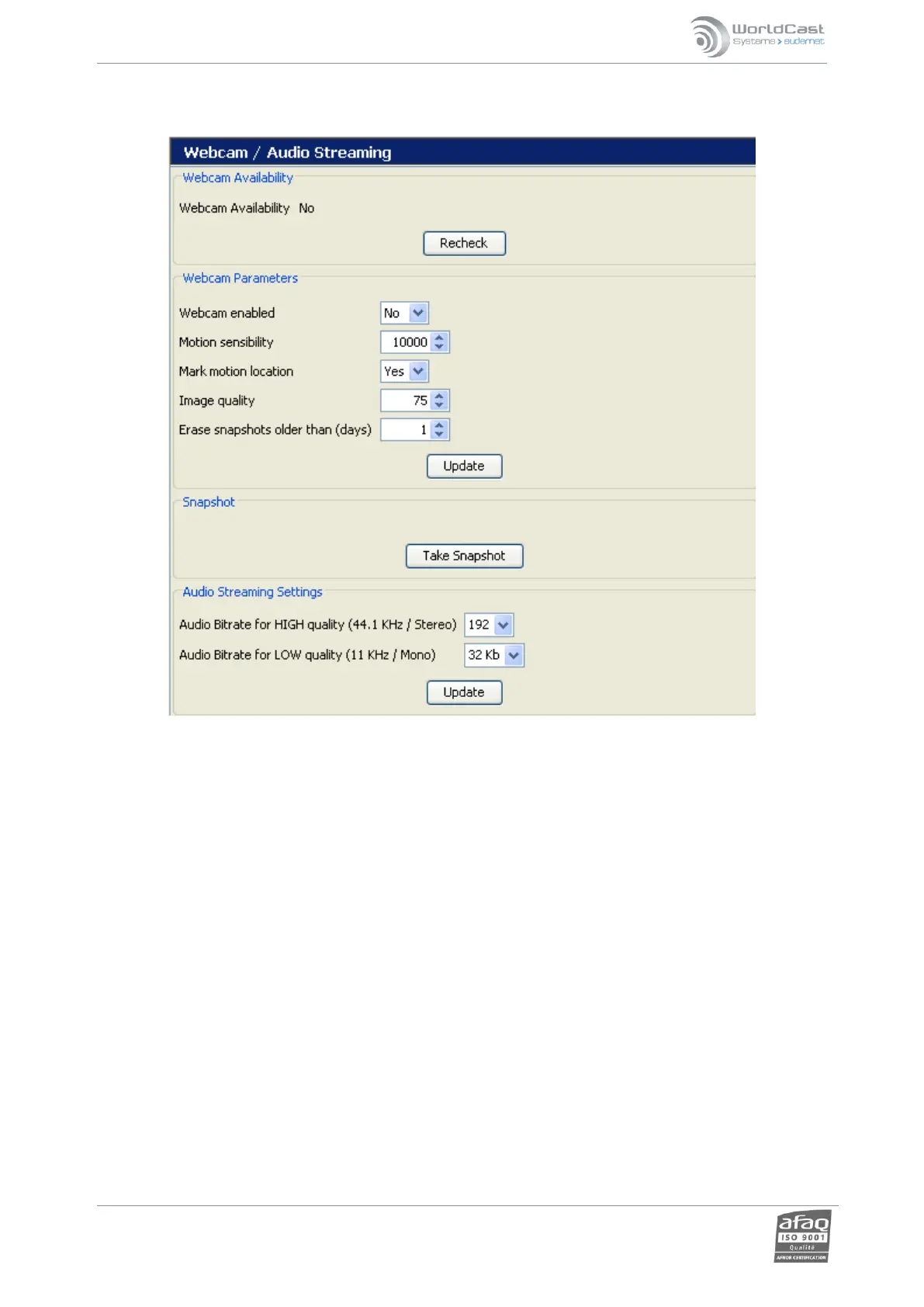
Webcam support is only available with webcams sold by WorldCast Systems. The webcam is detected on start-up;
however, detection can be forced with the “Recheck” button.
Options that can be configured are:
Webcam enabled: activates or deactivates the webcam support.
Motion sensitivity: sensitivity of the movement detection from 1000 to 32000 (“1000” is the highest
sensitivity).
Mark motion location: circles the zone where the movement has been detected with a red frame.
Image quality: from 50 to 100 (100 is the best quality).
Erase snapshots older than: automatically delete files older than ‘n’ days.
Images can be downloaded to a PC using any FTP client software (not provided by WorldCast Systems).
The FTP software requires the following information:
Relio IP address.
The “Recording” account user name and password (see ‘User’ page section 5.4).
For the audio streaming, set the encoding quality for high and low quality streaming depending on the network.



 To Next Page