73
XAG AUSTRALIA
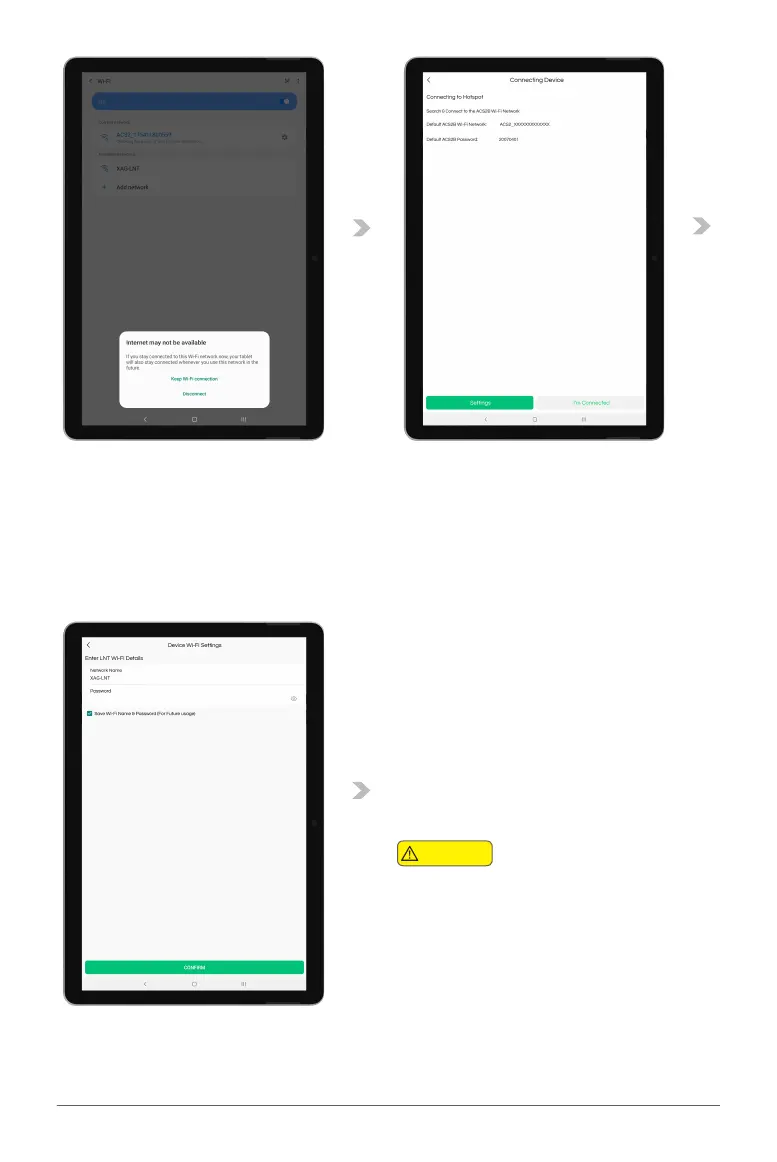
08. After connecting to the ACS2 Module Wi-Fi, Some Smart Device (Mobile / Tablet) may prompt
a Notification to stay connected to a Wi-Fi Network without internet connection. Please select
“Keep Wi-Fi connection”.
09. Return to the APP, and Tap on “I’m Connected” to access Equipment Network Settings”.
10. Enter the LNT Wi-Fi Network Name &
Password for the LNT (Local Network
Terminal), then save the settings via
“Confirm”.
Default LNT Wi-Fi Network:
XAG-XXXX
Default LNT Password:
20070401
Check & ensure the entered LNT Network Name
& Password is Correct, otherwise user will not be
able to add the device.
Warning



 To Next Page