Instrument operation
48
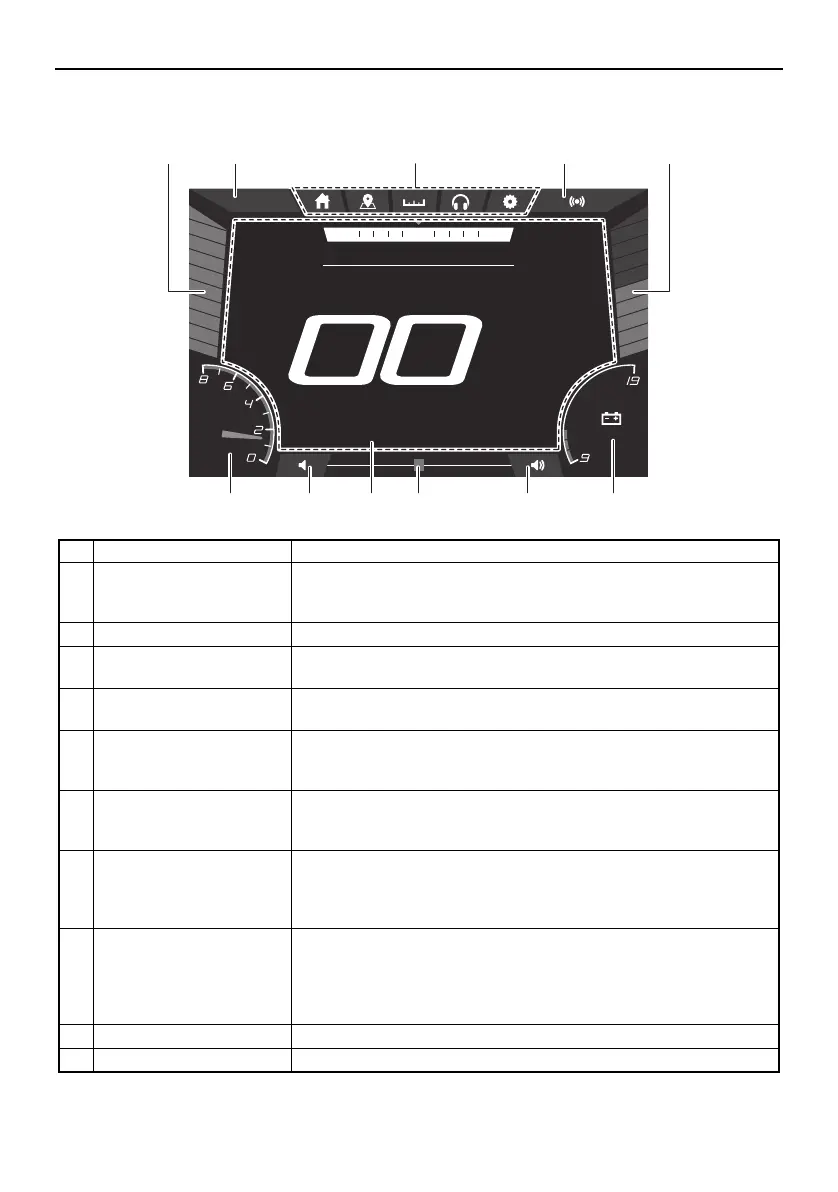
Multi-function display elements (195S)
Name Function
1 Fuel level bar graph Shows the amount of fuel remaining in the fuel tank. Depending on
the amount of remaining fuel, the color of the bar graph segments
changes.
2 Clock Shows the time. Tap the clock to set the time. (See page 58.)
3 Screen tab bar Shows the tabs for the various screens that can be shown on the
center display.
4 Warning mute button Mutes the sound of the buzzer for a specific time depending on
the warnings present.
5 Depth level bar graph Shows the water depth in feet or meters. Depending on the depth
alarm setting and detected water depth, the color of the bar graph
segments changes.
6 Battery voltage Shows the battery voltage in a bar graph format and numerical for-
mat. Depending on the battery voltage value, the color of the bar
graph segments changes.
7 Volume button Adjusts the volume level of the stereo system. Tap a button to in-
crease (right button) or decrease (left button) the volume by 1 lev-
el, and touch and hold the button to increase or decrease the
volume level continuously.
8 Volume slider Adjusts the volume level of the stereo system. To increase the vol-
ume level, drag the slider to the right. To decrease the volume lev-
el, drag the slider to the left.
If a system error occurs or a warning is activated, the volume slid-
er changes to the warning icon bar. (See the following section.)
9 Center display Shows various information for each screen tab.
10 Engine tachometer Displays the engine speed.
DEPTH
ft
.8
9
FUEL
%
100
am10:27
1350
RPM
NNW NE
SPEED
12.1V
MPH
13425
6789710
SportsBoat_F4V12.book Page 48 Thursday, June 4, 2020 5:17 PM
Downloaded from ManualsNet.com search engine




 To Next Page