Instrument operation
58
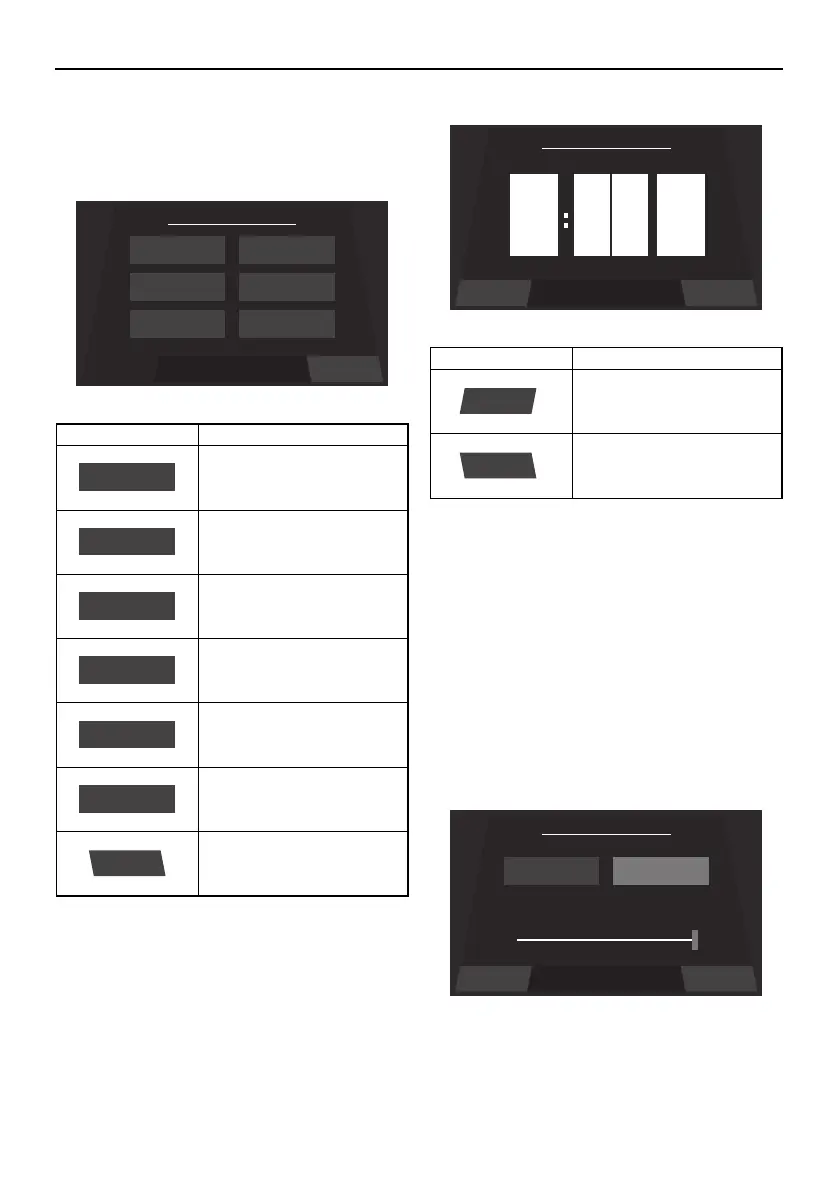
Setting screen
The setting screen can be used to change the
settings of the multi-function display unit.
Time setting screen
Tap the time unit that you want to set and
scroll up or down.
When “US unit” is selected, the time is dis-
played in the 12-hour format. When “Metric
Unit” is selected, the time is displayed in the
24-hour format.
Brightness setting screen
The multi-function display has a day mode
and a night mode.
The brightness can be set separately for the
day mode and for the night mode.
Item Function
Displays the time setting
screen.
Displays the depth alarm
setting screen.
Displays the unit setting
screen.
Displays the brightness
setting screen.
Displays the maintenance
setting screen.
Displays the language set-
ting screen.
Displays the factory reset
screen.
ResetSelect a Menu
Menu
Language
Brightness
Depth
Wellness
Unit
Time
Time
Unit
Brightness
Wellness
Language
Reset
Item Function
Saves the set time as the
current time and displays
the setting screen.
Displays the setting screen
without saving the set
time.
9
pm
0
0
Save
Back
Save Back
Set Brightness
Night Brightness Day Brightness
50% 100%
SportsBoat_F4V12.book Page 58 Thursday, June 4, 2020 5:17 PM
Downloaded from ManualsNet.com search engine






 To Next Page