Instrument operation
57
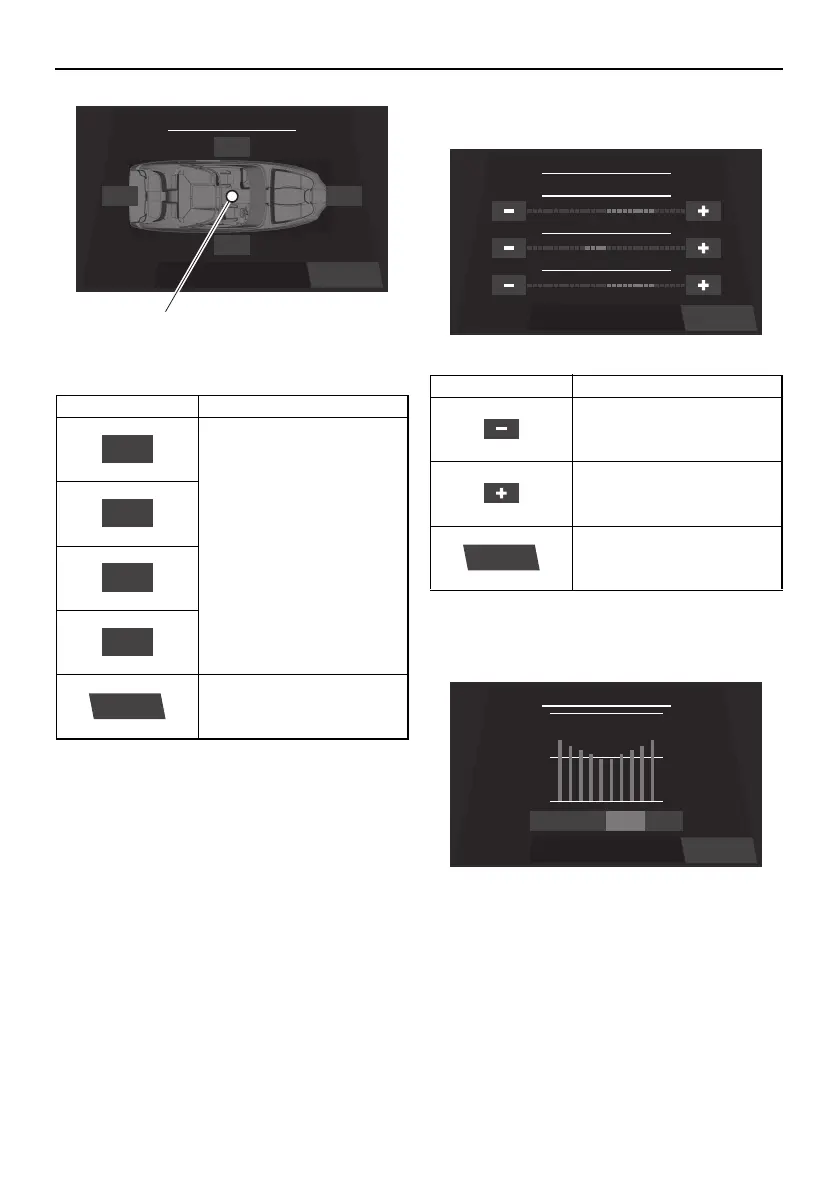
1 Blue dot
The settings can also be adjusted by drag-
ging the blue dot.
Bass / Mid / Treble setting screen
Equalizer setting screen
The 4 available modes are “Flat”, “Pop”,
“Rock”, and “Classic”.
Item Function
Increase the balance and
fader levels. Tap a button
to adjust the setting by 1
level, and touch and hold
the button to adjust the
setting continuously.
Displays the main audio
setting screen.
Balance / Fader
Left
Right
Rear Front
Back
1
Rear
Left
Right
Back
Item Function
Decreases the setting lev-
el.
Increases the setting level.
Displays the main audio
setting screen.
Back
Bass / Mid / Treble
+2
TREBLE
-1
MIDDLE
+2
BASS
Back
Back
Equalizer
PopFlat ClassicRock
SportsBoat_F4V12.book Page 57 Thursday, June 4, 2020 5:17 PM
Downloaded from ManualsNet.com search engine




 To Next Page