Instrument operation
56
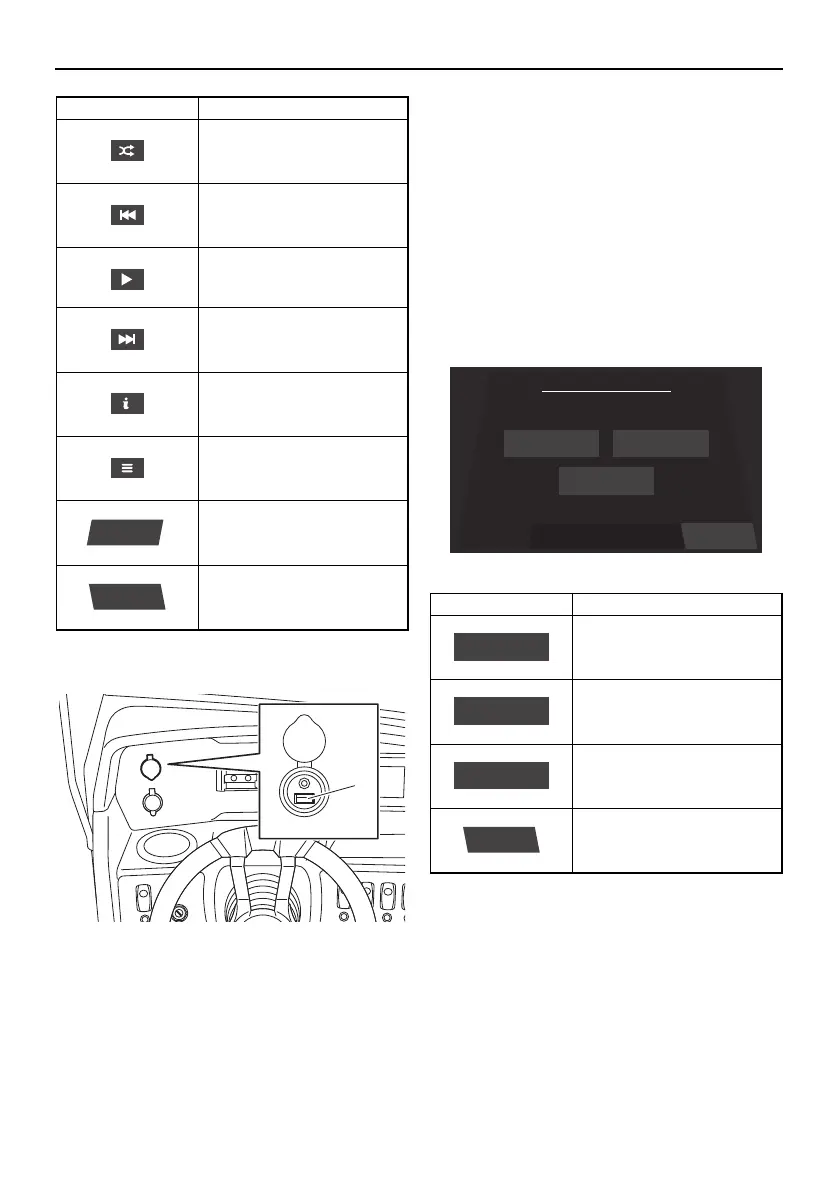
Location of the USB terminal
1 USB terminal
Open the cap and connect to the USB ter-
minal.
If an external device that is already paired
using Bluetooth is connected to the USB
terminal, the audio system may not operate
properly. When charging an external de-
vice, check that the external device is not
connected to the audio system using Blue-
tooth before connecting it to the USB ter-
minal.
Main audio setting screen
The settings of the audio system can be
changed.
Balance / Fader setting screen
The currently selected levels for the balance
and fader are indicated by a blue dot on the
illustration of the boat.
Shuffles the order in which
the audio tracks are played
back.
Selects the previous audio
track.
Pauses or resumes the
playback of the audio
track.
Selects the next audio
track.
Displays information about
the current audio track.
Displays the list of audio
tracks.
Displays the main audio
setting screen.
Displays the media screen.
Item Function
Settings
Source
Item Function
Displays the balance/fader
setting screen.
Displays the bass/mid/tre-
ble setting screen.
Displays the equalizer set-
ting screen.
Displays the media screen.
BackSelect a Setting
Media Setting
Balance/Fader Bass/Mid/Treble
Equalizer
Balance/Fader
Equalizer
Back
SportsBoat_F4V12.book Page 56 Thursday, June 4, 2020 5:17 PM
Downloaded from ManualsNet.com search engine




 To Next Page