Instrument operation
49
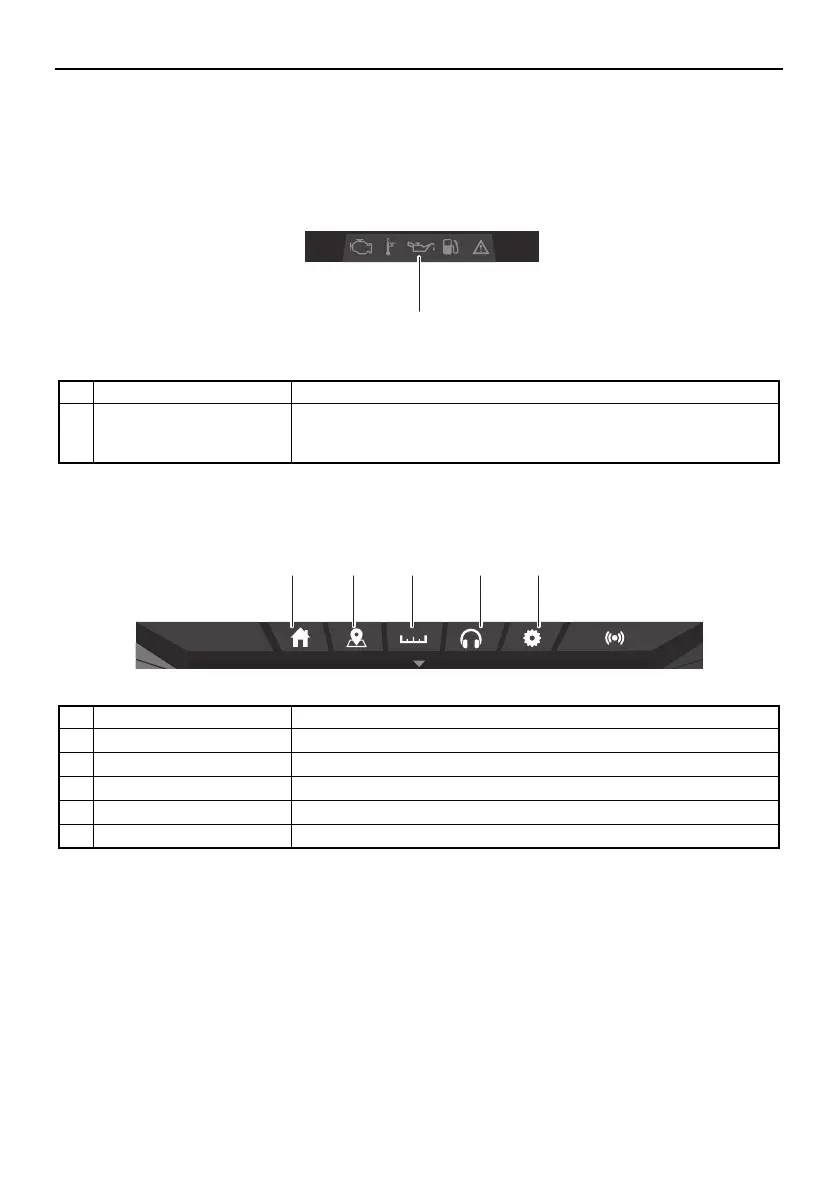
Warning icon bar
The warning icon bar is shown instead of the volume slider only when an error is detected or
a warning is activated.
Screen tab bar
Name Function
1 Warning icon bar Displays the warning icons.
When a warning icon is displayed, tap the icon to display the
warning message for that icon.
Name Function
1 Home screen tab Displays the home screen. (See page 50.)
2 Map screen tab Displays the map screen. (See page 50.)
3 Trip screen tab Displays the trip screen. (See page 51.)
4 Media screen tab Displays the media screen. (See page 52.)
5 Setting screen tab Displays the setting screen. (See page 58.)
1
am10:27
34215
SportsBoat_F4V12.book Page 49 Thursday, June 4, 2020 5:17 PM
Downloaded from ManualsNet.com search engine




 To Next Page