Instrument operation
53
The lock mark “ ” appears when the entire
audio system is turned off or an external de-
vice is not connected.
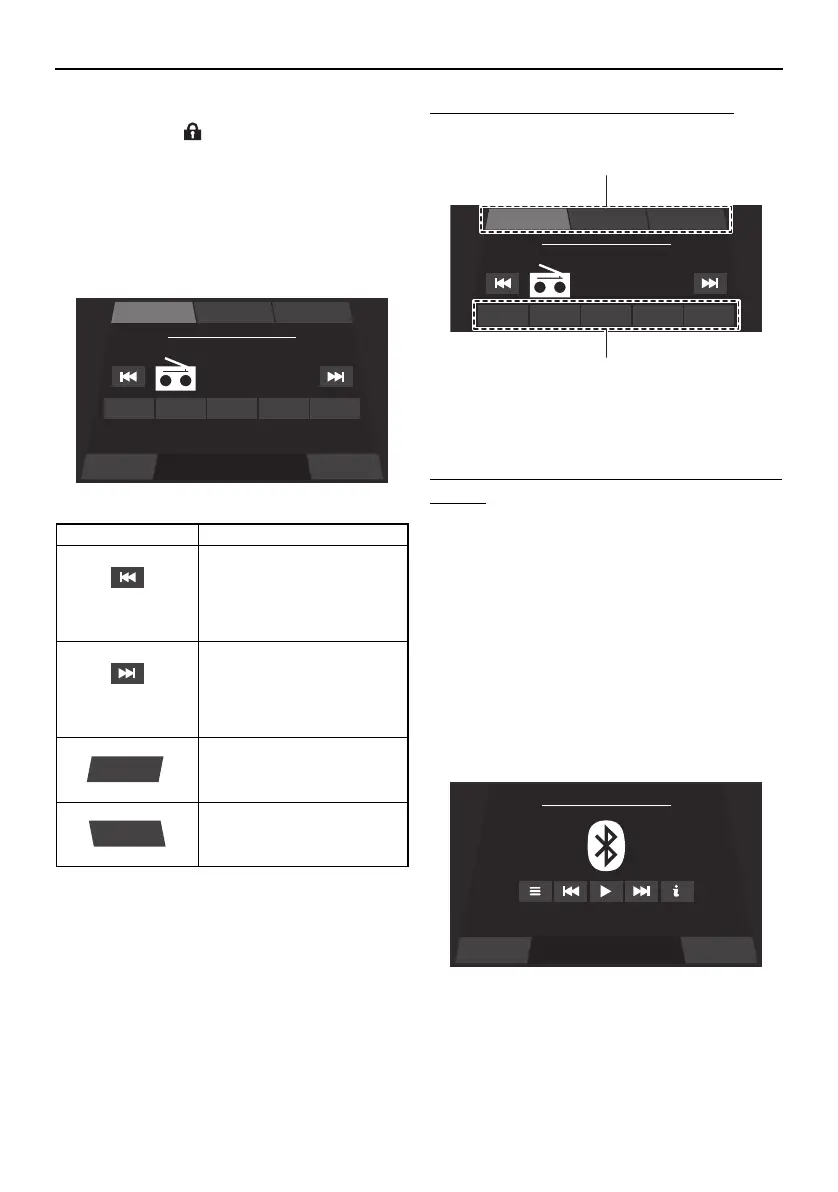
Radio screen (AM/FM)
You can receive a radio broadcast.
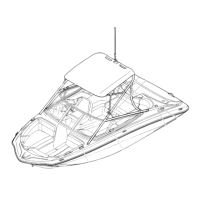
To change the radio station frequency:
Tap a preset list button or preset button.
1 Preset list button
2 Preset button
To save a radio station frequency to a preset
button:
Tune the radio to the desired radio station,
and then touch and hold the desired preset
button for 3 seconds.
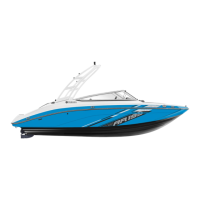
Bluetooth screen
Smartphones and other external devices that
are compatible with Bluetooth can be con-
nected wirelessly to the audio system to lis-
ten to the audio tracks stored on the devices
through the audio system’s speakers.
Item Function
Decreases the radio sta-
tion frequency. Touch and
hold this button to auto-
matically seek the next
available radio station.
Increases the radio station
frequency. Touch and hold
this button to automatically
seek the next available ra-
dio station.
Displays the main audio
setting screen.
Displays the media screen.
Settings Source
FM Radio
Playing
107.7
MHz
P1 107.7 P2 103.5 P3 103.1 P4 102.7 P5 107.7
FM-3FM-2FM-1
Settings
Source
FM Radio
Playing
107.7
MHz
P1 107.7 P2 103.5 P3 103.1 P4 102.7 P5 107.7
FM-3FM-2FM-1
Settings Source
Bluetooth - Connect Device ...
SportsBoat_F4V12.book Page 53 Thursday, June 4, 2020 5:17 PM
Downloaded from ManualsNet.com search engine




 To Next Page