Instrument operation
50
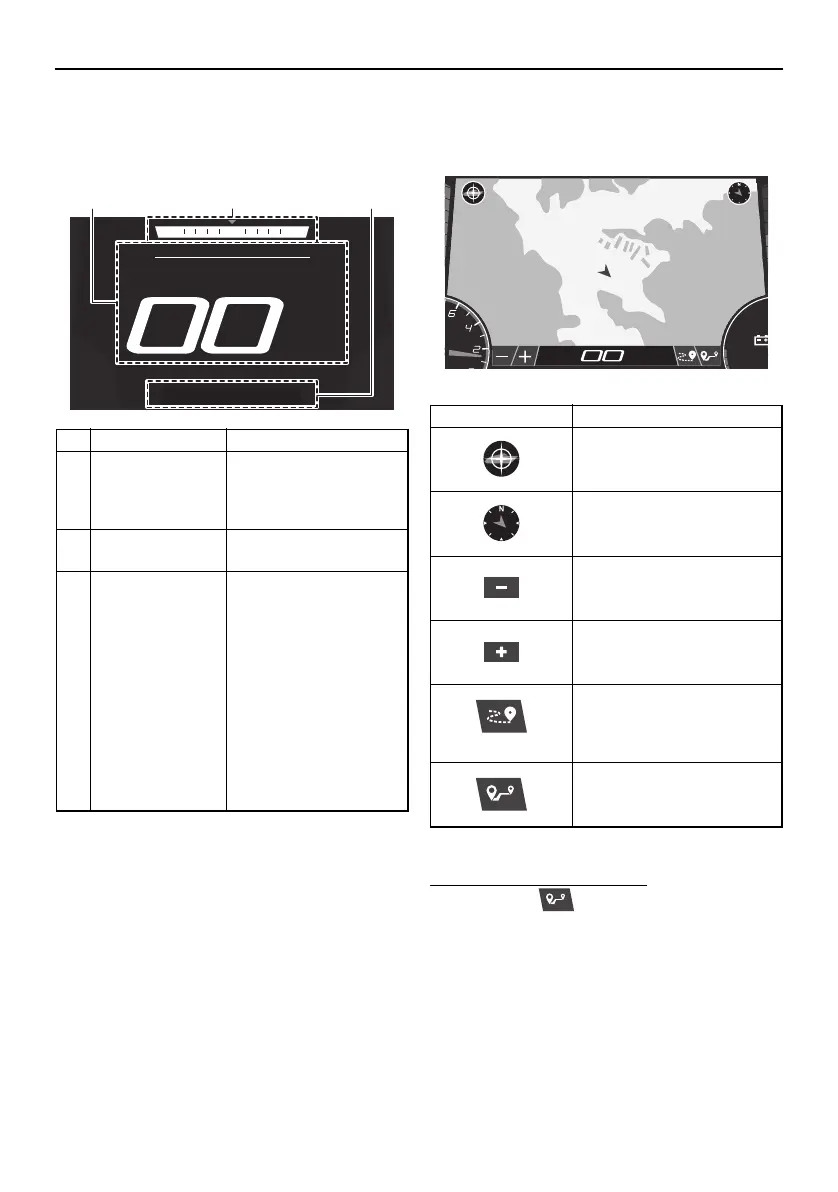
Home screen
This screen displays the boat speed, current
heading of the boat, and other information.
* Before the engine is started, the water tem-
perature will be displayed.
Map screen
This screen displays a map.
To use the waypoint marks:
(1) Tap the “ ” button.
(2) Tap the location of the desired waypoint
mark on the map.
Name Function
1 Boat speed* Displays the boat
speed in miles per
hour or kilometers per
hour.
2 Heading Displays the heading
of the boat.
3 Cruise assist /
no-wake mode
status indicator
Displays the operating
status of the cruise as-
sist and no-wake
mode.
When the cruise assist
is activated, “Cruise”
and the cruise assist
setting level will be dis-
played.
When the no-wake
mode is activated, “No
Wake” will be dis-
played.
Item Function
Re-centers the map on
your current location.
Displays the heading of the
boat.
Zooms out to display a
more distant view of the
map.
Zooms in to display a clos-
er view of the map.
Activates and deactivates
the tracking function that
displays the route your
boat has traveled.
Sets a waypoint mark.
RPM
MPH
12.1
SportsBoat_F4V12.book Page 50 Thursday, June 4, 2020 5:17 PM
Downloaded from ManualsNet.com search engine




 To Next Page