Basic Operation
46
DTX700 Owner’s Manual
Turning On the Click-Track
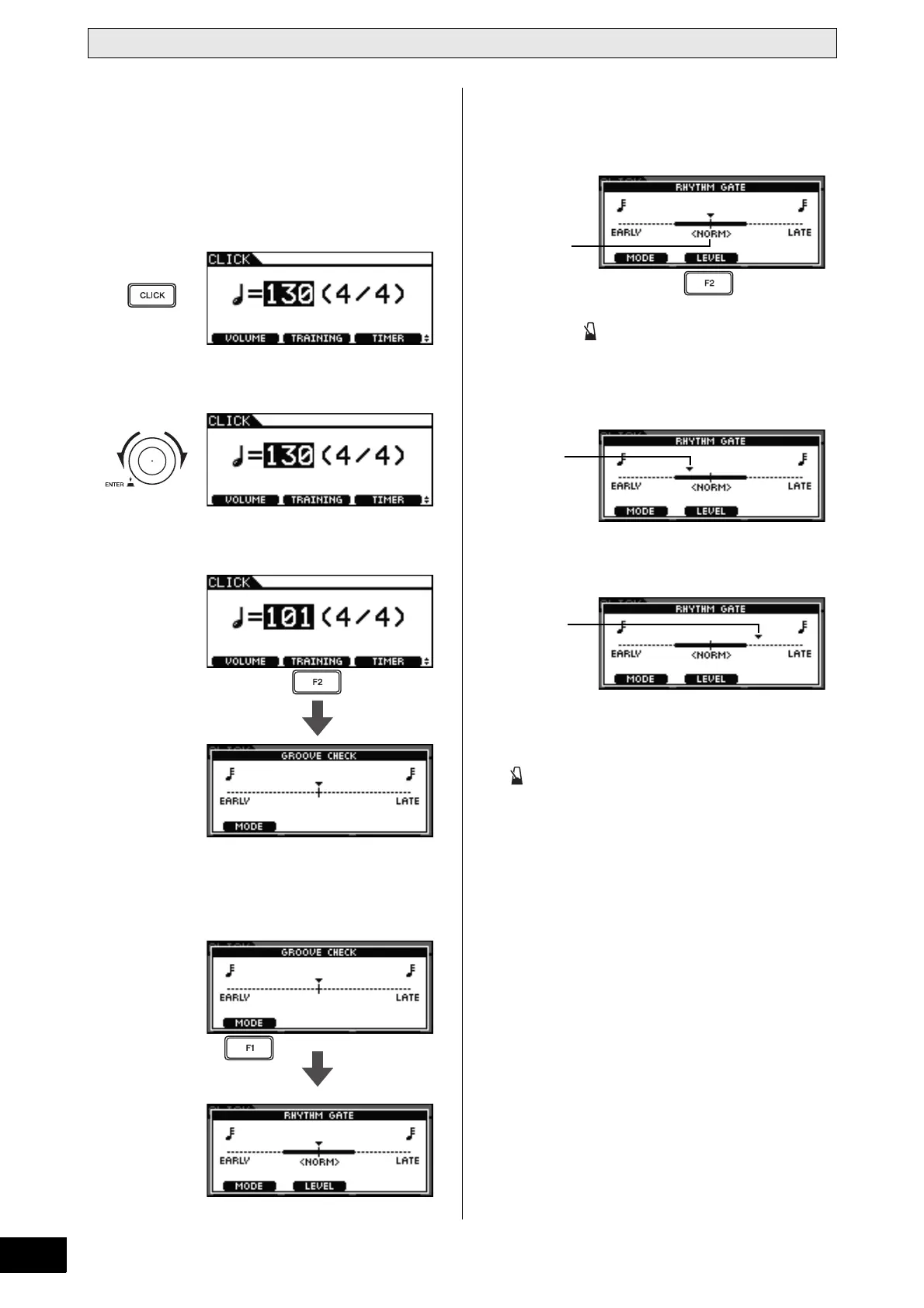
Rhythm Gate – Practice playing with per-
fect timing
The Rhythm Gate function only allows pads to produce a
sound if they are played at exactly the right time. With this
function, you can treat practice like a game, improving your
ability and having fun at the same time.
1 Press the [CLICK] button.
2 Turn the dial to set the practice tempo.
3 Press the [F2] button.
4 Press the [F1] button to access the Rhythm
Gate page. (You may need to press more than
once.)
5 Press the [F2] button to select a difficulty
level.
Three different levels are available – Easy, Normal, and Pro.
6 Press the [ ] button to start the click-track.
7 Play the pads along with the click-track.
Example of good timing
Example of poor timing
8 When you have finished practicing, press the
[ ] button once again.
The click-track will stop.
NOTE
•You can also use the Rhythm Gate function with your
DTX700’s built-in songs.
Press several times
if necessary.
Yo ur timing
A sound will be produced.
Yo ur timing
No sound will be produced



 To Next Page