PM5D/PM5D-RH Owner’s Manual Reference section 233
Information shown
in the display
Function
menu
Global
functions
Output
functions
Input
functions
Appendices
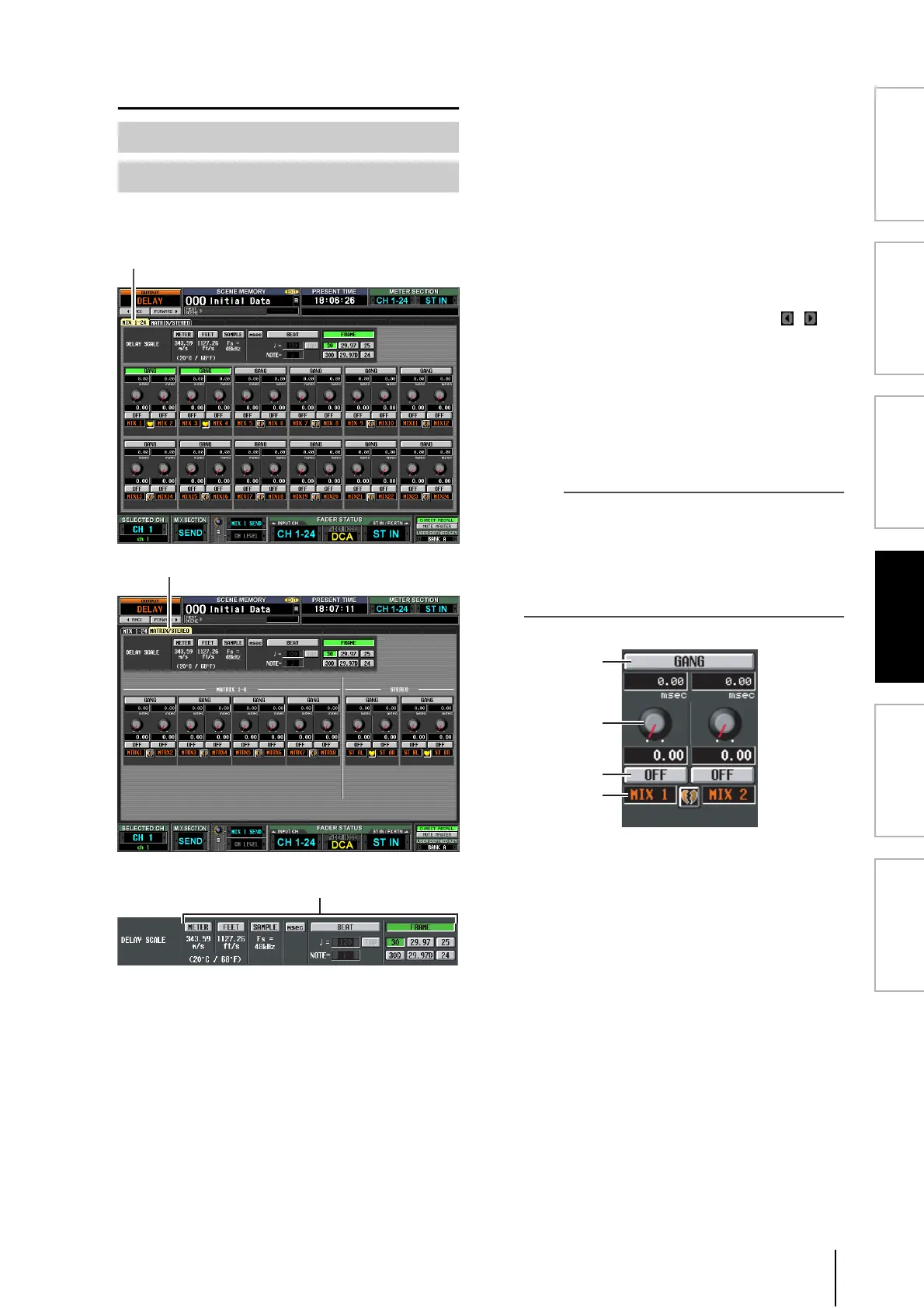
OUTPUT DELAY function
Here you can edit the delay parameters of the selected out-
put channel.
A DELAY SCALE
The unit you select here is used to indicate the delay
time in the box below the delay time knob (
3) and in
other screens. You can choose one of the following
units.
• METER
The distance in meters, calculated as the speed of
sound at an air temperature of 20°C (343.59 m/s) x the
delay time (seconds).
• FEET
The distance in feet, calculated as the speed of sound at
an air temperature of 20°C (68°F) (1127.26 feet/s) x
the delay time (seconds).
• SAMPLE
The delay time is shown as a number of samples. If you
change the sampling frequency at which the PM5D
operates, the number of samples will change
accordingly.
• msec (milliseconds)
The delay time is shown in units of milliseconds. If this
button is on, the boxes above and below the delay time
knob (
3) will show the same values.
• BEAT
The delay time is shown in units relative to the note
length (considered as 1.0) specified by the tempo
(BPM) and note value (NOTE).
To specify the tempo, you can either use the /
buttons located immediately below the BEAT button,
or repeatedly tap (click) the TAP button, or repeatedly
click a User Defined key that is assigned to [TAP
TEMPO]-[CURRENT PAGE].
• FRAME
The delay time is shown in units of frames.
Use the six buttons located below the FRAME button
to select the number of frames per second.
Hint
• If you change the DELAY SCALE setting of the OUTPUT
DELAY function screen, the DELAY SCALE setting of the
INPUT DELAY function screen will change in tandem.
• The TAP button of the OUTPUT DELAY function is indepen-
dent from the TAP TEMPO button of the internal effect.
• The number of frames per second is linked with the TIME
CODE SETUP field in the EVENT LIST screen (SCENE
function).
B GANG
This button specifies whether the delay parameters will
be linked for adjacent odd-numbered/even-numbered
channels. This can be specified independently of pair-
ing. If the GANG button is turned on for channels of
differing delay times, turning the delay time knob (
3)
will change the delay times of both channels while
maintaining the difference in their delay time.
C Delay time knob
This knob sets the delay time of each channel. The box
below the knob shows the delay time in the units you
selected in (
1). The box above the knob always shows
the delay time in millisecond units.
D DELAY ON/OFF
This button switches delay on/off. This is linked for
paired channels.
E Channel
This is the number of the channel you are editing. Two
paired channels are indicated by a heart symbol dis-
played between them. You can click this symbol to
enable/disable pairing.
MIX 1-24 screen
MATRIX/STEREO screen
MIX1-24
MATRIX/STEREO
2
3
4
5





 To Next Page