PM5D/PM5D-RH Owner’s Manual Operating section 91
11
Monitor and Cue
This chapter explains the PM5D’s Monitor and Cue functions.
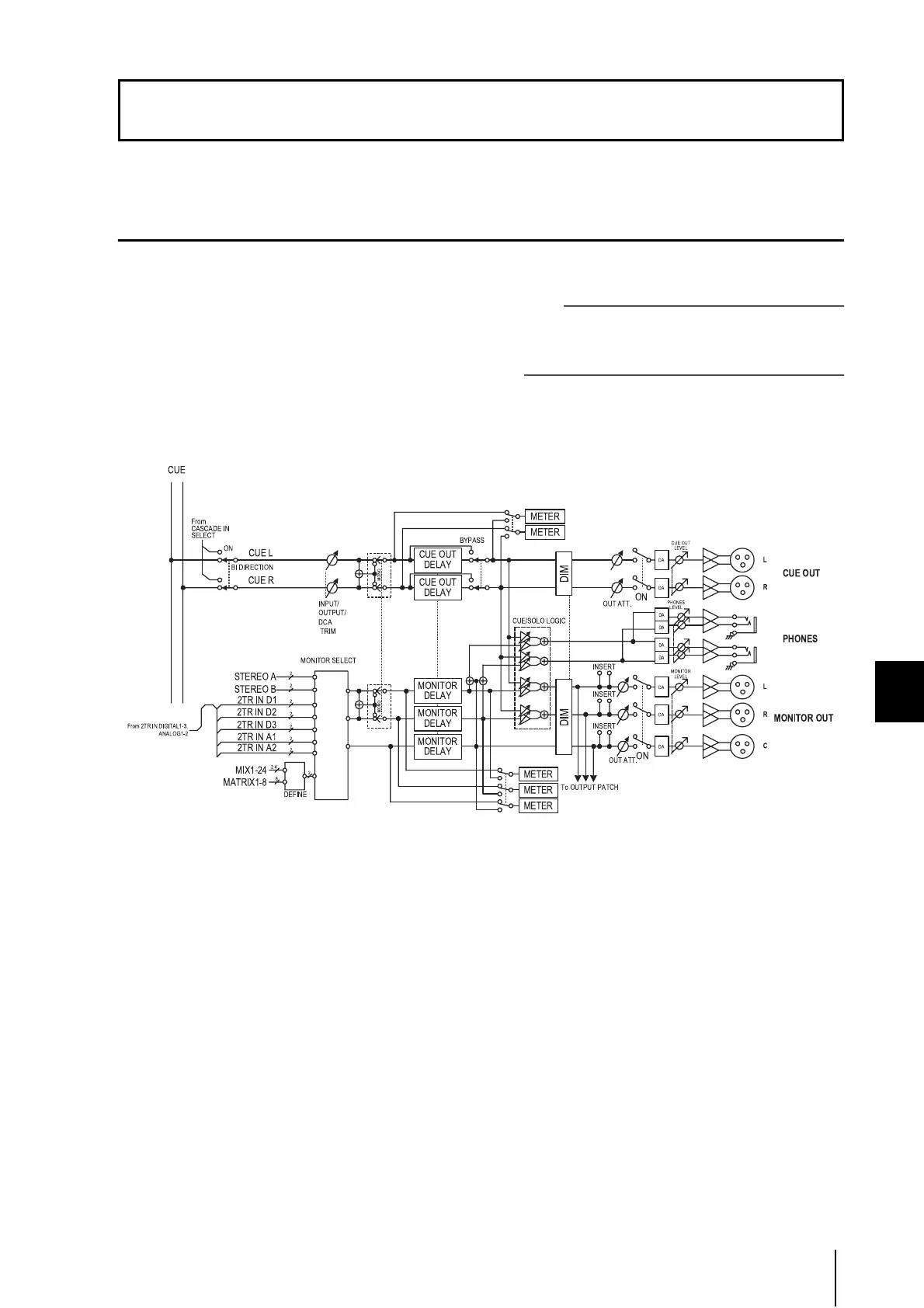
About the MONITOR and CUE sections
The MONITOR section sends the signal selected as the
monitor source to the MONITOR OUT jacks. You can
select the following signals as the monitor source.
• The input signal from 2TR IN ANALOG jacks 1/2
• The input signal from 2TR IN DIGITAL jacks 1–3
• The output signal of the STEREO A/B channels
• The output signal of the LCR channels
• The output signal of a pre-selected MIX channel 1–24
or MATRIX channel 1–8
The CUE section sends the cue signal of the channel/group
selected by a panel [CUE] key to the CUE OUT jacks.
Hint
If the CUE INTERRUPTION button is turned on in the MONI-
TOR screen (MON/CUE function), the Cue/Solo signal will
also be sent from the MONITOR OUT jacks when Cue/Solo is
active.
• MONITOR SELECT
Selects the monitor source.
• MONITOR DELAY
Delays the monitor signal.
• CUE OUT DELAY
Delays the cue signal.
• METER
Switches the signal that is shown in the meter section
or in the display.
• DIM (Dimmer)
Attenuates the monitor/cue signal by a fixed amount.
• OUT ATT. (Output attenuator)
Attenuates/boosts the monitor/cue signal.
• ON (On/off)
Switches the monitor signal on/off.
• PHONES LEVEL
Adjusts the output level of the top panel and front
panel PHONES jacks.
• MONITOR LEVEL
Adjusts the monitor level.
• CUE OUT LEVEL
Adjusts the output level of the cue signal.
11 Monitor and Cue





 To Next Page