INPUT DELAY function
270 PM5D/PM5D-RH Owner’s Manual Reference section
INPUT DELAY function
Here you can edit the delay parameters of the selected
input channel.
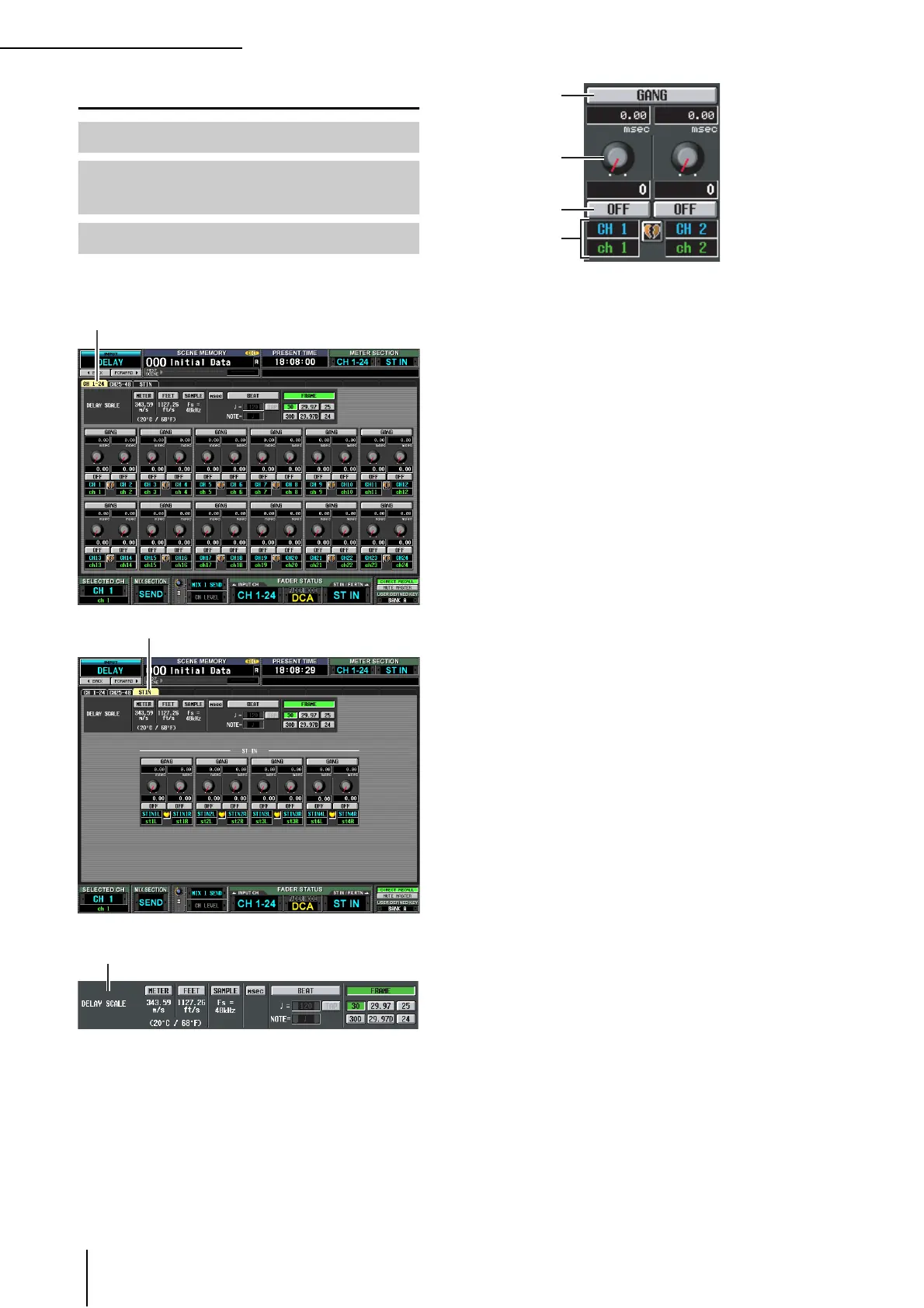
A DELAY SCALE
Here you can select the units in which the delay time is
displayed. The units that can be selected are the same
as in OUTPUT DELAY function DELAY SCALE
(➥ p.233). When you change the delay scale in the
INPUT DELAY function, the delay scale of the OUT-
PUT DELAY function will also change accordingly.
B GANG
C Delay time knob
D DELAY ON/OFF
These are the same as in the OUTPUT DELAY func-
tion (➥ p.233).
E Channel
This area shows the number and name of the input
channel you are editing. Two paired channels (or a ST
IN channel) are indicated by a heart symbol displayed
between them. You can click this symbol to enable/dis-
able pairing.
CH 1-24 (Input channel 1–24) screen
CH 25-48 (Input channel 25–48)
screen
ST IN (ST IN channel) screen
CH 1-24
ST IN
2
4
3
5




 To Next Page