INPUT GATE/COMP function
266 PM5D/PM5D-RH Owner’s Manual Reference section
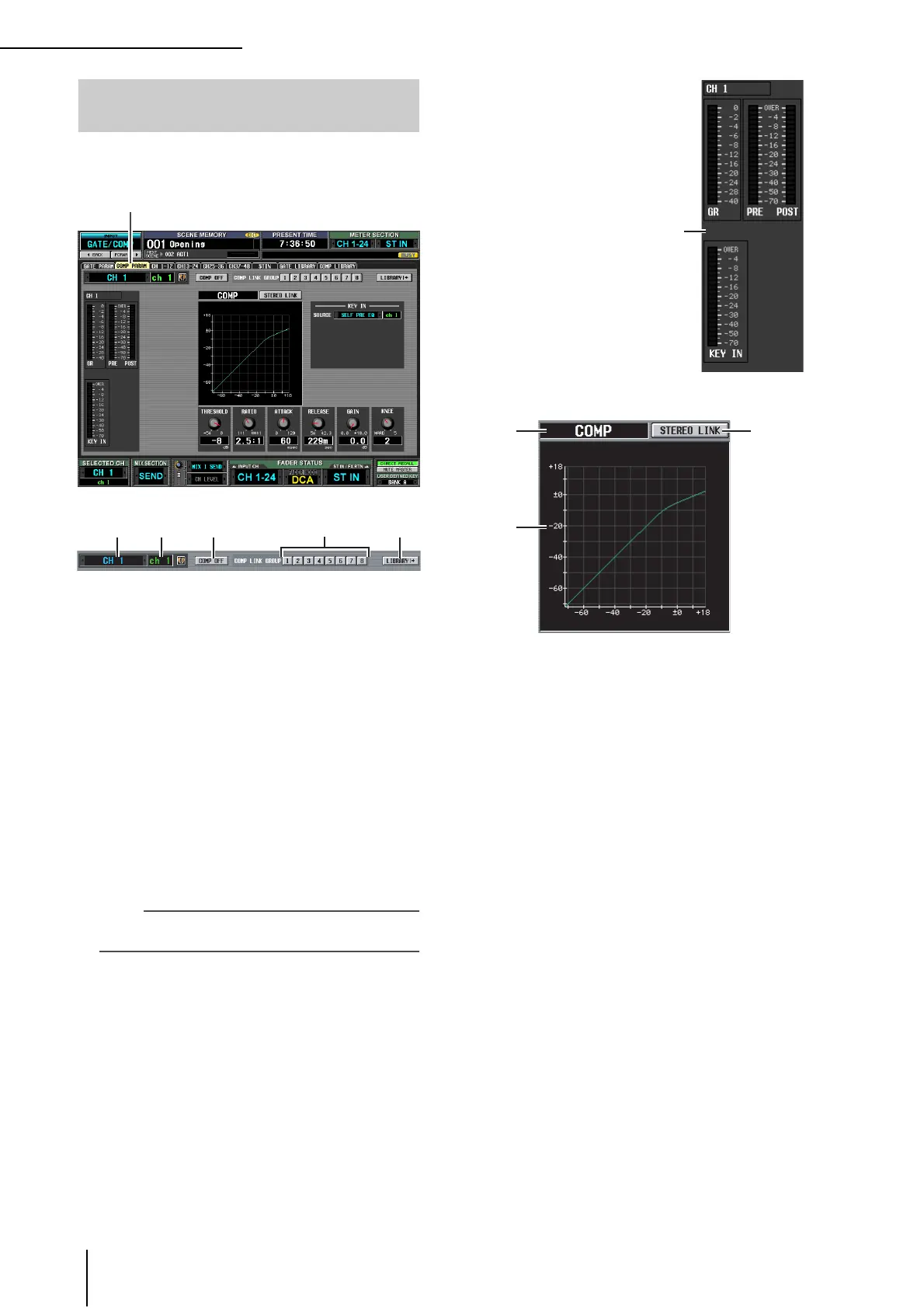
Here you can edit the compressor parameters of the
selected input channel.
A Channel selection
Select the input channel (input channel, ST IN chan-
nel) that you want to edit.
B Name
This is the name of the currently selected input chan-
nel. If the input channel is paired (or if a ST IN channel
is selected), a heart symbol is displayed at the right. For
an input channel, you can click this symbol to enable/
disable pairing.
C COMP ON/OFF (Compressor on/off)
Turns the compressor on/off for that channel.
D COMP LINK GROUP (Compressor link
group)
Selects the compressor link group (1–8) to which that
channel belongs. Compressor parameters are linked for
input channels belonging to the same group.
Note
Input channel compressor link groups are independent from
output channel compressor link groups.
E LIBRARY
This button accesses the COMP LIBRARY screen
(➥ p.232), where you can store/recall compressor
library settings for input channels.
F Level meters
These meters indicate the
amount of gain reduction
(GR), the peak level before
(PRE) and after (POST)
the compressor, and the
peak level of the key-in
signal (KEY IN) that
causes the compressor to
operate. If the signal clips,
the OVER segment will
light.
G Type
Indicates the type of the currently selected compressor.
H STEREO LINK
This specifies whether compressor parameter settings
and key-in signal operation will be linked for adjacent
odd-numbered/even-numbered input channels (STE-
REO LINK button on), or will be independent
(STEREO LINK button off). (For details on compres-
sor stereo link ➥ p.229)
I Compressor graph
This graph displays the approximate response of the
compressor.
COMP PARAM (Compressor parame-
ter) screen
COMP PARAM
6
87
9





 To Next Page