PREPARATIONS ➤ Connecting speakers En 17
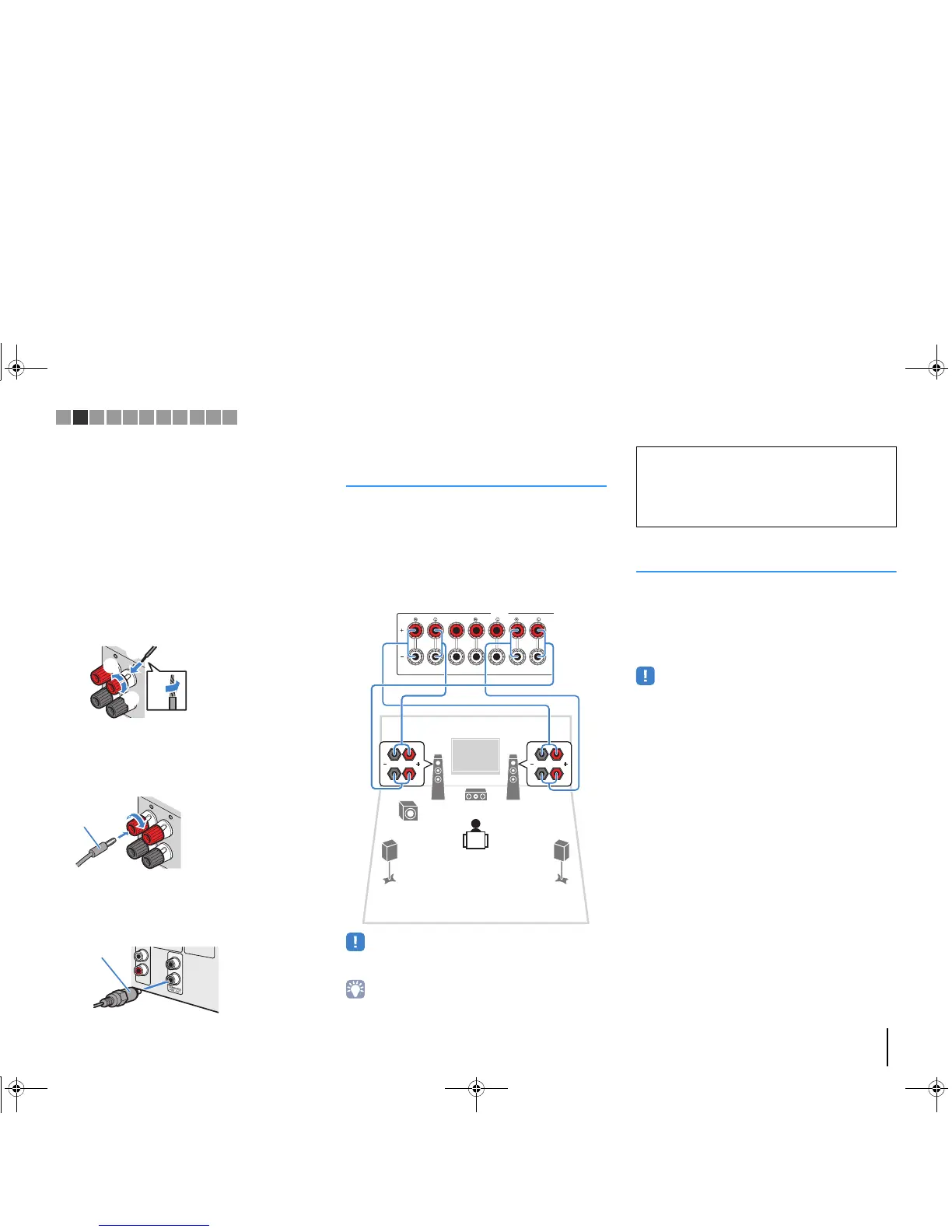
■ Connecting speaker cables
Speaker cables have two wires. One is for connecting
the negative (-) terminal of the unit and the speaker, and
the other is for the positive (+) terminal. If the wires are
colored to prevent confusion, connect the black wire to
the negative and the other wire to the positive terminal.
a Remove approximately 10 mm (3/8”) of insulation from
the ends of the speaker cable and twist the bare wires of
the cable firmly together.
b Loosen the speaker terminal.
c Insert the bare wires of the cable into the gap on the side
(upper right or bottom left) of the terminal.
d Tighten the terminal.
Using a banana plug
(U.S.A., Canada, China, Australia and General models only)
a Tighten the speaker terminal.
b Insert a banana plug into the end of the terminal.
■ Connecting the subwoofer
(with built-in amplifier)
Use an audio pin cable to connect the subwoofer.
Connecting front speakers that
support bi-amp connections
(RX-V577 only)
When using front speakers that support bi-amp
connections, connect them to the FRONT jacks and
SURROUND BACK/BI-AMP/ZONE B jacks.
To enable the bi-amp function, set “Power Amp Assign”
(p.79) in the “Setup” menu to “BI-AMP” after connecting
the power cable to an AC wall outlet.
• Surround back speakers or Zone B speakers cannot be used during
bi-amp connections.
• The FRONT jacks and SURROUND BACK/BI-AMP/ZONE B jacks
output the same signals.
Connecting Zone B speakers
(RX-V577 only)
The Zone A/B function allows you to playback an input
source in the room where the unit is installed (Zone A)
and in another room (Zone B). To connect the Zone B
speakers, see “Playing back music in multiple rooms
(RX-V577 only)” (p.69).
• Surround back speakers or bi-amplified front speakers cannot be
used while the Zone B function is enabled.
Caution
• Before making bi-amp connections, remove any brackets or
cables that connect a woofer with a tweeter. Refer to the
instruction manual of the speakers for details. If you are not
making bi-amp connections, make sure that the brackets or
cables are connected before connecting the speaker cables.
1 2 3 4 5 6 7 8 9 10 11
00_RX-V477_V577_om_U.book Page 17 Monday, November 11, 2013 1:19 PM



 To Next Page