EasyManua.ls Logo

Yamaha RX5 - Page 11

Yamaha RX5
81 pages
Print Icon
To Next Page IconTo Next Page
To Previous Page IconTo Previous Page
Loading...
THE
WAVEFORM
DATA
CARTRIDGE
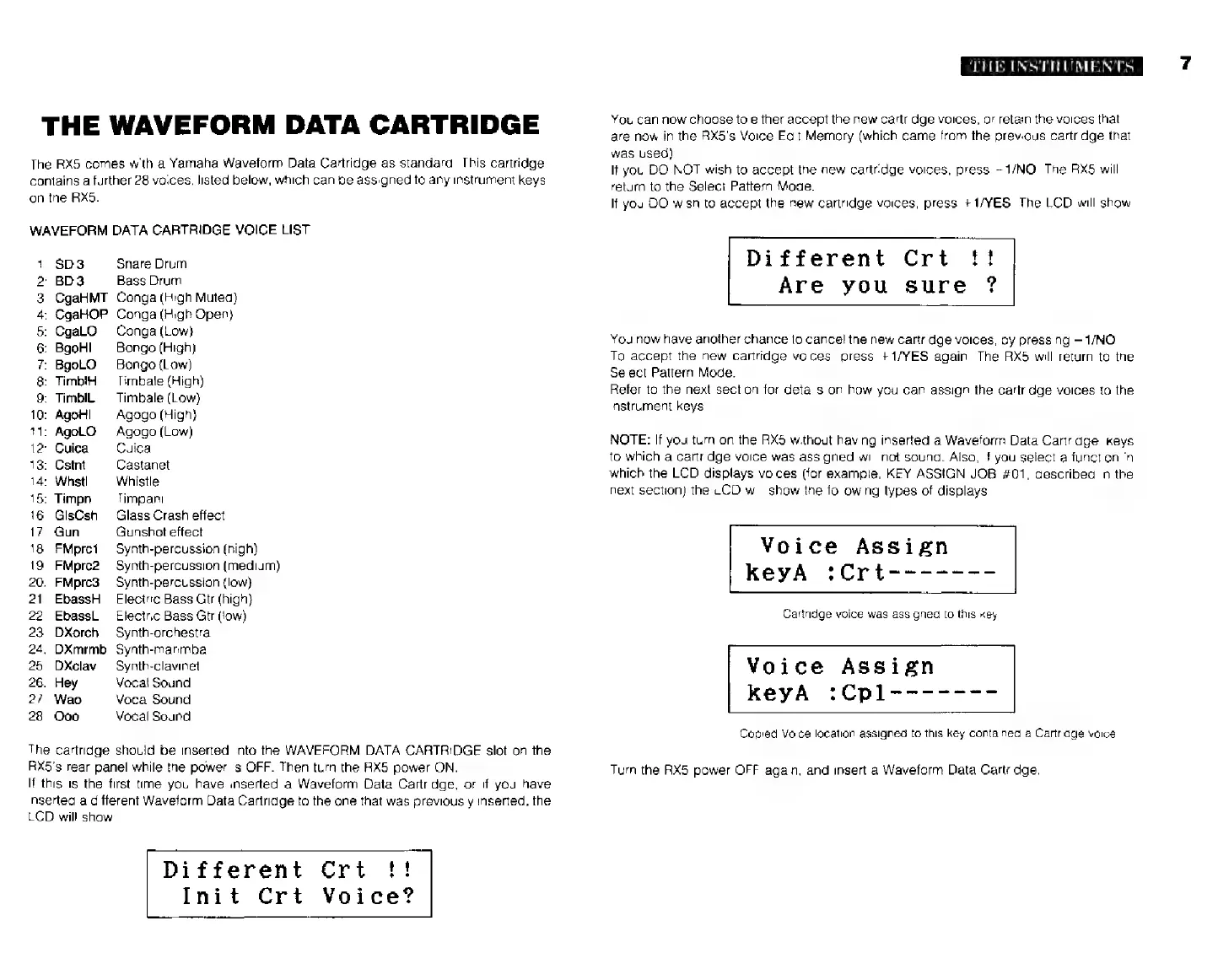
The
АХ5
comes
with
a
Yamaha
Waveform
Data
Cartridge
as
standard.
This
cartridge
contains
a
further
28
voices,
listed
below,
which
can
be
assigned
to
any
instrument
keys
on
the
RX5.
WAVEFORM
DATA
CARTRIDGE
VOICE
LIST
1:
SD3
Snare
Drum
2:
BD3
Bass
Drum
3:
CgaHMT
Conga
(High
Muted)
4:
CgaHOP
Conga
(High
Open)
5:
CgaLO
Conga
(Low)
6:
BgoHl
Bongo
(High)
7:
BgoLO
Bongo
(Low)
8:
TimblH
Timbale
(High)
9:
TimbIL
Timbale
(Low)
10:
Ао!
Agogo
(High)
11:
AgoLO
Agogo
(Low)
12:
Cuica
Cuica
13:
Cstnt
Castanet
14:
Whstl
Whistle
15:
Timpn
Timpani
16:
GlsCsh
Glass
Crash
effect
17:
Gun
Gunshot
effect
18:
FMprci
Synth-percussion
(high)
19:
FMprc2
Synth-percussion
(medium)
20:
FMprc3
Synth-percussion
(low)
21:
EbassH
Electric
Bass
Gtr
(high)
22:
EbassL
Electric
Bass
Gtr
(low)
23:
DXorch
Synth-orchestra
24:
DXmrmb
Synth-marimba
25:
DXclav
Synth-clavinel
26:
Hey
Vocal
Sound
27:
Wao
Vocal
Sound
28:
Ooo
Vocal
Sound
The
cartridge
should
be
inserted
into
the
WAVEFORM
DATA
CARTRIDGE
slot
on
the
RX5's
rear
panel
while
the
power
is
OFF.
Then
turn
the
RX5
power
ОМ.
If
this
is
the
first
time
you
have
inserted
a
Waveform
Data
Cartridge,
ог
if
you
have
inserted
a
different
Waveform
Data
Cartridge
to
the
one
that
was
previously
inserted,
the
LCD
will
show
Different
Crt
Init
Crt
Voice?
THE
INSTRUMENTS
You
can
now
choose
to
either
accept
the
new
cartridge
voices,
or
retain
the
voices
that
are
now
in
the
RX5's Voice
Edit
Memory
(which
came
from
the
previous
cartridge
that
was
used).
It
you
DO
NOT
wish
to
accept
the
new
cartridge
voices,
press
—1/NO.
Тһе
АХ5
will
return
to
the
Select
Pattern
Mode.
If
you
DO
wish
to
accept
the
new
cartridge
voices,
press
+1/ҮЕЅ.
The
LCD
will
show
Different
Crt
Are
you
sure
?
You
now
have
another
chance
to
cancel
the
new
cartridge
voices,
by
pressing
1/NO.
To
accept
the
new
cartridge
voices,
press
+1/YES
again.
The
RX5
will
return
to
the
Select
Pattern
Mode.
Refer
to
the
next
section
for
details
an
how
you
can
assign
the
cartridge
voices
to
the
instrument
keys.
NOTE:
If
you
turn
on
the
НХ5
without
having
inserted
a
Waveform
Data
Cartridge,
keys
to
which
a
cartridge
voice
was
assigned
will
not
sound.
Also,
if
you
select
a
function
in
which
the
LCD
displays
voices
(for
example,
KEY
ASSIGN
JOB
#01,
described
in
the
next
section)
the
LCD
will
show
the
following
types
of
displays.
Voice
Assign
КеуА
:Crt-------
Cartridge
voice
was
assigned
to
this
key
Voice
Assign
keyA
:Cpl-------
Copied
Voice
location
assigned
to
this
key
contained
a
Cartridge
voice
Turn
the
RX5
power
OFF
again,
and
insert
a
Waveform
Data
Cartridge.