EasyManua.ls Logo

Yamaha RX5 - Insert Function

Yamaha RX5
81 pages
Print Icon
To Next Page IconTo Next Page
To Previous Page IconTo Previous Page
Loading...
SONG
OPERATIONS
4.
Press
+1/YES
to
move
to
the
next
Part,
and
enter
another
Pattern
number
in
the
same
way.
EDIT SONG
98
Раг%й002-
РТМ
33
5.
Continue
moving
through
the
Song,
entering
Pattern
numbers
as
desired.
it's
a
good
idea
to
keep
a
written
record
of
a
Song.
as
you
edit
it.
Refer
to
the
SONG/CHAIN
CHART
at
the
end
o!
this
manual.
You
can
move
backwards
through
a
Song
using
the
—1/NO
key.
This
lets
you
go
back
to
check
a
Part.
Any
time
a
Part
is
displayed,
you
can
change
the
Pattern
contained
in
that
Part
by
entering
а
new
Pattern
number.
Holding
down
a
—1/NO
or
+1/YES
key
lets
you
move
rapidly
through
a
Song.
6.
Once
you
have
entered
all
the
Parts
of
your
Song,
press
PATTERN/SONG
to
exit
the
Edit
Song
Mode.
You
can
now
play
your
Song.
*
You
can
also
insert
Repeats,
Tempo
Changes,
Volume
Changes
and
Search
Marks
by
pressing
the
keys
corresponding
to
those
functions
after
pressing
the
INSERT
key.
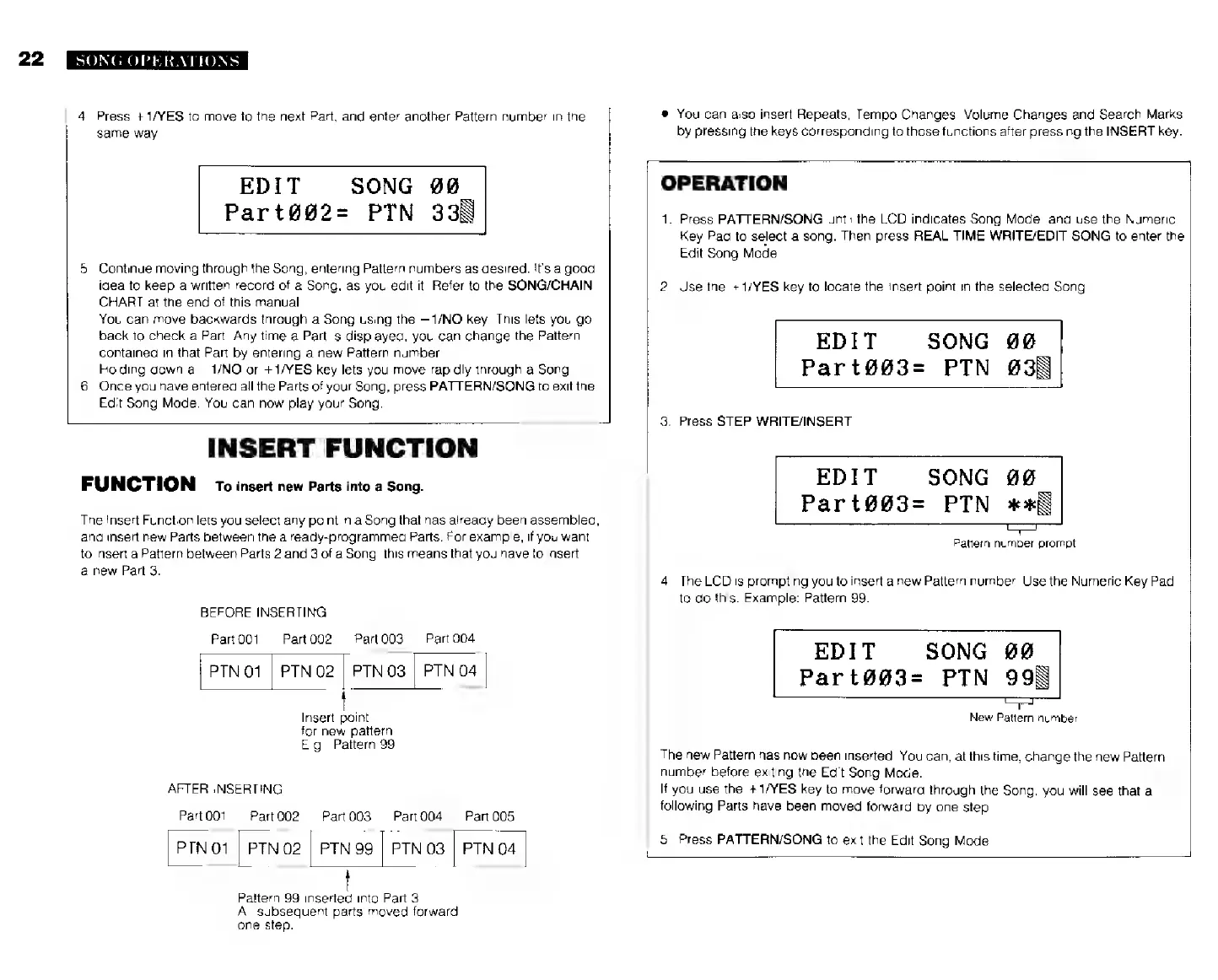
INSERT
FUNCTION
FUNCTION
то
insert
new
Parts
into
а
Song.
The
Insert
Function
lets
you
select
any
point
in
a
Song
that
has
already
been
assembled,
and
insert
new
Parts
between
the
already-programmed
Parts.
For
example,
if
you
want
to
insert
a
Pattern
between
Parts
2
and
3
of
a
Song,
this
means
that
you
have
to
insert
a
new
Part
3.
BEFORE
INSERTING
Рап001
Part002
Parl003
PTN
01
|
PTN
02
|
PTN
03
|
PTN
04
Part
004
Insert
point
for
new
pattern
E.g.,
Pattern
99.
AFTER
INSERTING
Part
001
Part002
Рай
003
Рап004
Раг
005
PTN01
|
РТМ
02
|
РТМ
99
|
РТМ
03
|
РТМ
04
Pattern
99
inserted
into
Part
3.
All
subsequent
parts
moved
forward
one
step.
OPERATION
1.
Press
PATTERN/SONG
until
the
LCD
indicates
Song
Mode,
and
use
the
Numeric
Key
Pad
to
select
a
song.
Then
press
REAL
TIME
WRITE/EDIT
SONG
to
enter
the
Edit
Song
Mode.
2.
Use
the
+1/YES
key
to
locate
the
insert
point
in
the
selected
Song.
EDIT
SONG
99
Part@@3=
РТМ
6038
3.
Press
STEP
WRITE/INSERT.
EDIT
SONG
#0
Part@@3=
РТМ
жж
Pattern
number
prompt
4.
The
LCD
is
prompting
you
to
insert
a
new
Pattern
number.
Use
the
Numeric
Key
Pad
to
do
this.
Example:
Pattern
99.
EDIT SONG
609
Part093-
РТМ
993
New
Pattern
number
The
new
Pattern
has
now
been
inserted.
You
can,
at
this
time,
change
the
new
Pattern
number
before
exiting
the
Edit
Song
Mode.
If
you
use
the
+1/YES
key
to
move
forward
through
the
Song,
you
will
see
that
all
following
Parts
have
been
moved
forward
by
one
step.
5.
Press
PATTERN/SONG
to
exit
the
Edit
Song
Mode.