EasyManua.ls Logo

Yamaha RX5 - Overview; MIDI Mode; System Example

Yamaha RX5
81 pages
Print Icon
To Next Page IconTo Next Page
To Previous Page IconTo Previous Page
Loading...
61
MIDI
MODE
OVERVIEW
The
MIDI
Mode
allows
you
to:
e
Set
the
amount
by
which
key
velocity
of
an
external
MID!
device
will
affect
the
envelope
parameters
of
all
voices.
Set
the
RX5
to
receive
MIDI
note
numbers,
and
assign
note
numbers
to
ә
Carry
out
reception
and
transmission
of
bulk
data,
with
a
second
RX5
or
other
each
instrument,
so
that
they
can
be
triggered
from
an
external
keyboard
or
suitable
MIDI
equipment.
sequencer
(Note
Number
Mode).
е
Set
the
RX5
to
receive
MIDI
pitch
signals,
so
that
selected
voices
(up
to
16)
e
The
RX5
Sync
Mode
should
be
set
to
MIDI
SYNC
in
order
for
it
to
be
controlled
by
can
be
used
as
sound
sources
for
up
to
16
external
MIDI
keyboards
or
an
external
MIDI
device.
It
should
be
set
to
INTERNAL
SYNC
if
it
is
being
used
to
sequencers
(Tunable
Note
Mode).
control
an
externa!
MID!
device.
Refer
to
the
SYNC
MODE
chapter.
Тһе
RX5,
when
*
Assign
instruments
to
MIDI
channels,
for
transmission
of
MIDI
note
numbers.
used
with
any
other
MIDI
devices,
should
have
its
Channel
Message
function
turned
A
selected
Gate
Time
will
also
be
transmitted.
ON
(refer
to
JOB
#01).
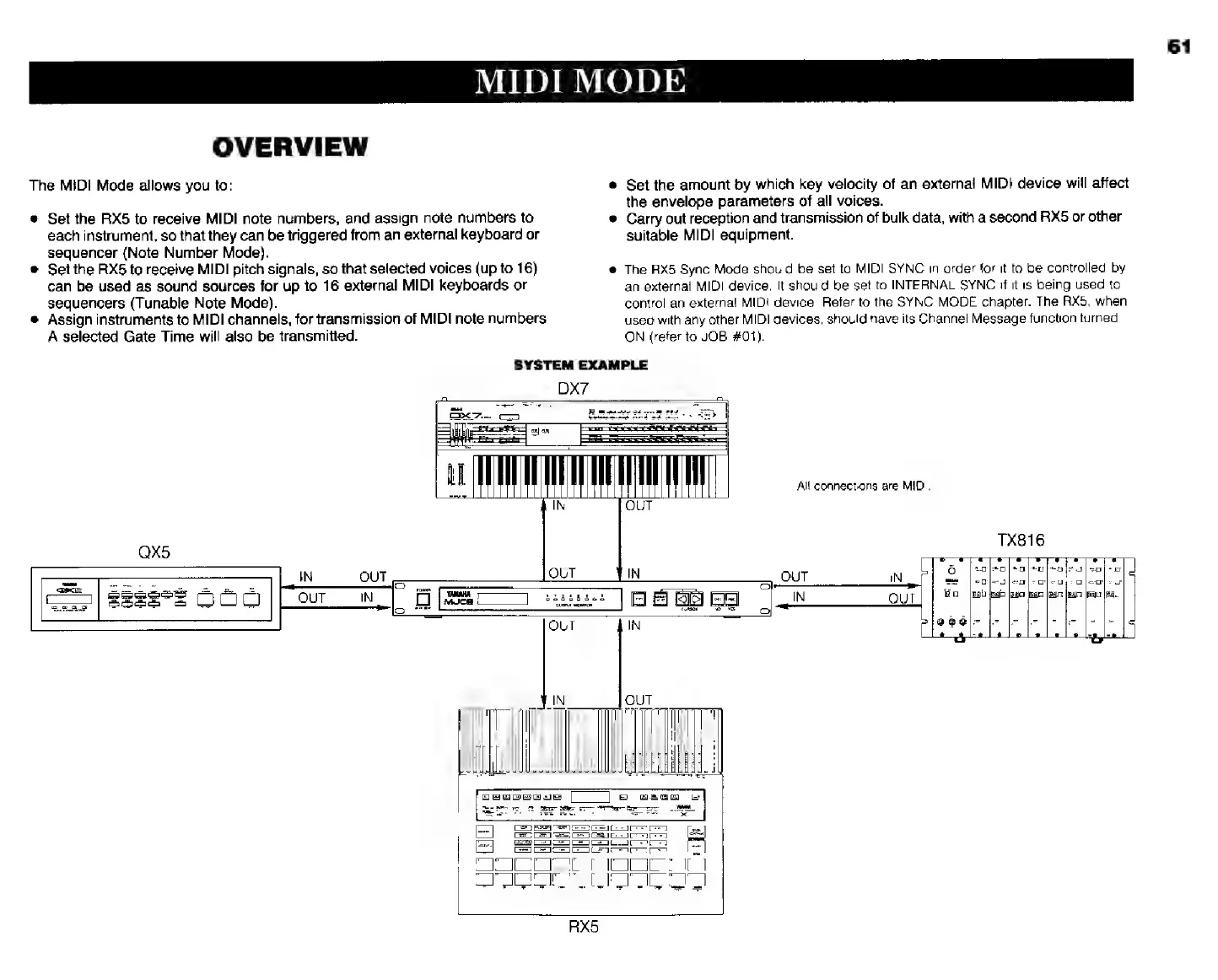
SYSTEM
EXAMPLE
DX?
я
E
|
А!
connections
аге
MIDI.